13. Connect to research data and services: MCP
Research information often lives inside a reference manager, database, or shared service rather than in the project’s files. Giving an agent a supported way to retrieve it can save repeated exports and attachments. The useful connection depends on what the task needs: finding records, reading documents, or making specified changes.
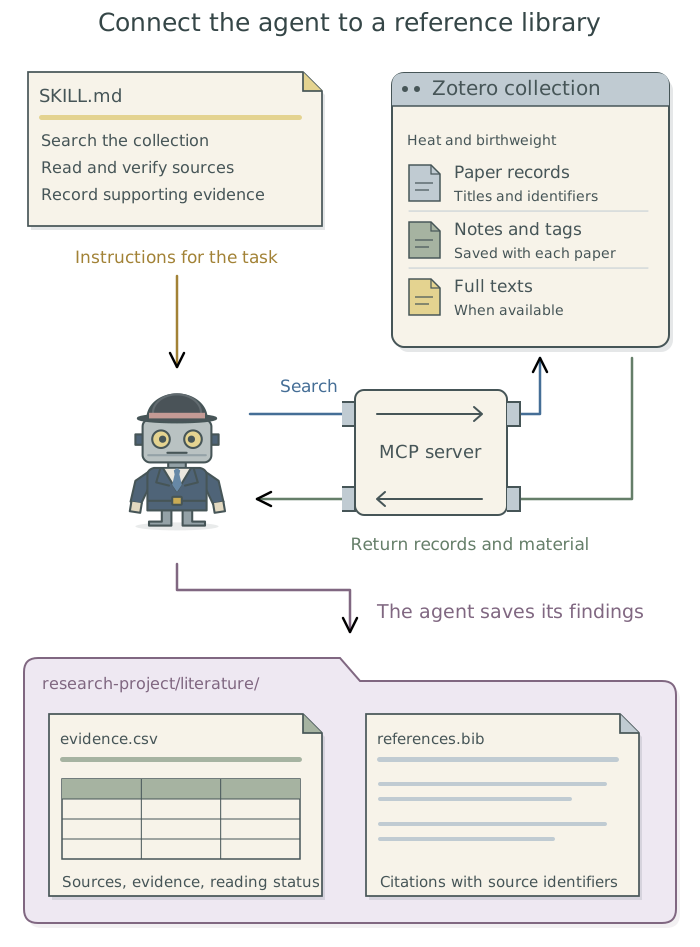
Suppose you keep the papers for a review of exercise and sleep in Zotero, a reference manager. They are grouped in a collection, a named set of references. The agent needs to retrieve those papers and notes and save a table of relevant findings in the research project. The Model Context Protocol (MCP) provides a common set of rules through which an agent application can discover and use operations such as searching that collection.
Choose an access route
An MCP server is a program that makes particular operations available to the agent application. It can run on your computer or elsewhere; the name does not mean you need a separate physical computer. For Zotero, a suitable server might offer searches and retrieval of reference details or attachments. The available operations depend on that server and its configuration.1
A connector links an agent to supported operations in another application or service. Some connectors use MCP; others use a different method. The agent may also be able to use an existing command-line tool, a program it operates through commands. An application programming interface (API) provides another way for programs to request operations directly.
| What the task needs | A suitable route |
|---|---|
| Read a fixed set of papers once | Saved references and available files may be sufficient. |
| Repeat searches or downloads supported by an existing command-line tool or API | Have the agent use that tool or interface. |
| Search or update application records through tools available in the agent app | Use a connector or MCP server that supports the required operations. |
Ask the agent to check the tools available in the session where you intend to work before adding a connection. The community Zotero MCP project documents both MCP access and a command-line tool, zotero-cli, for agents that can run commands. It is one candidate to assess, rather than an official Zotero service. Have the agent choose a maintained integration that supplies the needed operations and is permitted for your account and material.2
Configure and check the connection
The agent should follow the chosen integration’s setup instructions, install missing components, and configure the connection in the intended agent application. Ask it to identify the account and library, whether the integration runs locally or remotely, and which records it can read or change. A connection configured in another app or session may need to be set up again in the app or session you intend to use.3
You complete any personal sign-in or consent. Some connections provide their own sign-in flow; others need an API key, a credential that grants access under an account. For the latter, Chapter 12: Keep credentials out of research files: 1Password and direnv explains how the agent can use a key without saving it in project files.
For a task that only retrieves papers, use read-only access where the integration supports it. Asking the agent to use one collection does not necessarily restrict its technical access to that collection. Have it explain the actual limits before you authorize the connection.
Retrieved material may be sent to a hosted large language model (LLM), which runs on the provider’s computers. The provider is the organization operating that service. Read-only access therefore still requires deciding which material may be sent. Apply Chapter 3: Know where your data goes in Doing Research with AI Agents and the tool controls in Chapter 2: Control what added tools can access.
Once connected, have the agent retrieve a known paper from the intended collection. It should compare the title and identifier with the expected record, then read an available attachment or note. This reveals whether it can obtain the material needed for the review, beyond merely finding a reference.
Set up access to the
Zoterocollection “Exercise and sleep” from this agent session, using a suitable permitted integration. Check existing connections first and install or configure what is missing. Explain the account, library, and records the connection can access, including any ability to make changes. Use read-only permissions where supported and guide any personal sign-in or consent. Retrieve the paper I identify, confirm its title and identifier, and read its available attachment or note. Report what you could access and any missing material. Leave the library unchanged. Save the setup and reconnection instructions in the project context files, without secret values.
Use the connection for the literature task
With access working, the agent can retrieve the review’s papers and notes and assemble an evidence table: a table linking each paper to relevant findings or passages and recording what the agent read. For example, it can record the exercise intervention, sleep outcome, and reported finding, with a source location for each. It should distinguish full papers it read, records supported only by an abstract, and papers it could not retrieve.
Have the agent save the table and bibliography in the research project, keeping the Zotero library unchanged unless you request an edit. For example, literature/evidence.csv can hold the table and literature/references.bib the bibliography.4 Checking a DOI helps identify a paper; checking whether it supports a claim requires reading the relevant material.5 Chapter 11: Find and assess research literature in the research guide develops that procedure.
Use the configured connection to retrieve papers and notes from the
Zoterocollection “Exercise and sleep” for this review. Follow the agreed research question and inclusion criteria. Save an evidence table linking the relevant findings to source passages, and maintain the project’s bibliography. Distinguish full texts you read from abstracts and records without accessible text. Report missing material and unresolved references. Save the outputs in the project’sliterature/folder and report their file paths. Leave the library unchanged unless I request an edit.
A skill is a saved set of instructions for a recurring task and its checks. If the review procedure will recur, ask the agent to follow a suitable existing skill or save the agreed procedure as one. The connection supplies access to records, while the procedure tells the agent how to use and assess them. Chapter 9: Use skills for recurring tasks in Doing Research with AI Agents explains how to find, create, and reuse skills.
Save the setup for later sessions
Have the agent save the connection details in the project context files. These should identify the integration and version, account and library, available operations, and configuration location, along with any personal sign-in required. Ask it to include the outcome of the retrieval check and instructions for reconnecting or disabling the connection.
Keep the connection’s configuration where the agent application expects it. Record the setup and usage instructions in project context files, or in global user instructions such as TOOLCHAIN.md when they apply across projects. Have it keep those instructions and the agreed literature procedure current.
Footnotes
MCP standardizes how an application discovers and requests operations from a server. Adding a server makes that server’s supported operations available; it does not provide access to every service. See the MCP architecture overview.↩︎
Use connections permitted by your institution for the account and material involved. At Harvard, consult the current HUIT guidance.↩︎
An agent application’s configuration can apply to one project or to several projects. Have the agent choose the intended scope and confirm that the tools appear in the actual session. See
Claude Code’s MCP configuration documentation.↩︎CSV stands for comma-separated values, a plain-text table format. A
.bibfile stores reference details in BibTeX format so document software can generate citations and a reference list. The agent maintains these files; the particular filenames here are examples.↩︎DOI stands for digital object identifier, a persistent identifier assigned to a research output. It helps identify the intended work but does not establish that the agent read it or that it supports a particular claim.↩︎