17. Run and adapt an LLM on your own hardware
Suppose a study uses a large language model (LLM) to identify barriers to attending medical appointments in interview excerpts. The records must remain in an approved computing environment. Running the LLM on an approved computer or institutional server lets the study process those excerpts there, rather than sending them to an external LLM service. The companion guide Doing Research with AI Agents discusses when local LLMs are useful.
For each excerpt, the study needs its identifier, an assigned category, and a supporting passage. For example, an excerpt describing a missed appointment because no bus was available might be labeled transport, with the relevant passage saved beside it. An existing LLM may already perform this task adequately with clear instructions and examples. Training it further is a separate option, considered after evaluating that starting point.
Decide how the research task will use the LLM
An LLM’s weights are numerical values learned during training. An LLM runtime loads those weights and generates responses to supplied prompts. This operation is called inference: the trained LLM predicts successive tokens, the units of text it processes.1 Here, inference refers to generating a response, rather than drawing statistical conclusions about a population or effect.
For the interview task, a script can read each excerpt, send it with the labeling instructions to the runtime, and save the response. The agent builds and checks that script. If the task instead requires an agent to choose and operate tools, it also needs a software harness: the program that supplies context to the LLM, carries out its tool requests, and returns the results for the next response. Context is the information the LLM receives to generate its response.
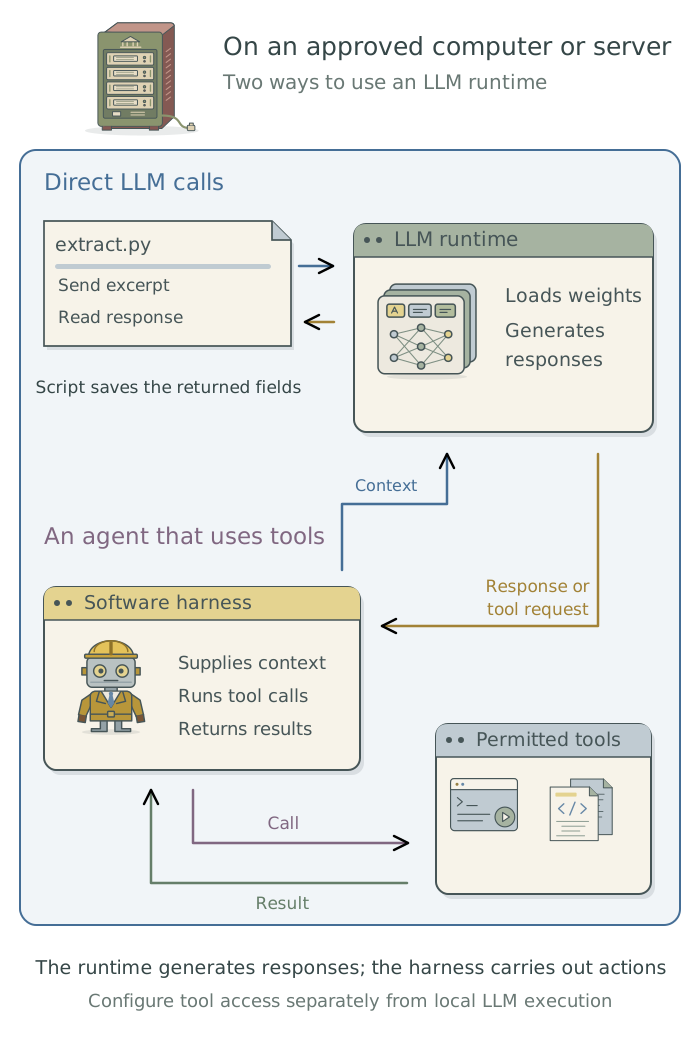
An agent using a hosted LLM can help write the code and configure local software without reading the protected interview records. Have it use permitted test material, such as synthetic excerpts, during setup. Before processing the study records, have it confirm that they will be read only by software permitted to handle them and sent only to the approved runtime.
Choose hardware and a runtime
Open weights are available to download under specified terms. Have the agent check those terms and flag restrictions relevant to the study; downloadable weights do not necessarily make the whole system open source. Ollama is one runtime for compatible downloaded LLMs. If an approved institutional service already meets the study’s needs, have the agent use it rather than install another runtime.
Ask the agent to check the computer’s operating system, memory, processing hardware, and storage before selecting an LLM.2 The download size is not the memory needed during use: longer inputs and more simultaneous requests increase that requirement. Quantization stores weights at lower numerical precision, often reducing memory use, but it can change the responses. The study should evaluate the actual LLM version and quantization it will use.3
For Ollama, have the agent configure the runtime that serves the responses. Its documented local-only setting disables cloud features. If the research script runs on the same computer, the runtime can listen on the loopback address, 127.0.0.1, so other computers cannot connect directly to it. An institutional server needs its own approved connection arrangements. Ask the agent to store downloaded weights outside cloud-synchronized project folders.
Apple’s on-device LLM
On a compatible Mac, Apple’s system LLM offers another documented option for tasks such as extracting specified fields. Its Foundation Models Python SDK, a library for access from a program, and the fm command have system and execution-mode requirements the agent must check. This differs from downloading open weights for Ollama; an offered cloud-processing mode changes where the request runs. Have the agent record the system and SDK versions and evaluate the intended task.
Run the research task
Have the agent prepare the labeling script and save a command to run it. For example, just can provide just label-excerpts, with the input file, instructions, and output folder specified by the agent. This is a command to create for the project, not a built-in Ollama command. Chapter 7: Give research tasks reliable commands: just explains how the agent maintains it.
Have the agent test that command on a small set of permitted excerpts before processing the full collection. The examples should span the expected input lengths. Each response should retain the correct excerpt identifier, a permitted category, and the requested supporting passage. The agent should report unreadable responses and missing fields, and check that passages attributed to an interview actually occur in the supplied excerpt. These checks establish that the software handles the responses; comparison with human judgments evaluates the labels themselves.
Prepare the approved computer for this interview-labeling task. Check its resources, choose a compatible LLM and runtime, and configure local execution without changing my usual hosted-agent settings. Use permitted test excerpts during setup. Create a saved command that reads the labeling instructions and excerpts and saves each original response alongside the extracted identifier, category, and supporting passage. Check representative input lengths, response fields, and memory use. Preserve failed attempts and report any inputs the setup cannot process. Record the software, settings, commands, and output locations in the project context files.
An input must fit both the LLM’s context capacity and the memory available to the runtime.4 If the setup cannot process the intended excerpts, the agent should explain the limitation so you can choose another candidate or approved computer. It should not silently shorten the material or substitute an LLM, because either change alters the labeling procedure.
Have the agent keep the raw response, the exact returned text, separately from the fields extracted into the analysis table, retaining failures and retries with their excerpt identifiers. It should record the prompt, generation settings, runtime version, and exact LLM identifier with each run.5 The project context files should explain how to start the runtime, run the command, and locate the records. These instructions should point to the saved configuration files rather than require someone to reconstruct the settings.
The research guide’s evaluation of LLM labeling explains how to assess the labels and their consequences for the analysis.
Connect the LLM to an agent
When the task requires an agent, its harness must be able to communicate with the selected runtime. Ollama’s Claude Code integration provides one documented option. Claude Code supplies the agent software; in this arrangement, a compatible LLM served through Ollama supplies the responses. Using the Claude Code application therefore does not, by itself, identify which LLM service is being used.
Have the setup agent configure a separate way to launch this local agent, preserving the settings for your usual hosted service. It should verify the destination of LLM requests and test an actual tool call, such as reading a permitted test file. Fluent text alone does not show that the LLM can produce a tool request the harness can execute. Ask the setup agent to retain the tool call and result and record the working launch command and settings in the global user instructions file TOOLCHAIN.md.6
Runtime settings govern LLM processing; an agent’s other tools can still contact remote services. Have the setup agent apply and check the file and network controls in Chapter 2: Control what added tools can access. The local agent can also be launched from a saved prompt using Chapter 16: Run agents from saved prompts, or take part in the coordinated work in Chapter 15: Divide work between agents: shared projects and git worktrees. Local execution, unattended execution, and delegation are separate choices that can be combined.
Prepare an adaptation study
If an existing LLM does not perform the labeling task well enough, training on reviewed examples may help it follow the study’s categories. Fine-tuning means training an existing LLM further. LoRA, or low-rank adaptation, is one approach: it keeps the original, or base, weights fixed and trains a relatively small set of additional values. Those values are saved as an adapter, which must be loaded with the compatible base LLM. Full fine-tuning instead updates the original weights.
The research guide explains when to consider training and how to evaluate the adapted LLM. Here, the agent’s task is to prepare the software for the approved study. It needs tools that support the chosen LLM, adaptation method, and hardware. Training can require more memory than generating responses, so the inference setup alone does not establish that the computer can handle it.
| Computing environment | Candidate tool | What the agent checks |
|---|---|---|
| Apple silicon Mac | MLX LM |
Support for the base LLM, available memory, and the required training-data format |
A supported PyTorch environment, commonly with a suitable GPU |
Hugging Face PEFT |
Support for the base LLM and adapter method, hardware, and software requirements |
| An institutional training service | Its approved training tools | Access to data, assigned computing resources, and where trained files are saved |
Have the agent install the tools in a recorded project environment, following Chapter 6: Preserve a software environment: rig, renv, and uv. It should prepare the examples in the format those tools require7 while preserving their assigned roles: training examples update the LLM, development examples help choose the setup, and held-out test examples support the final evaluation. Converting the files must not change which examples belong to each set.
Save, reload, and evaluate the adapted LLM
Before a long training run, have the agent check that a short run can save an adapter and load it with the base LLM in a separate program run. This confirms that the saved files can be used after the training session ends. Loading also requires the matching tokenizer, the software that divides text into the units the LLM processes. The loaded version should generate responses through the same labeling workflow used for the unadapted LLM.8
Set up the agreed adaptation study using the approved training, development, and held-out test assignments. Preserve the base LLM and the selected prompt for the unadapted comparison. Before the planned training run, check that a short run can save an adapter and reload it with the base LLM in a separate program run. Save the training configuration and progress. Evaluate the selected adapted version and the unadapted comparison on the same held-out test excerpts using the agreed criteria. Keep both sets of responses and document the commands and files needed to use the saved version again.
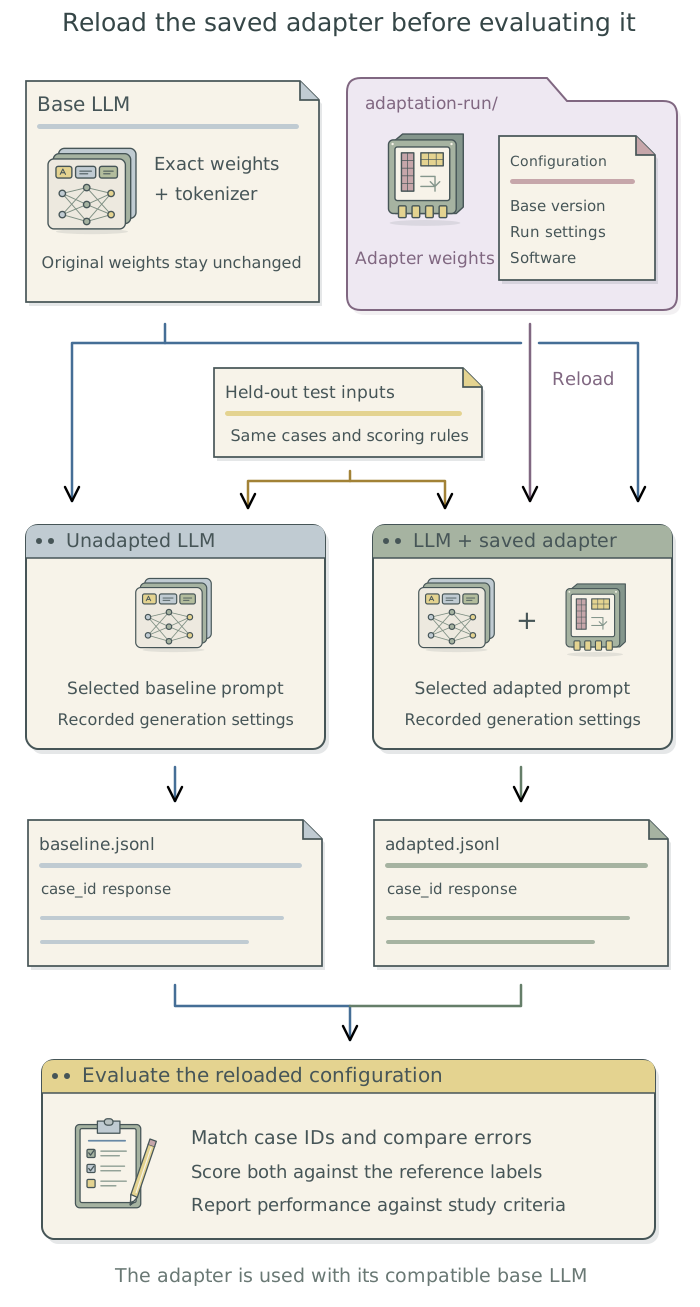
For the interview study, the comparison is between the selected adapted LLM and the unadapted LLM with its selected prompt. Have the agent save both sets of responses with matching excerpt identifiers, then score them against the same human reference labels. The scientific evaluation determines whether adaptation improved the task; successfully saving and loading an adapter establishes only that those software steps worked.
Have the agent retain the adapter and its configuration with the matching base LLM and tokenizer. It should preserve the training-data assignments, software environment, and evaluation results, with commands for loading and using the adapter in the project context files. If using another runtime requires converting or combining the adapter and base weights, have the agent evaluate that exported version too; it is the version that will generate the study’s labels.
For longer training, have the agent configure checkpoints: saved training state from which an interrupted calculation can continue. It should check the software’s recovery procedure and arrange job management for the approved computer. Chapter 9: Keep unattended jobs moving: pueue explains local job queues; institutional systems may provide their own scheduler. Training data, responses, logs, and adapters can contain or retain sensitive information, so their storage and sharing must follow the study’s requirements.
Footnotes
A token is a unit of text, often a word or part of a word. The LLM predicts a distribution over possible next tokens and uses it to generate a response. The research guide’s explanation of LLM inference places this prediction step in the research workflow.↩︎
An accelerator performs particular calculations faster than a general-purpose processor. A GPU, or graphics processing unit, is commonly used for LLM calculations. The agent should check the runtime’s actual hardware support rather than infer it from the computer’s name.↩︎
Lower precision uses fewer bits to represent numerical values. For example, a quantized LLM may use four-bit weights in place of higher-precision values. The Hugging Face explanation of quantization describes how this reduces memory requirements. Evaluate the chosen version on the research task.↩︎
Context capacity is the amount of information the LLM can process in one response generation, measured in tokens. The agent should check the runtime’s input/output limits and the actual token count instead of estimating capacity from document pages.↩︎
A tag is a convenient name that can later point to different weights; a digest identifies particular content.
Ollama’s model-list API provides identifying information. An API is an interface through which one program requests an operation from another. Have the agent retain the returned identifier for the LLM actually used.↩︎For the global user instructions file TOOLCHAIN.md, see Chapter 8: Apply your conventions across projects in Doing Research with AI Agents.↩︎
MLX LMcan read.jsonlfiles, meaning JSON Lines: a text format with one structured record per line. Each training record can pair a prompt with the desired response. Its data-format documentation explains supported layouts; the agent should convert the study’s reviewed examples to the selected tool’s format.↩︎The
MLX LMadaptation guide andPEFTquicktour document saving adapters and using them with a base LLM. The agent should check compatibility with the software that will generate the study responses.↩︎