9. Use skills for recurring tasks
9. Use skills for recurring tasks
Many research tasks recur with different inputs: setting up a paper, checking citations, or preparing figures for a manuscript. A skill saves instructions for an agent to carry out a task and check its work. It can preserve lessons from earlier work and reduce the need to explain the same steps again.
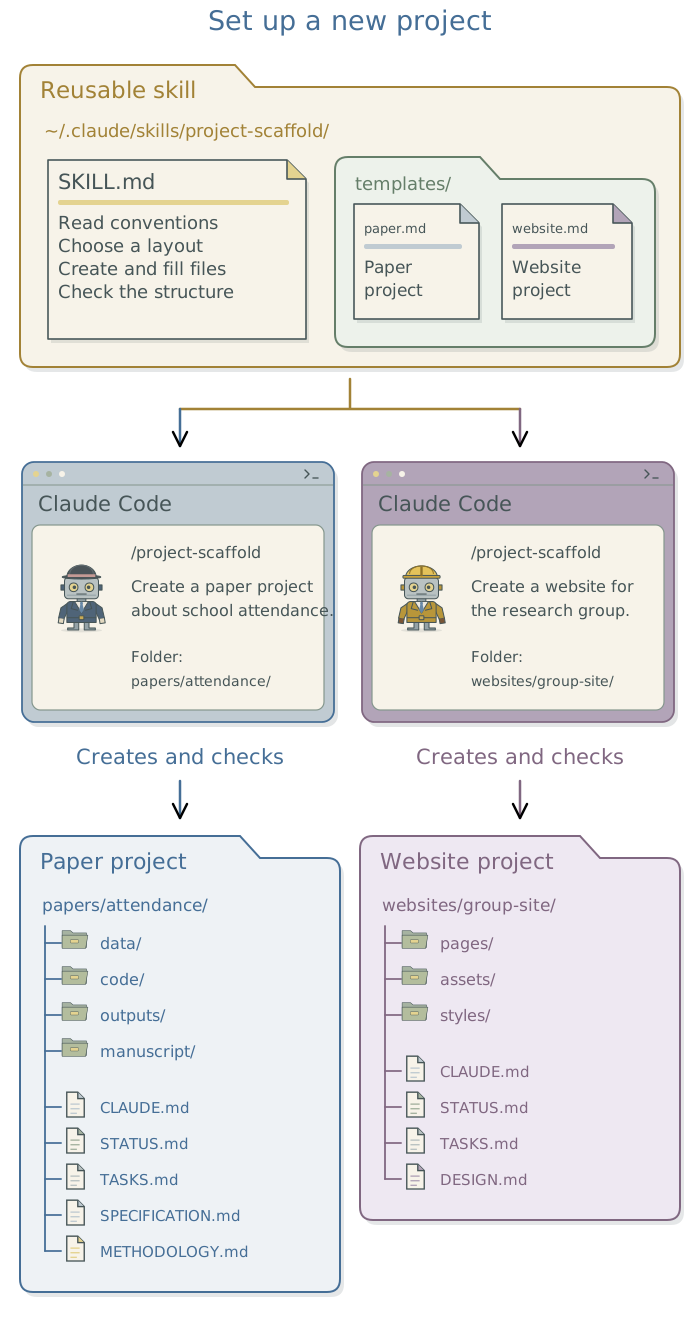
Consider the paper project scaffold, which follows the approach described in Chapter 6: Organize your research projects. Once you have a suitable paper project layout, a skill can direct the agent to create it for another study, draft the project context files, and identify missing information. You supply the new project’s purpose; the skill supplies the setup instructions.
What a skill adds
A skill is a folder containing a file called SKILL.md. It can also contain scripts, reference material, or templates. The agent reads the instructions in SKILL.md and uses its tools to carry them out. A saved script specifies operations for a computer to execute; a skill can guide work that requires the agent to inspect inputs, choose suitable steps, or ask for a decision.
Project context files describe a study, its requirements, and its progress. Global user instructions establish conventions across projects, while a skill describes how to carry out a recurring task. Have the skill consult the project context files and global user instructions rather than copying their contents. That lets you change a convention once without updating every skill that uses it.
| Recurring task | What a skill can preserve |
|---|---|
| Set up a project | Choose a suitable layout, create project context files, and identify missing decisions. |
| Search the literature | Record queries, verify DOI metadata, and separate checked sources from leads. |
| Explore a dataset | Examine variables and missingness, save the report, and flag questions for the researcher. |
| Check a manuscript’s numbers | Trace values to saved results and report inconsistencies in the rendered document. |
These are examples of tasks that might be useful to package into skills. A skill can make the steps more consistent, but its instructions still require interpretation and do not guarantee identical outputs.
Use an existing skill
Before creating a skill, ask the agent whether an installed skill or one in the DSS agent skills catalogue already covers the task.1 Your research group may have a collection of skills suited to its research. Have the agent inspect the chosen skill’s instructions and supporting files, explain the expected inputs and changes, and adapt anything that conflicts with your project. Try it on the next suitable task and review the resulting work.
In Claude Code, you can invoke an available skill with /skill-name or ask for it by name. The agent may also choose a relevant skill based on its description; the full instructions load when the skill is used.2 Ask the agent to retain the source and version of an adopted skill so later changes can be understood.
Turn a useful task into a skill
When a task has worked well and is likely to recur, ask the agent to write a SKILL.md file with the instructions that made it work. Have it specify what the task receives, what it should produce, how to check the result, and which decisions remain yours. A scaffold skill should ask for the project’s purpose and where its folder should be created, use the appropriate layout, and leave unresolved methods as questions.
Write a reusable
SKILL.mdfor the project setup we have agreed. Have it ask for the new project’s purpose and where its folder should be created, follow the relevant layout conventions, preserve existing files, and leave missing research decisions as questions. Include checks of the created folders and records. Try it on a new project folder and report the result.
The agent might write the start of SKILL.md like this:
---
name: research-scaffold
description: Set up a new research project using the agreed workspace
  and layout conventions. Use when asked to create a project.
---

Read the workspace index and project-layout conventions if available.
Confirm the project's purpose, intended output, and where its folder should be created.
Propose the folder structure before creating it. Preserve existing files.
The header names the skill and describes when to use it. The body gives the steps; the complete example adds instructions for drafting and checking the project context files. Ask the agent to adapt this example to your project layouts and conventions, then use it to set up a project as described below.
Download the scaffold skill example
Read the complete scaffold skill example
---
name: research-scaffold
description: Set up a new research project using the agreed workspace
  and layout conventions. Use when asked to create a project.
---

Read the workspace index and project-layout conventions if available.
Confirm the project's purpose, intended output, and where its folder should be created.
Propose the folder structure before creating it. Preserve existing files.

After the researcher accepts the structure:
- Create only the folders needed for the intended output.
- Draft CLAUDE.md (or AGENTS.md) with instructions and paths to the other
  project context files and relevant conventions.
- Add status and task records appropriate to the work already agreed.
- Record unresolved research decisions as questions, not assumed facts.
- For a paper project, write SPECIFICATION.md from the researcher's current
  decisions and start METHODOLOGY.md with decisions actually made and their reasons.
  Leave unresolved choices explicit; do not invent a history.
- In CLAUDE.md (or AGENTS.md), tell the agent to follow SPECIFICATION.md when
  implementing or checking the analysis and consult METHODOLOGY.md for rationale.
  Approved scientific changes update both: rewrite the specification and add a
  dated decision at the top of the log, preserving earlier entries.

Check the result:
- Confirm that the created paths match the accepted structure.
- Check that the instructions refer to files that exist, or clearly identify
  files still to be supplied or created.
- Confirm that existing files were preserved.
- Show the folder structure, the project context files, and unresolved decisions.

Ask before changing an existing project or adding software or services.
Do not acquire data, fit models, or publish files as part of this setup.
Ask the agent to place the skill in its supported location: global user skills in Claude Code use ~/.claude/skills/, while project-specific skills use .claude/skills/ inside the project.3 Each skill has its own folder containing SKILL.md. Supporting templates or scripts belong beside it, with instructions explaining when to use them. The project scaffolds in Appendix A: Project scaffolds and starter files can supply the folder layouts for this skill.
Refine and reuse the skill
Have the agent use the skill on a representative task before relying on it repeatedly. For project setup, check that the folders match the intended output, the project context files contain known facts, and existing files remain intact. If it omits a required step or makes an unwanted assumption, ask it to revise the instructions or checks and try the affected part again.
Have the agent keep SKILL.md concise and move lengthy templates or reference material into supporting files. A step that always performs the same calculation can become a saved script that the skill calls. Preserve the skill’s changes so you can identify which version was used for consequential work.
Automate a repeated check with a hook
A hook runs a configured action at a particular event, such as after a file edit. It can automate a quick check that is otherwise often missed. Begin with checks requested through the agent, then add a hook when there is a clear recurring need. Avoid launching a full analysis after every small edit. Whether a hook can prevent an action depends on its timing and configuration; the official hooks documentation explains setup and testing.
Footnotes
Other collections include Anthropic’s skills repository and OpenAI’s skills catalog. Ask the agent to check whether a candidate skill supports the app and tools you use.↩︎
Anthropic’s skills documentation explains invocation, supporting files, and when skill content loads. The description helps the agent select a skill; it is not a guarantee that it will choose or follow it correctly.↩︎
See Anthropic’s skill locations, which calls global user skills “personal” skills. These apply across projects; project-specific skills can be shared with suitable project files.↩︎