8. Rerun only affected steps: targets and Snakemake
When an analysis changes, the agent needs to identify which steps must be repeated and which saved results can still be used. Each step has dependencies: the data, code, or earlier results it uses. A dependency runner tracks these relationships and determines which steps are affected by a change.
For example, a Bayesian model may take hours to fit. Its posterior draws (the sampled parameter values) can be saved and reused to calculate new comparisons or generate figures. A change to the data or model requires updating the fit and the outputs that use it. The agent can manage these dependencies with targets for an R workflow, or Snakemake for workflows using other languages or combining several.
Show the dependencies
Suppose two Bayesian models use the same prepared data. The agent uses their saved posterior draws to make a comparison figure included in the manuscript. These connected steps form a pipeline.
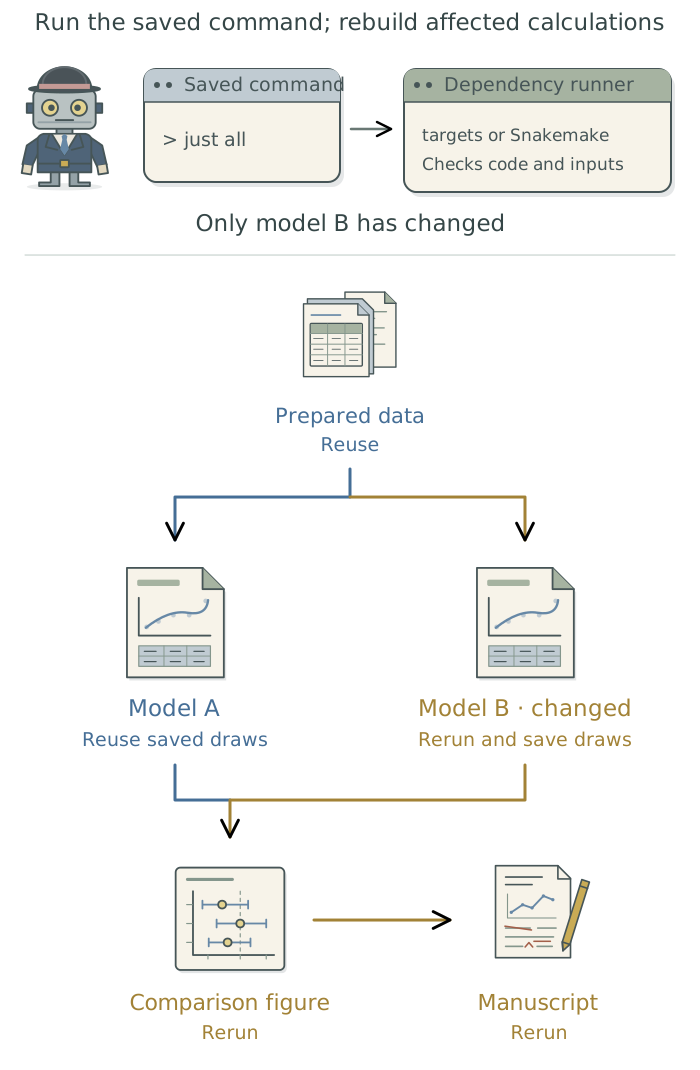
Have the agent identify the data, model settings, code, and saved results each step needs, and the outputs it produces. It should record these relationships and show them in a diagram for your project.1 You check whether they match the intended analysis.
If a step downloads data, have the agent save a copy and record that file as an input. When the copy is refreshed, the runner can identify the calculations that depend on it. If the agent does not record a required file or setting as a dependency, the runner may reuse old results even after that input changes.
Use saved commands to run the pipeline
just is a command runner: it saves instructions for starting a task under a short name (see Chapter 7: Give research tasks reliable commands: just). The agent can set up just all2 to start targets or Snakemake. The dependency runner then checks which results are current and runs the steps needed to update the analysis. Either dependency runner can also be used on its own. Adding just gives the agent a consistent front door for running the project’s tasks.
For the two-model example, the expected behavior is:
| What changes | What runs again | What can be reused |
|---|---|---|
| A figure label | The figure and manuscript | Prepared data and both model fits |
| The specification of model B | Model B, the comparison figure, and manuscript | Prepared data and model A |
| The shared input data | Affected data preparation, both fits, and the outputs that use them | Any unaffected earlier work |
| Nothing changes and all outputs are present | No analysis steps | All current saved results |
The agent uses the same just all command in every case. The dependency runner determines which calculations actually run. Reusing the saved posterior draws avoids repeating hours of fitting when only a later step has changed.
The agent can also configure just figures to ask the dependency runner for the figures. The runner checks the inputs and saved results those figures need, updating them if necessary.
The following prompt uses targets for an R analysis with Bayesian models.3 For a workflow using other languages, ask the agent to use Snakemake instead.
Preserve this project’s current results and software versions. Set up
targetsfor thisRanalysis, installing it in the project’s software environment if needed and recording its version. Use the existing analysis code to connect data preparation, the Bayesian model fits, saved posterior draws, comparison figures, and the manuscript through their dependencies. Configure the commandjust allto run the complete workflow throughtargets, and configurejust figuresto request the figures through the same runner. Show me the dependency diagram. Check selective reruns with small representative inputs, keeping test outputs separate from the study’s results. Report which steps run and which results are reused, and investigate unexpected differences. Use these commands for future updates to the analysis.
Check what reruns
Before a long analysis run, ask the agent to show which steps it expects to repeat.4 It should verify that behavior in a smoke test, using small representative inputs and saving test outputs separately from the study’s results.
Have the agent check the three changes in the table: a figure edit, a change to one statistical model, and a change to shared data. It should then run the workflow without further changes and confirm that completed results are reused. Ask it to name the steps repeated and results reused, check the output files, and diagnose any unexpected behavior before running the full analysis. These checks concern how the workflow runs; the statistical methods still need their own evaluation.
Recover work after an interruption
After an interruption, have the agent identify completed steps and restart the workflow, reusing saved results that remain current. Suppose a simulation study needs 100 model fits, each defined as a separate pipeline step with a saved result. If 40 fits finish before an interruption, the runner can reuse those results and run the remaining fits. An unfinished fit may still need to start again.
Continuing partway through an unfinished calculation requires a checkpoint: a saved intermediate state that the program can reload.5 Checkpointing usually uses capabilities of the existing analysis software, or progress-saving and recovery logic the agent adds to the project’s code. It does not generally require another tool.
| What needs to survive an interruption? | What provides it? |
|---|---|
| Submitted tasks, their status, and logs | The job-queue tool pueue |
| Completed analysis steps and their results | Saved outputs managed by targets or Snakemake |
| Progress inside an unfinished calculation | Checkpoint support in the analysis software or project code |
Have the agent explain what the project’s software can recover. If a fit cannot resume partway through, saving each completed fit still limits how much work must be repeated. A single pipeline step containing all 100 fits does not automatically save them individually.
Make this simulation workflow recoverable after an interruption. Save each completed repetition so restarting does not repeat it when the inputs, code, and settings are unchanged. Check whether the fitting software can also save and reload progress within an unfinished fit, and configure that where supported. Choose how often to save progress and document its location and the restart command in the project context files. Test recovery on five repetitions, interrupting after some finish and while another is running. Keep test outputs separate from the study’s results. Restart with the same inputs, settings, and software versions, then check that completed work is reused without missing or duplicating repetitions. Explain which unfinished work still needs to start again.
Have the agent keep the workflow definitions, software-version records, and required inputs with the project, and record the location of saved results in the project context files. To run the saved commands unattended, see Chapter 9: Keep unattended jobs moving: pueue.
Footnotes
The agent usually defines a
targetsworkflow in_targets.Rand aSnakemakeworkflow in aSnakefile. It writes and maintains these files; see thetargetsmanual andSnakemakerules.↩︎In this example,
allis the name of a recipe: saved instructions the agent defines in the project’sjustfileto update the complete workflow.just allruns that recipe.↩︎The DSS targets skill provides a reusable procedure for building and checking an R pipeline.↩︎
For
targets, the agent can usetar_outdated()to identify steps that need updating. ASnakemakedry run shows the planned steps without executing them.↩︎Saved posterior draws do not necessarily contain all the state needed to continue sampling. Have the agent check what the fitting software can save and reload. The dependency runner’s record of completed steps does not itself provide checkpoints within a fit.↩︎