2. Control what added tools can access
Adding a tool can change which files, applications, or online services an agent can access. The agent can identify what access the research task requires, explain the choices, and configure and test the controls. You decide which files and accounts it may use.
Suppose a study needs many statistical model fits, but the computer can run only a few at once. A queue is a list of runs waiting to start. A tool such as pueue manages that queue and starts another fit when one finishes. Running those fits requires access to the analysis code and approved inputs, plus somewhere to save results and logs. It should not require permission to change the original data or read another study’s files.
Check where the work runs
In Claude Code, permission rules1 allow tool actions, require approval, or block them. A sandbox2 adds restrictions enforced by the operating system on programs running inside it.3 Written instructions explain how the agent should work, but do not enforce those restrictions.
Some tools send work to a background service: a program that runs separately from the agent and carries out submitted tasks. For example, pueue uses one to start queued jobs. Ask the agent to check what the service and the programs it starts can access.4
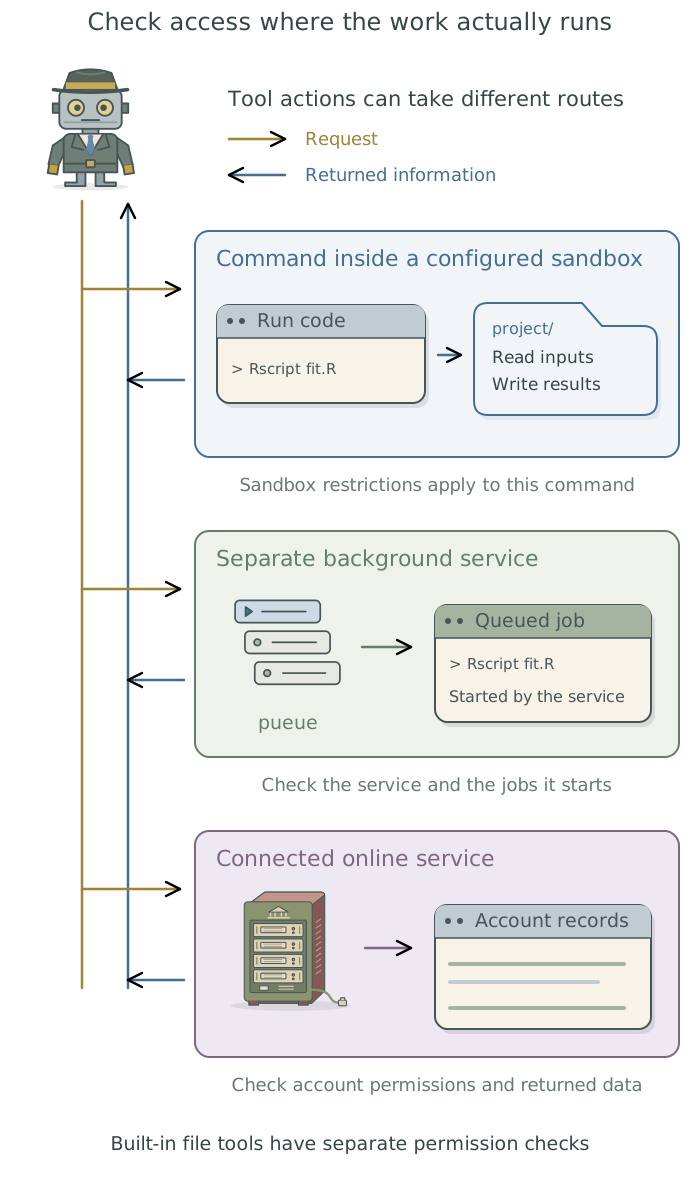
Claude Code’s built-in sandbox is off by default. When enabled, it covers commands run inside it and the programs they start. It does not enclose every tool available to the agent. Built-in file tools have their own permission checks; connected services and separately running services need their own access controls.5
Ask the agent to check whether the sandbox is enabled and explain which files and services each tool needs to access. Once you agree on the permitted access, have the agent enable and configure the necessary controls, test them with harmless files, and report any restrictions it could not verify.
Suppose you give the agent read-only access to a research database. It can retrieve records without changing them, but the retrieved information may still be sent to the large language model (LLM) it uses. If the LLM runs on a provider’s computers, such as Anthropic’s, that provider receives the information. Decide which material may be sent before giving the agent access. The companion guide Doing Research with AI Agents explains what reaches the LLM and how to establish a chain of custody.
Choose where the settings apply
Use global settings for rules shared across your projects and project settings for the requirements of a particular study. Ask the agent to inspect the existing files and any institution-managed settings before proposing changes.
| Scope | Settings file | Use |
|---|---|---|
| Global | ~/.claude/settings.json6 |
Personal settings across projects on this computer. |
| Project | .claude/settings.json inside the project |
Settings that can be shared with project collaborators. |
| Personal project | .claude/settings.local.json inside the project |
Your own settings for this project; keep this file out of version control. |
For many settings, the personal project file takes priority over the shared project file, which takes priority over global defaults. Permission rules combine across those files: a project allowance does not remove a matching global deny. Your institution can also enforce managed settings. Ask the agent to report which settings actually apply, including changes supplied when the session starts.7
Keep secret values out of these files and saved command approvals. Chapter 12: Keep credentials out of research files: 1Password and direnv explains how to supply them to the program that needs them.
Ask the agent to configure and check access
Describe the files and services the work needs. For the batch of fits, you could ask:
Set up access for these statistical model fits. The approved inputs are in [folder]; results and logs belong in [folder]. Leave the inputs unchanged and block access to [excluded folder]. Check the current agent settings and the queue service’s access. Explain where changes are needed before applying them. Test permitted and blocked actions with harmless substitute files, then report the settings changed, the outcomes, and anything you could not verify.
The agent should test the paths the work will actually use with harmless substitute files. A direct command succeeding or failing does not establish how a queued job behaves. Its report might include the following checks.
| Check | Expected outcome |
|---|---|
| Run a representative queued fit on approved synthetic inputs | Saved result and log appear in the intended folders. |
| Try to change a substitute for a protected input | The configured restriction blocks the change. |
| Try to read an excluded substitute file through each relevant tool or process | Each attempted route is blocked; untested routes are identified. |
Have the agent record which settings it changed, where they are stored, and the test results in the project context files. If a required restriction fails, have the agent diagnose and fix the problem, then confirm that the check passes before using protected inputs. These checks can expose configuration mistakes; they do not establish protection against every possible action.
The optional example below is intended to protect data/raw from changes and exclude data/restricted. Have the agent adapt it to the actual project, merge it with existing settings, and perform the relevant checks above. JSON is a text format that stores settings under named fields; you do not need to edit it yourself.
Read the example project settings
File-tool paths beginning with / are project-relative here; sandbox paths beginning with ./ in project settings resolve from the project root. In global settings, relative sandbox paths resolve from that settings directory. These are different conventions, so the agent must resolve and check both before relying on them.
{
  "permissions": {
    "deny": [
      "Read(/data/restricted/**)",
      "Edit(/data/restricted/**)",
      "Edit(/data/raw/**)",
      "Edit(/.claude/**)",
      "Bash(git push --force*)",
      "Bash(git reset --hard*)",
      "Bash(git clean*)",
      "Bash(rm -rf*)",
      "Bash(sudo*)"
    ],
    "ask": ["Bash(git push*)"]
  },
  "sandbox": {
    "enabled": true,
    "failIfUnavailable": true,
    "allowUnsandboxedCommands": false,
    "filesystem": {
      "denyRead": ["./data/restricted"],
      "denyWrite": ["./data/restricted", "./data/raw", "./.claude"]
    },
    "network": {"allowedDomains": []}
  }
}
The sandbox must start successfully, and the example disables unsandboxed retries. Existing excluded commands or broader settings still require inspection. This file does not configure a separately running queue, browser account, or remote service, and it is not a complete restriction on every file on the computer. The keys follow the linked documentation; the agent must test the required behavior in the intended environment.
When a tool needs different access
If an operation is blocked, ask the agent to identify what it needs: a particular folder, a network destination, or access to the queue service. It should explain a specific change and its consequences. A command that runs outside the sandbox needs another arrangement that meets the project’s access requirements.
Where stronger separation is required, the agent can help configure an approved separate environment. Chapter 10: Run work in a separate environment: containers explains one option. Use the institution’s support route when the necessary controls cannot be established in the current environment.
When you add a tool or change how work runs, ask the agent to repeat the access tests using harmless substitute files. It should confirm that the required work succeeds and that attempts to change protected inputs or read excluded files are blocked.
Footnotes
These settings can permit routine edits, require approval before publishing files, and block changes to protected inputs. See Chapter 4: Control what the agent can do in Doing Research with AI Agents for examples. Anthropic’s permission documentation describes the rules and their precedence.↩︎
A restricted environment for running programs. It can limit which files those programs read or change and which online services they contact. See Chapter 4: Control what the agent can do in Doing Research with AI Agents for an explanation of how sandboxing works alongside permission rules.↩︎
The operating system is the core software managing a computer’s hardware, files, and running programs. macOS, Windows, and Linux are examples.↩︎
Programs started inside the sandbox remain restricted when they run in the background. Sending work to a service outside the sandbox does not extend those restrictions to it. See Anthropic’s sandbox scope and
pueue’s separate client and service.↩︎Anthropic documents that the sandbox is off by default and lists what runs outside it.↩︎
The tilde (
~) means your home folder. The other two paths start inside the project folder. See Anthropic’s settings-file reference.↩︎See Anthropic’s settings precedence and permission-rule precedence. These explain file merging; the agent must still inspect the configuration used by the actual session and its extensions.↩︎