4. Recover earlier work: git and gh
Research projects change as sample definitions, analyses, and manuscripts develop. Keeping a version history of selected files lets the agent explain what changed or recover earlier work. The history remains available after your conversation with the agent has ended.
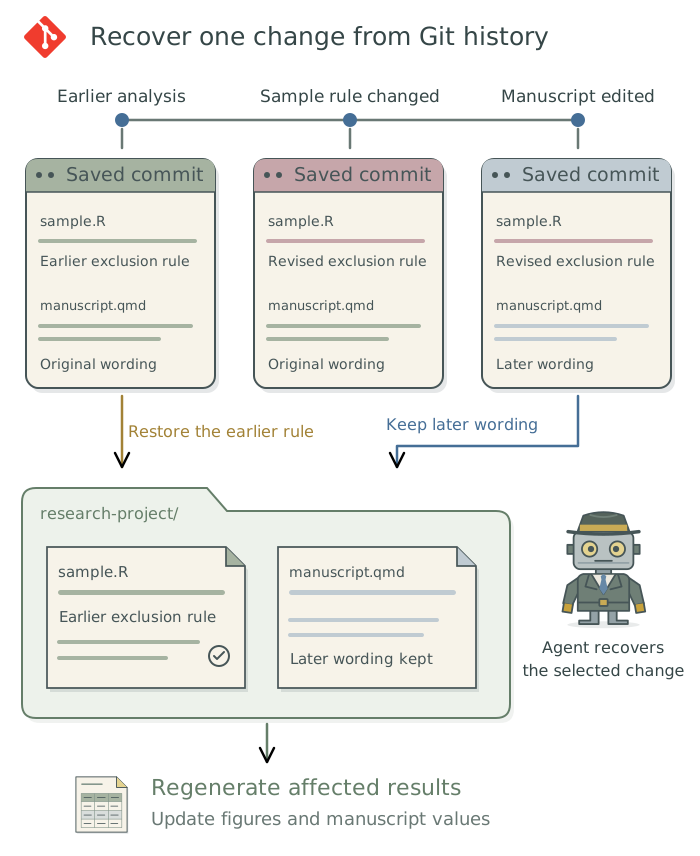
Suppose a revised exclusion rule removes far more observations than expected. You decide which sample definition is appropriate; the agent can use Git1 to find the relevant change and recover the earlier rule while preserving unrelated manuscript edits. A restored rule can change the results, so affected figures and manuscript values must be regenerated too.
Give the project a useful history
A Git repository (often shortened to “repo”) stores the project’s history. A commit records a version of selected files with a message describing the change. The agent can create these checkpoints after meaningful pieces of work, such as an approved sample rule or a completed figure. The descriptions should explain the change well enough to find it later.
Git preserves versions of the project’s files, but the study’s requirements and the reasons for research decisions still need to be written down. For a paper, keep the current scientific requirements in SPECIFICATION.md and dated decisions with their reasons in METHODOLOGY.md.2 When you make or revise a research decision, have the agent keep SPECIFICATION.md current and record the decision and its reason at the top of METHODOLOGY.md, preserving earlier entries.
Maintain version history for this project using
Git. Inspect any existing repository and preserve current edits. Track the code, manuscript, and appropriate configuration, excluding protected data, credentials, generated libraries, and caches. Record meaningful checkpoints as tasks are completed, and summarize changes affecting the analysis or reported results.
The agent handles file selection and commits. You do not need to inspect every code difference to benefit from the history. A diff, which shows changed lines, remains useful when investigating a particular decision or unexpected result. A .gitignore file tells Git which untracked files to leave out; it does not erase files already in history. Chapter 12: Keep credentials out of research files: 1Password and direnv explains how to keep secret values out of research files. Keep appropriate backups for files that Git does not track.
A Git repository can contain thousands of small internal files that record changes. Cloud storage services such as Dropbox, Google Drive, and OneDrive may try to sync these files as they change, creating heavy sync activity that can slow the computer or temporarily block access to files. Have the agent check the storage setup before creating a repository in a synced folder. Appendix D: Troubleshooting explains the precautions and how to handle an existing repository.
Recover the change you need
State the desired outcome rather than a Git operation:
Restore the earlier sample-selection rule while preserving unrelated manuscript wording and figure-formatting edits. Update the approved analysis requirements and record why the rule changed. Rerun the affected analysis, regenerate its figures, and identify manuscript values that need updating.
After restoring earlier work, the agent should explain what it restored, which saved version it used, which files it changed, and which outputs it regenerated. If the earlier state was never recorded, the agent should say what it can recover and what must be reconstructed. It should not silently reset the entire project to an older version.
Footnotes
Gitis the software’s name;gitis the command the agent uses to operate it. The illustration uses the Git logo by Jason Long, licensed under CC BY 3.0.↩︎These are project context files: saved instructions and records that the agent can consult in later sessions. See Chapter 7: Give the agent context for your project in Doing Research with AI Agents.↩︎