12. Keep credentials out of research files: 1Password and direnv
Research programs sometimes need access to an online account to retrieve data or use a service. A credential is information used to establish that access, such as a password or an API key.1 Keeping credentials separate from research files lets you share scripts and results without also sharing access to the account.
Suppose an agent prepares a script that sends published abstracts to a paid large language model (LLM) service to classify them by study design. The script needs an API key each time it runs. 1Password, a password manager, can store that key and supply it when needed. If your institution already provides a suitable credential service, have the agent use it instead.
Supply a credential to a command
For the abstract-classification example, first choose the service account and acceptable spending. Ask the agent to explain how the script’s API use will be billed, including whether it is covered by an existing subscription. Have it check the available credential tools and configure the chosen arrangement. For 1Password, the agent uses its command-line tool, op. Have it install op through Homebrew if needed and configure access to your account.2
1Password stores the key in a vault, a protected collection of saved items. The agent should guide any personal steps needed to create the key with the service, save it directly in the vault, and authorize access. Keep the key out of the conversation. Ask the agent to check which service operations the key permits and which vault items the configured programs can access, limiting both to the task where supported.
The script receives the key through an environment variable: a named value made available to a running program. For example, it can read MODEL_API_KEY without containing the key itself. The agent records a secret reference, which identifies the vault item and field holding the key, in the project’s settings.3 When the agent starts the script through op run, op retrieves the referenced key and supplies it under that variable name.
Have the agent save the complete command so later runs use the same credential arrangement. It should tell you if a later run needs renewed sign-in.
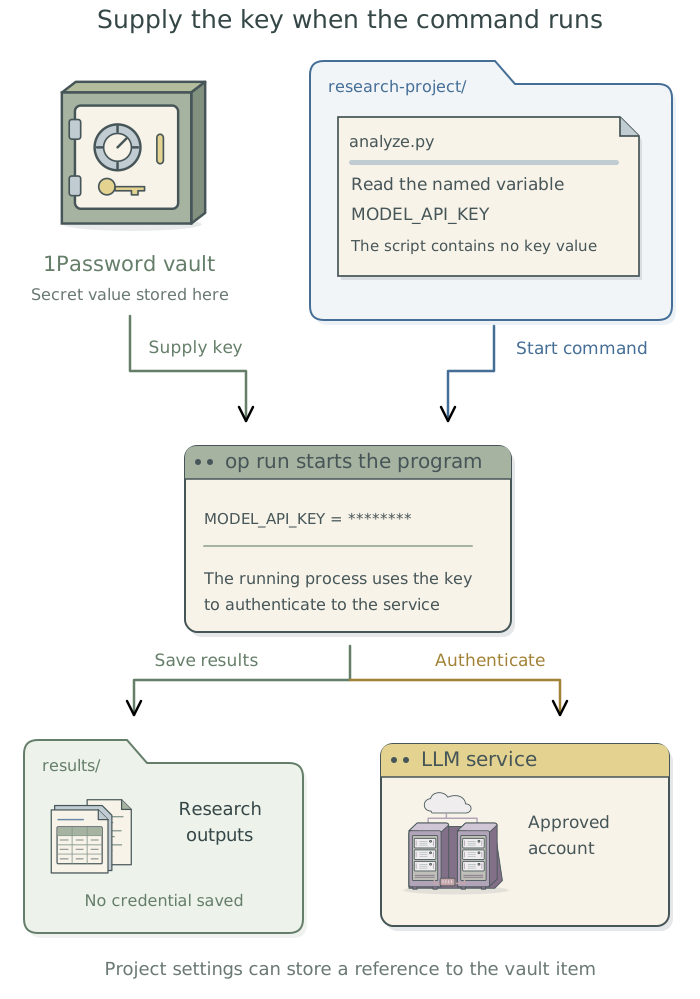
The running program can read or transmit the key it receives. Have the agent apply the access controls in Chapter 2: Control what added tools can access to the programs involved. When diagnosing a failure, it should check the required access without printing the key or all environment variables.
Reuse project settings when useful
A saved command using op run may be enough. If several project commands need the same settings, the agent can use direnv, a tool that automatically loads environment variables for a project folder. For example, commands that classify abstracts and retry failed classifications may both need the service address and the same credential reference. The key itself remains in the vault.
Have the agent install and configure direnv if this would help. Its project file, .envrc, contains executable instructions, so the agent should explain what they do before you approve loading them.4 Keep secret values out of that file. The agent should confirm that the commands it actually uses receive the intended settings.
Check access and save the instructions
Ask the agent to classify one permitted abstract through the saved command and confirm that the response reaches the intended results file. It should report which service account was used and whether any access or payment problem occurred. This checks the connection and script; you still assess whether the study-design classifications are suitable for the research.
If the script will run through a job queue, which holds jobs until they can start, have the agent check that route too. A later job may need a sign-in that was available only during the interactive session. The agent should explain and resolve that requirement before submitting unattended work.5 Chapter 9: Keep unattended jobs moving: pueue explains queue setup.
Have the agent save the service access instructions in the project context files. These should record the service and account identifier, credential reference, variable name, saved command, and any personal sign-in required. Have the agent record where the credential tools’ settings are stored and how it checked that the saved command works. None of these instructions should contain the key.
Set up this project’s abstract-classification script to use the chosen LLM service account within the spending limit we agreed. Check the available credential tools and configure
1Passwordandop, or the established institutional equivalent. Guide any personal steps needed to create, store, or authorize the key without putting it in the conversation. Supply it when the script runs, and keep its value out of source files, logs, and results. Save the command, run it on one permitted abstract, and check the saved classification. Report the account used and any unresolved problem. Save the setup and sign-in instructions in the project context files, without the secret. Use the saved command for later runs.
Replace an exposed credential
If a key has been exposed, ask the agent to guide its revocation and replacement through the service that issued it. Complete any required personal account steps there. Deleting the key from the latest script does not remove copies from version history or other systems. The agent can help locate affected files without reproducing the secret, update the credential reference, and check that the script uses the replacement. You decide any further account action or investigation of unauthorized use.
Footnotes
API stands for application programming interface: a way for one program to request operations from another. An API key identifies authorized access under a service account; it may permit reading data, making changes, or incurring charges, depending on the service and key settings.↩︎
To sign in through the
1Passworddesktop app, have the agent configureopto use the app and guide any personal authorization.Homebrewcan install the app on macOS. In WSL2, integration with the Windows app uses the Windowsop.exe; the agent should follow 1Password’s platform-specific setup instructions.↩︎The agent can use an environment file, often ending in
.env, to associate variable names with secret references. In this arrangement the file holds references, not the key values.op runreads the file and supplies the values to the script; see 1Password’s environment-variable guidance. Other.envfiles may contain secrets, so the agent should check before sharing one.↩︎The agent uses
direnv allowto approve loading.envrc. Where commands do not automatically load the project’s settings,direnv execcan load them before starting a command. See thedirenvmanual.↩︎The submitted job should retrieve the key when it starts. Have the agent check that the queue does not capture a secret value from the submission environment or store one in its command or logs. Personal sign-in during setup does not establish that a later unattended run can authenticate.↩︎