Appendix B. Maintain personal settings: chezmoi
Personal tool settings can contain months of useful work: global user instructions1 refined through research projects, a terminal layout that works well, or settings that resolved a recurring software problem. Recreating them after a lost computer or an accidental overwrite would mean repeating that work. Their configuration files are scattered across locations chosen by different tools, rather than collected in one project folder that can simply be put under version control.
chezmoi is a tool that maintains copies of selected configuration files in one directory and installs them in the locations where the tools read them. Git can then record changes to that collection, and a repository stored elsewhere provides a copy from which to recover or set up another computer. chezmoi manages the relationship between the collection and the scattered working files; Git supplies their version history.
Choose which settings to preserve
Configuration files supply a program’s settings or instructions. Many have names beginning with a dot, or live inside folders whose names begin with a dot, so they are often called dotfiles. The examples below are personal settings across projects; a study’s own configuration can remain with its project files.
| Settings worth preserving | Example location |
|---|---|
Global user instructions for Claude Code |
~/.claude/CLAUDE.md |
Shell configuration for zsh |
~/.zshrc |
Terminal panes and shortcuts for Zellij |
~/.config/zellij/config.kdl |
In macOS and Linux shell paths, ~ means your home folder. These are example locations: ask the agent to identify the files your tools actually use and preserve any existing settings-management arrangement. Appendix A: Tools for customizing your terminal explains the terminal tools.
Have the agent select the files with you before adding them. Keep passwords, access tokens, and saved sign-in state out of an ordinary settings repository, including a private one. Chapter 12: Keep credentials out of research files: 1Password and direnv explains how programs can obtain secret values when needed. If a selected file controls agent permissions, the protection must cover both its maintained copy and the file the agent application reads, as explained in Chapter 2: Control what added tools can access.
Understand the two copies
The source is the maintained copy held by chezmoi, normally under ~/.local/share/chezmoi/. The applied file is the copy installed where its program reads it. For example, the source file dot_zshrc becomes ~/.zshrc when applied; the dot_ prefix tells chezmoi to restore the leading dot.2 The diagram shows this relationship on two computers, but preserving settings is useful even if you use only one.
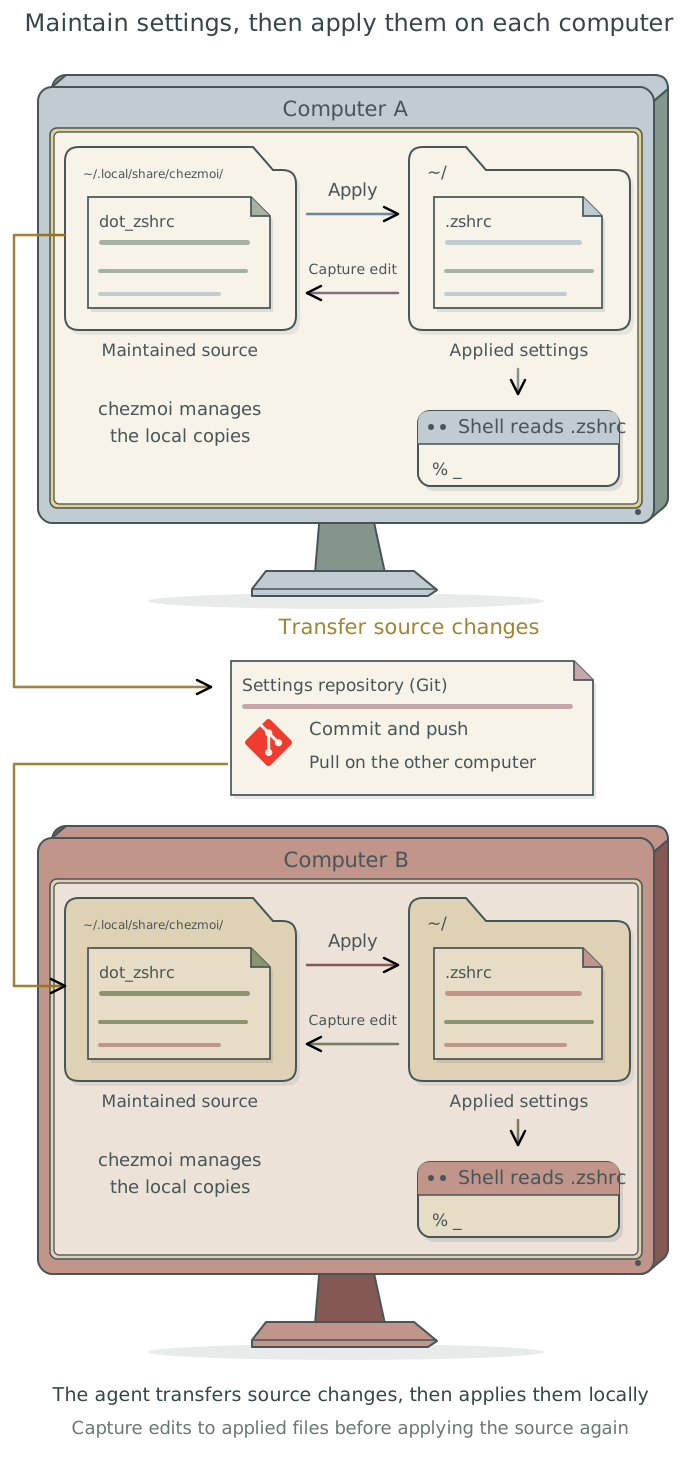
Suppose you add a convention to your global user instructions: retain full-precision numerical results and round values only when presenting them. The agent can edit the maintained source, check what applying it would change, and apply the update to ~/.claude/CLAUDE.md. It should then confirm that a new agent session loads the intended instructions. The instruction has been preserved only when the source also contains the change; editing the applied file alone leaves it vulnerable to being replaced by an older source copy.
Maintain the settings and recover earlier versions
Ask the agent to preserve existing files, set up chezmoi if needed, and record which files it manages. For a new global user instruction, editing the source and applying it provides a straightforward routine. Some applications also rewrite their settings themselves. Before applying a source version over such a file, the agent must compare the copies and capture any intended changes from the applied file back into the source.3
Have the agent record checked changes in the settings repository and keep the agreed backup copy current. For example, it can push the source repository to a private GitHub repository you authorize. A repository kept only on the same computer cannot recover files after that computer is lost.
If a later instruction causes problems, ask the agent to restore its earlier wording from version history while retaining unrelated improvements. It should apply the correction and check the result in a new session. Have it save the managed file locations and the update, backup, and recovery instructions in the settings repository’s README.md, linked from your global user instructions.
Preserve my global user instructions and useful personal tool settings. Inspect their current locations and any existing settings manager before changing anything. Identify the files to manage with
chezmoi, excluding secret values and sign-in state, and preserve their current contents. Set up the maintained source and version history, then check that applying the source produces the intended files and that the relevant tools read them. Propose a backup location outside this computer and configure it after my approval. Record how to maintain the settings, recover an earlier version, and set up another computer in the settings repository’sREADME.md, linked from my global user instructions. Use that maintenance process for future settings changes.
Use the settings on another computer
On another computer, have the agent install chezmoi, retrieve the source repository, and inspect the proposed changes before applying them. Existing settings there may need to be preserved or merged. Transferring the repository and applying its contents are separate steps; saving a change on one computer does not automatically update the files on another.4
Some settings can be identical across computers, while others refer to different folder locations or available programs. A chezmoi template produces the appropriate settings for each computer. The agent can configure these differences while maintaining global user instructions once.5 It should check the actual result on the new computer, such as opening the intended terminal layout or confirming which global user instructions a new agent session loads.
Footnotes
See Chapter 8: Apply your conventions across projects in Doing Research with AI Agents.↩︎
The
chezmoisetup guide explains source and destination directories; its source-state attributes explain filename prefixes. The agent handles this mapping, so you do not need to rename the files yourself.↩︎See
chezmoidaily operations for editing and applying source changes, andre-addfor capturing changes made to applied files.↩︎The
chezmoisetup guide describes using a hosted repository, including a private one, to transfer settings between computers.↩︎See
chezmoi’s guide to differences between machines. Templates can vary particular settings without requiring independently maintained copies of every file.↩︎