3. Install and manage tools with Homebrew
The agent may need a program that is not yet installed. A package manager installs the program and its supporting software, and provides a consistent way to update or remove it.
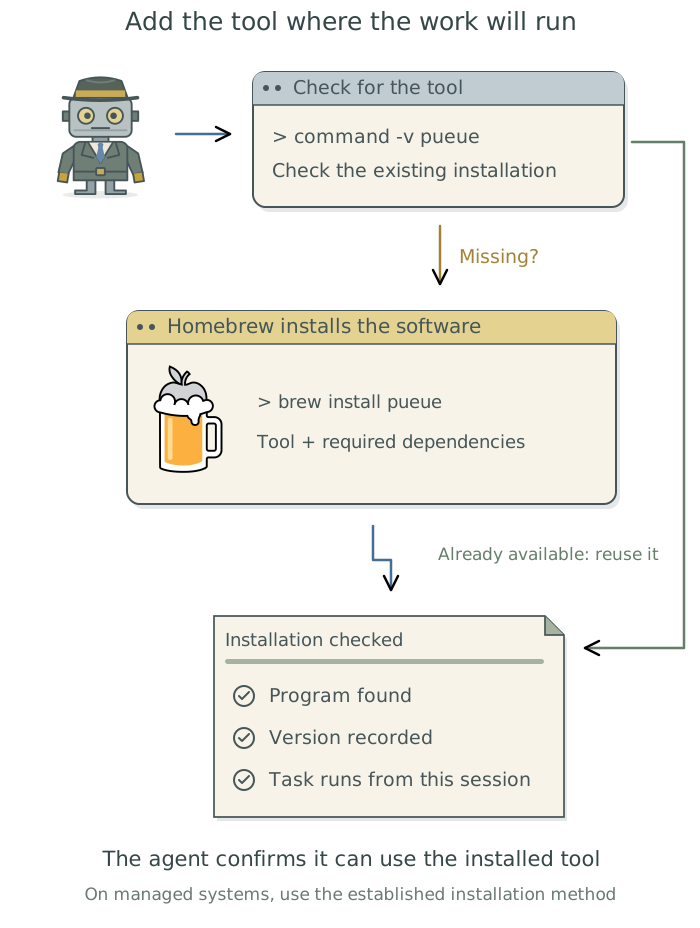
Homebrew supplies many of the tools in this guide. For example, pueue is a tool that manages a job queue, starting waiting simulation runs as others finish. The agent checks whether it is installed on the computer that will run the simulations, installs it if needed, and configures the queue for the project.1
Ask the agent to install the tool
Describe the task to the agent and name the tool if you have one in mind. Otherwise, ask it to recommend a suitable tool or consult Chapter 1: Choose tools for a research need.
Homebrew is the package manager we recommend in this guide. It works on macOS and Linux, including Windows through Windows Subsystem for Linux (WSL2). Before adding software, have the agent check what is already installed. On a computing cluster or another institution-managed system, it should also check for established installation methods and use those where appropriate. Otherwise, ask it to install Homebrew if needed, explaining any steps you must complete yourself.
Set up a job queue for this project’s simulations, using
pueueunless a suitable tool is already available. Check existing installations and how software is managed on the computer that will run the jobs. UseHomebrewunless an established institutional method is more appropriate, particularly on a computing cluster. InstallHomebrewif needed, and explain any steps I must complete myself. Configure the queue and confirm that you can submit and monitor jobs from this session.
The installation command for pueue is brew install pueue; the agent runs it. You handle system password prompts and institutional authorization. Enter passwords only when prompted by the installer or system, not in the conversation.
The agent can install Homebrew using its official installation script. If a step needs your input, such as an administrator password, it should explain exactly what to do in the Claude app’s built-in terminal2 or the relevant system dialog.
After setup, ask the agent to confirm that it can use the tool for the project and tell you which version is installed. If it cannot find a program that is already installed, have it investigate why before installing another copy.
Keep a record of installed tools
A Brewfile lists software to install with Homebrew, helping the agent set up the same tools on another computer. Your global user instructions file TOOLCHAIN.md3 records what each tool does and when the agent should use it. Ask the agent to maintain both as tools are added, removed, or changed.
The exact language and package versions used by an analysis need their own records; Chapter 6: Preserve a software environment: rig, renv, and uv explains these.
Before updating software used by an analysis, ask the agent to explain the proposed change and preserve the software versions needed to rerun that analysis.
Footnotes
The illustration uses the official
Homebrewlogo, by Homebrew contributors, distributed under BSD-2-Clause. The guide includes its complete license notice and credits for the software logos.↩︎A terminal is a panel where you can enter commands and see their output. See Chapter 18: Use an agent from the terminal: Claude Code.↩︎
See Chapter 8: Apply your conventions across projects in Doing Research with AI Agents for guidance on organizing these files and telling the agent when to read them.↩︎