7. Give research tasks reliable commands: just
Repeating a research task means knowing which scripts to run, in what order, and with which settings. A command tells the computer which program or saved task to run. Saving the instructions for a task under one command lets the agent or a collaborator repeat it without reconstructing those details.
Suppose a figure shows estimates from a statistical model. If model fitting and plotting are separate steps, the agent can regenerate the figure from saved estimates without fitting the model again. just is a command runner that gives these tasks short names. The agent saves each task’s instructions as a recipe in the project’s justfile.
Make each task runnable on its own
Have the agent check that each task can run separately. For example, the plotting code should read the statistical model’s estimates from a saved file, so it can regenerate the figure even after the original analysis session has ended. If the code needs reorganizing, the agent should first save the current results, then check that the revised code reproduces them. Chapter 13: Build a modular analysis workflow in the companion guide Doing Research with AI Agents explains how to structure the code this way.
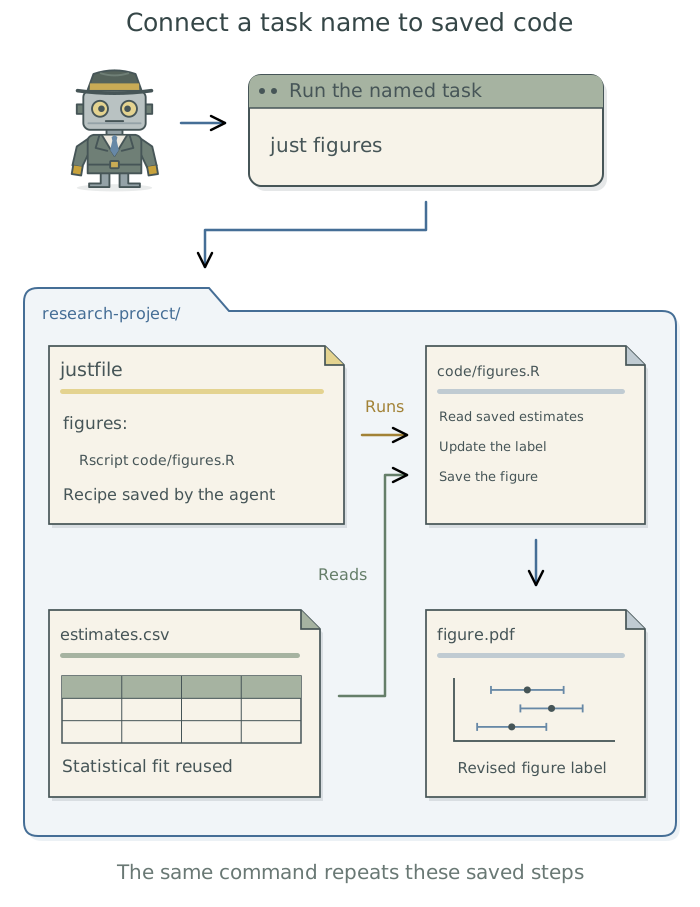
Save the commands
The agent installs just if needed, using Homebrew or your preferred package manager. It then creates and maintains the project’s recipes. A small project might offer the following menu. These are examples to create for the project; installing just alone does not provide them.
| Example command | Project operation |
|---|---|
just all |
Run the project’s complete documented workflow. |
just fit age-spline1 |
Fit the named statistical model and save its results. |
just contrasts |
Calculate comparisons of interest, such as differences between groups, from saved model results. |
just figures |
Generate figures from saved results. |
just power |
Run simulations to estimate statistical power for a proposed study. |
just paper |
Build the manuscript with its tables, figures, and reported results. |
just smoke |
Run a small version of the workflow to check that its steps work together. |
Inspect this project’s analysis and set up named commands for fitting the statistical model, regenerating figures from saved estimates, and running the complete workflow. Use
justunless existing project commands already cover these tasks. Check that the individual tasks can run separately. If the code needs reorganizing, save the current results first and confirm that the revised code reproduces them. Explain what each command does and use these commands whenever you carry out the corresponding tasks.
Ask the agent to use these recipes in normal work and keep their descriptions current. You can ask the agent to list the project’s commands and explain what each does. A completed figure task should report the command used, the saved estimates it read, and the figure it produced.
Run a smoke test
A smoke test runs a small, representative workload through the actual workflow before a long run. For a simulation study, the agent might run a few repetitions instead of thousands, then produce the expected tables and figures from those results. Ask the agent to propose a small workload for your project, explain which steps it will check, and configure just smoke to run it. It should use the same analysis code and software environment as the full run and save the test outputs separately from the main study’s results.
Add a
just smokerecipe for this simulation study. Run five repetitions, fitting the planned statistical model in each and then generating the summary tables and figures. Use the same simulation and analysis code, sample size, and software environment as the full run. Save the test outputs separately from the main results. Check that each step completes and produces the expected files, and report any problems. Run this check after relevant code changes and before starting the full simulation.
Ask the agent to check the contents of the outputs as well as whether the files exist. In the simulation example, it should confirm that all five repetitions produced results and that those results were used in the summary tables and figures. A successful smoke test shows that these steps work together on the small run; it does not establish that the statistical method is suitable for the research question.2
To have the workflow determine which steps need rerunning after a change, see Chapter 8: Rerun only affected steps: targets and Snakemake.
Footnotes
Here,
age-splineis an example name for a statistical model allowing a curved relationship between age and the outcome. The name afterfitidentifies which model the agent should fit.↩︎For checks of statistical performance and independent implementations, see Chapter 14: Test the analysis against known truth and Chapter 15: Check the agent with independent implementations in Doing Research with AI Agents.↩︎