Appendix E. Terminal vocabulary
This appendix explains terms encountered in terminal windows, commands, and tool diagnostics. Use it to look up an unfamiliar word or ask the agent to explain that word in the command or error you are reading.
From a device to a window
Many terminal terms describe physical equipment that software has replaced. A terminal was a device through which a person communicated with a computer. A teletype combined a keyboard and printer: typed characters went to the connected machine, and responses appeared on paper. Museum collections preserve examples used for computer access. Later terminals displayed text on a screen.
A modern terminal emulator provides a similar text interface in a software window. It can display a shell for entering commands and starting programs, a text editor for changing text files, or an AI agent that follows instructions and uses tools to carry out tasks. The window’s appearance alone does not tell you which program is receiving your input.
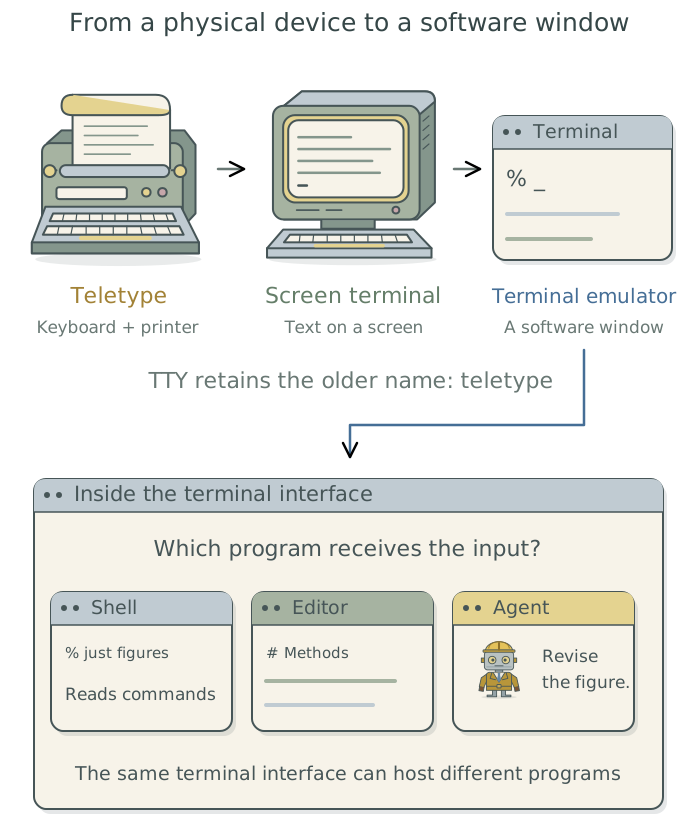
The program receiving your commands
Shells such as Bash and zsh can run saved scripts as well as commands you type. When a shell starts a program such as an agent, your input goes to that program until it finishes or you exit it; the shell then becomes ready for another command. Chapter 18: Use an agent from the terminal: Claude Code demonstrates this sequence. Appendix A: Tools for customizing your terminal explains shell choices and terminal configuration.
| Term | Meaning in this guide |
|---|---|
| Terminal / terminal emulator | The text interface, now usually a software window, in which programs receive typed input and display output |
| Shell | The program interpreting commands and starting other programs; for example, zsh starts the agent when you enter claude |
| Shell prompt | The text indicating that the shell is ready for a command; distinct from a written prompt addressed to an agent |
| TTY | A terminal connection; the term appears in diagnostics about how programs receive input |
| Pseudo-terminal, PTY | A software-created connection that behaves like a terminal for the program using it |
Programs can behave differently when their input comes from a terminal rather than a file or another program. That distinction explains messages such as not a tty: TTY names a terminal connection, so the message means that the program’s input is not connected to one.1 A pseudo-terminal2 supplies a terminal connection when needed. Appendix D: Troubleshooting explains an example involving R started by an agent on macOS. This does not mean every unattended command requires one.
Commands and file locations
In just figures, just names the program and figures selects a saved task, called a recipe. Chapter 7: Give research tasks reliable commands: just explains how the agent creates those recipes. Programs also need to locate their files. A path such as data/analysis.csv is interpreted from the program’s working directory, its current folder, so the same command can find different files when started elsewhere.
| Term | Meaning in this guide |
|---|---|
| Command-line interface, CLI | An interface in which you control a program by typing commands and supplying arguments |
| Argument | Information supplied after the program name; figures is an argument in just figures |
| Option / flag | An argument that selects a program’s behavior, such as --list in just --list; some options also take a value |
| Working directory | A program’s current folder, used as the starting point for relative file paths |
| Absolute path | A location starting at the filesystem’s root, such as /Users/your-name/Research/my-project |
| Relative path | A location interpreted from a starting folder; data/analysis.csv identifies a file in that folder’s data/ directory |
Home folder, ~ |
Your personal folder on the computer; in shell paths, ~/Research/ refers to its Research/ subfolder |
PATH |
The list of directories searched for a program when its command is given without a file path |
| Dotfile | A file whose name begins with a dot, such as .zshrc; these files are usually hidden in normal file listings and often contain configuration |
The home folder and working directory are different concepts. For example, the working directory may be a research project while ~/.zshrc still points to the shell settings in your home folder.
The file-path examples above use Unix conventions shared by the macOS and Linux operating systems.3 Their shells use forward slashes to separate folders and ~ for the home folder. These conventions also apply in the Linux environment provided on Windows by WSL2; Chapter 18: Use an agent from the terminal: Claude Code introduces that Windows route. The /Users/your-name/Research/my-project path is specific to macOS.
Programs, input, and output
A running program can receive information from the terminal, files, or another program. It can also send results and diagnostic messages through separate output channels. These terms help explain what the agent is inspecting when a command fails.
| Term | Meaning in this guide |
|---|---|
| Process | A running instance of a program; two simultaneous analysis runs are separate processes |
| Environment variable | A named value supplied to a program, such as a setting that identifies a project folder; programs can pass these values to programs they start |
Standard input, stdin |
The input channel a program can read, supplied through typing, a file, or another program |
Standard output, stdout |
The channel a program uses for ordinary output, which can be displayed or saved |
Standard error, stderr |
A separate output channel commonly used for errors and other diagnostic messages |
| Pipe | A connection passing one program’s output to another program’s input; for example, passing a status report to a tool that selects the failed jobs |
| Exit status | A number a program returns when it finishes |
A zero exit status4 reports success according to the program’s own rules. In Chapter 9: Keep unattended jobs moving: pueue, the pueue wait command returns zero when it finishes waiting, even if the queued job failed. The agent must check the job’s recorded outcome and saved research outputs.
Footnotes
TTY abbreviates teletype, an early keyboard-and-printer terminal. In modern software, the name refers to a terminal connection, including connections created by software.↩︎
A pseudo-terminal (PTY) is a software-created connection that lets a program behave as though it were attached to a terminal. It can provide terminal input and output without a person opening a terminal window.↩︎
An operating system manages a computer’s hardware and runs programs. Unix is an operating system whose design influenced many later systems. macOS is based on Unix, and Linux follows many of the same conventions.↩︎
An exit status is a number a program returns when it finishes. By convention, zero reports success; other numbers usually indicate an error. The number describes the program’s own outcome, which may cover only one step of a research task.↩︎