7. Give the agent context for your project
7. Give the agent context for your project
An agent joining a research project needs to know what you are trying to establish, which files to use, and which decisions have already been made. Saving that knowledge in the project lets it begin useful work without repeatedly asking you to reconstruct the study. These project context files also help you and your collaborators understand changes made along the way.
Suppose you return to a paper after a month and ask an agent to revise Figure 2. Several versions of the results remain in the project folder. The agent needs to know which version uses the agreed sample, why some observations were excluded, and whether the sensitivity analysis is finished.
Explain the project and the current task
Describe the research question, the relevant data and outputs, and the result you want from this task. Point the agent to the current files and explain which decisions need your involvement. For a new project, identify what remains undecided. For an existing one, supply the information that cannot reliably be inferred from its scripts and filenames.
Conversation details can be lost during compaction or be unavailable in a new session. Have the agent save agreed decisions and the current state of the work in project context files it can read again. It should also record unresolved questions, so an assumption does not become an apparent fact when the next session begins.
Save project context files
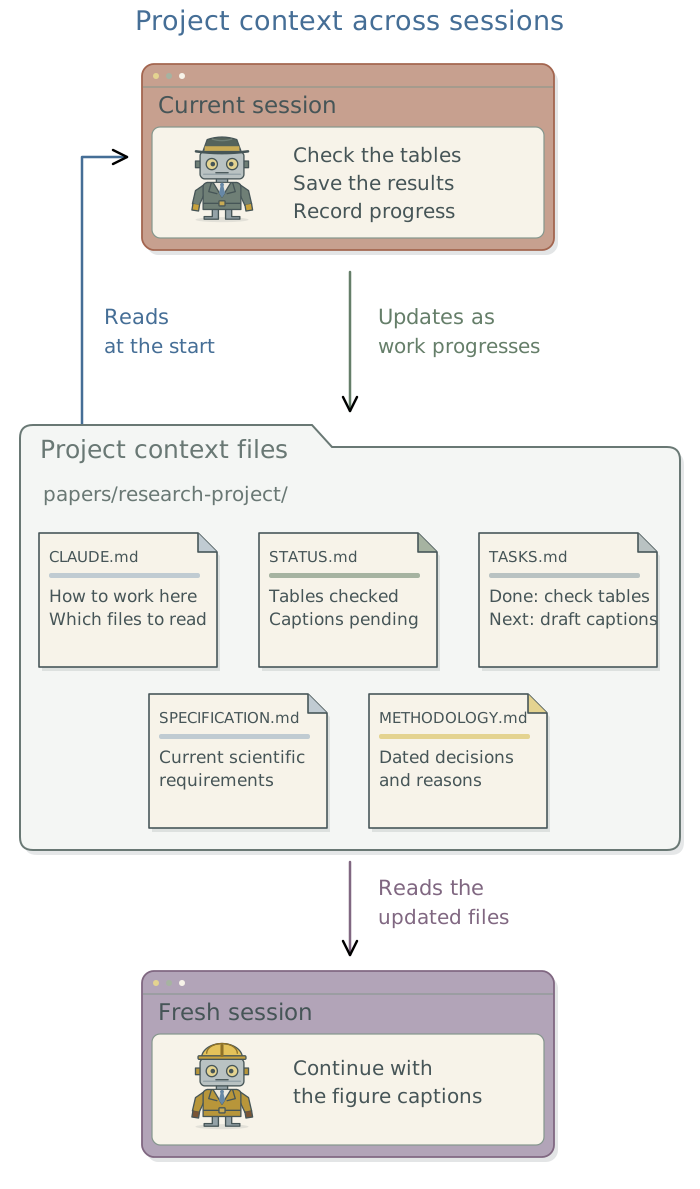
Project context files tell the agent what the project is trying to achieve, how it should work, what has been decided, and what remains to be done. Each file has a specific purpose, as shown below.
In Claude Code, a project-level CLAUDE.md supplies instructions at the start of a session. Other agent tools use AGENTS.md for these instructions.1 Keep the instructions short: explain the project, identify the important files, and tell the agent when to consult them. Detailed plans, results, and decision histories can remain in separate files.
| File | Purpose and example |
|---|---|
CLAUDE.md |
How the agent should work: follow the scientific specification and read the current status before starting. |
STATUS.md |
Current state: the main analysis is complete; the sensitivity analysis is pending. |
TASKS.md |
Work to do and completed work: update Figure 2’s labels, with a dated entry after checking the result. |
SPECIFICATION.md |
Current scientific requirements: which records to include, what to estimate, and which checks and outputs to produce. Have the agent rewrite it when approved decisions change. |
METHODOLOGY.md |
Dated scientific decisions and reasons: why an exclusion rule changed and which part of the specification it affects. Add new entries at the top, preserving earlier ones. |
README.md |
A collaborator’s introduction: what the project contains and how to reproduce its outputs. |
The status, task, specification, and decision-log filenames are conventions, not special commands. Tell the agent which files to read and maintain. For a paper project, keep the current scientific requirements in SPECIFICATION.md and the reasons for decisions in METHODOLOGY.md. The agent can then find the prescribed analysis without reconstructing it from earlier decisions. When you approve a methodological change, have it update the specification and add an entry to the decision log.
Read this project and draft a concise
CLAUDE.mdfor future sessions. Identify its purpose, current files, agreed research decisions, and unresolved questions. Point to the other project context files and include instructions to keep them current. Preserve existing authored guidance and show me the proposed changes.
A useful instruction identifies both the record and its purpose:
Before starting, read STATUS.md and TASKS.md and inspect the relevant files.
Follow SPECIFICATION.md when implementing or checking the analysis;
consult METHODOLOGY.md for decisions and reasons.
After working, update the status and tasks from the outputs actually checked.
After an approved scientific change, update SPECIFICATION.md and add a dated
decision and reason at the top of METHODOLOGY.md. Preserve earlier entries.
The complete project example is also available as a download. Adapt its research details before using it.
Download the project CLAUDE.md template
Read the complete CLAUDE.md example
# [Project name]

[Describe the research question, purpose, and intended outputs.]
[Adapt the paths and file list below to the project. Keep unresolved choices
explicit; do not invent research decisions to complete this template.]

## Read first
- STATUS.md: current state and next decision.
- TASKS.md: work remaining and dated completions.
- SPECIFICATION.md: current scientific requirements; follow it when implementing
  or checking the analysis.
- METHODOLOGY.md: dated scientific decisions and their reasons; consult it when
  the rationale or history matters.

## Files
- data/raw/: approved original inputs; preserve unchanged.
- code/: saved analysis and validation steps.
- outputs/: saved results, figures, and checks.
- manuscript/: text linked to the saved outputs.
- README.md: actual commands and environment restoration instructions.

## Working rules
- Follow the written specification. Report missing inputs or ambiguities.
- Do not invent observations, alter the estimand, or weaken a failed check.
- Save full-precision results; apply rounding only for presentation.
- Keep exploratory work, simulations, and manuscript results distinguishable.
- Record the exact input and software versions used.
- Inspect changed outputs and record verification before reporting completion.

## Maintain project context files
- Read STATUS.md and TASKS.md before starting; check relevant project files.
- Update the task list as work starts, finishes, or becomes blocked.
- Keep STATUS.md a short account of the current state, not a running history.
- When the researcher approves a scientific change, rewrite SPECIFICATION.md
  to reflect the current requirements and add a dated entry at the top of
  METHODOLOGY.md explaining the decision, reason, and specification change.
- Preserve older decisions and frozen specifications used for completed runs.
- Keep unfinished work, failed checks, and unresolved questions explicit.

## Access
[Identify approved inputs, storage, and services, and any restrictions on use.]
Ask before adding external services or publishing. These instructions do not
enforce file or network permissions; configure access controls separately.
Record plans and research decisions
When a task needs a plan, distinguish the scientific decisions from the agent’s proposed implementation. You may already have settled the estimand, sample, and estimator; the agent still needs to work out which scripts to change and which checks to run. Give it the research question and relevant supporting material, and have it identify unresolved choices before implementation.
For difficult work, ask one or two fresh agent sessions to critique the proposed plan.2 Responses can differ even when the sessions use the same LLM. A fresh session also reviews the plan without the preceding conversation, which may help it notice assumptions the first session took for granted. Give each session the research question, constraints, evidence, and plan, and ask it to identify questionable assumptions, missing steps, or alternatives. Use your judgment and the evidence to resolve their suggestions; sessions using the same LLM can share mistakes, so agreement does not establish that a method is appropriate.
Have the agent save its implementation plan separately from the scientific requirements in SPECIFICATION.md. When you approve a scientific change, have it rewrite the affected requirements and add a dated entry at the top of METHODOLOGY.md, explaining the decision and its reason. Preserve earlier entries. The project record should explain why the work changed, rather than leaving a later reader to infer the reason from altered code. Chapter 14: Test the analysis against known truth and Chapter 15: Check the agent with independent implementations explain how to check the resulting analysis.
Keep project context files current
Make maintaining project context files a standing instruction in the project’s CLAUDE.md or maintained AGENTS.md. The agent should read the relevant project context files before starting, track the assigned work, and update the affected files after checking its outputs. You can then direct the research and review the results without issuing the same bookkeeping prompt every session.
For example, after correcting a figure’s labels, the agent adds a dated completion entry to TASKS.md and updates STATUS.md to identify the rebuilt figure. If no statistical model was refitted, the record should not imply that the analysis was rerun. An approved scientific change updates SPECIFICATION.md and receives a dated explanation in METHODOLOGY.md; a completed formatting task does not need either change.
The following prompts can establish the routine or recover it when a session has lost track of the work.
Read
CLAUDE.md(orAGENTS.md),STATUS.md, andTASKS.md, plus any other project context files relevant to the next task. Then inspect the inputs and outputs needed for that task. Summarize the current work, flag any disagreement between the project context files and the work saved on disk, and identify the next action.
Update
TASKS.mdandSTATUS.mdfrom the work and outputs actually checked. For scientific changes I approved, updateSPECIFICATION.mdand add dated entries at the top ofMETHODOLOGY.mdexplaining the decisions, reasons, and specification changes. Preserve earlier entries. Leave unfinished work and failures explicit, with enough information for the next session to continue.
Keep STATUS.md short and current. Record completed and outstanding work in TASKS.md. Keep current scientific requirements in SPECIFICATION.md and dated decisions with their reasons in METHODOLOGY.md. Have the agent consult those records when relevant rather than loading every past result into every task. If you edit a file during a session, tell the agent to read it again before continuing. A fresh conversation can still load saved information; Chapter 16: Use LLM outputs as research data explains how to control what it receives.3
Footnotes
When using agent tools from multiple providers, keep one maintained instructions file. Ask the agent to make
CLAUDE.mda symbolic link toAGENTS.md, so both filenames refer to the same content, and check that each tool reads it. This avoids independently edited copies. See Anthropic’s instructions for sharing a file and the AGENTS.md guidance.↩︎The DSS plan-review skill provides a reusable procedure for this review.↩︎
With
Claude Code’s auto memory, the agent decides which notes to save for future sessions. For project context files, you specify what the agent must maintain. Ask it to correct outdated memories, and keep important research decisions in the project context files.↩︎