16. Run agents from saved prompts
Some research tasks need to be repeated as their inputs change. The agent can prepare a saved command that starts another agent, supplies its instructions, and collects its results. This is headless execution: a program supplies the agent’s prompt and receives its response, without an interactive conversation.1
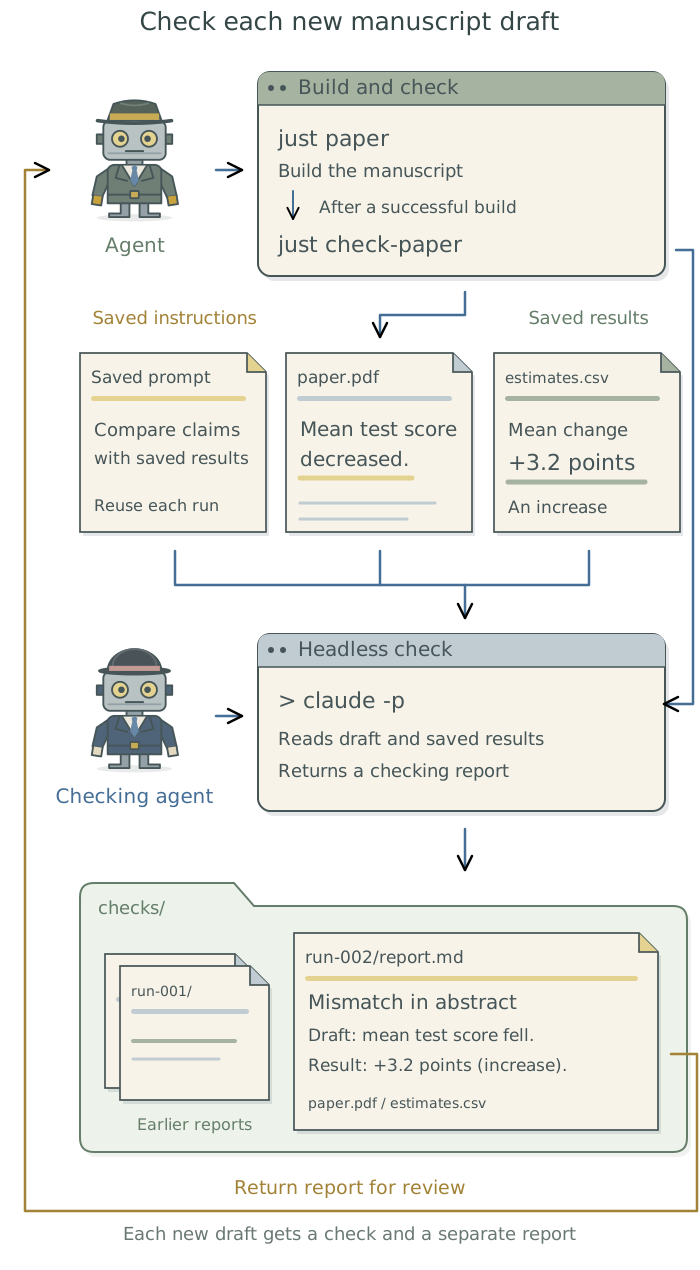
Suppose you update an analysis of students’ test scores and rebuild the manuscript. The table updates automatically, but the abstract still says that average scores fell when the revised results show they rose. A checking agent can compare the draft with the saved analysis results and flag this outdated wording. Claude Code supports headless execution through the command claude -p, which the agent can use to launch this check. Once configured, the workflow can check each new draft automatically.
Save the task and its launch command
Tell the agent what the check should do and what it should return. For the manuscript check, ask it to compare reported numbers and descriptions of results with the saved analysis outputs, allowing for the manuscript’s stated rounding. Each finding should identify the passage and the supporting results file. The checking agent should report problems without editing the manuscript or rerunning the analysis, so its findings can be reviewed before changes are made.
Have the agent save the checking instructions in a prompt file such as check-manuscript.md. These instructions could also be packaged as a skill: a reusable procedure that an agent follows, including during a headless run.2 The saved instructions describe the work; the launch command starts the agent that will carry it out.
The saved command starts the checking agent with its prompt, the selected draft and results files, and a new folder for its report.3 just, a command runner, lets the agent give this command a name such as just check-paper. The agent creates that command for the project; Chapter 7: Give research tasks reliable commands: just explains how. The same instructions can be reused while the draft and results change between runs.
Choose the inputs, software, and access
To prepare the workflow, have the agent check whether the claude command is available and install or configure it if needed. Having the desktop app installed does not establish that the command is available; Chapter 18: Use an agent from the terminal: Claude Code explains its setup. The agent should check which account the command uses, explain any additional charges, and guide any personal sign-in you need to complete.
When setting up the command, the agent can specify whether each run starts a new session, with a separate conversation history, or continues an existing one. For this manuscript check, have it start a new session for each draft and supply the draft, its saved results, and the instructions it needs.
Context is the information supplied to the agent’s large language model (LLM) for generating a response. A new session may still load project context files, global user instructions,4 or saved memory. Have the agent identify what will be loaded and select the material the task needs. It should give the checking agent read-only access to the draft and supporting results, and permission to save its report in the designated output folder.
Ask the agent to check the tools and permissions from the headless session itself. An action requiring an unavailable approval should be reported as blocked rather than leave the run waiting indefinitely. If the task requires files to be excluded, have it test those restrictions with harmless files; Chapter 2: Control what added tools can access explains the controls.
Claude Code settings for unattended runs
The dontAsk permission mode denies tool actions that would otherwise require approval, although installed extensions can affect that behavior. Normally permitted actions still run. The --bare option skips most automatically loaded instructions and extensions, but requires service credentials5 rather than ordinary subscription sign-in. Have the agent check the installed version, account requirements, and instructions needed before selecting these settings. Neither option alone establishes which files the checking agent can access.
Another example: test a research archive
A headless agent can also check whether another researcher could reproduce a paper’s results from an archive/ folder. This task needs deliberate separation from the working project. Have the agent prepare a test copy, recreate the software from the archive’s documented requirements, and exclude unprovided files, instructions, and previous conversations. It should verify the intended access restrictions before launching the check.6 The checking agent follows the reproduction instructions and reports problems without repairing the archive during the check.
Test and run the workflow
Before checking a complete manuscript, have the agent run a smoke test: a small representative task through the actual command, account, tools, and reporting steps. For example, it can check one results paragraph and table against their saved estimates. It should also test a temporary copy with a deliberately changed value, confirm that the checking agent reports the discrepancy and its source, and verify that the original files remain unchanged. Have it resolve any setup failures before enabling automatic checks.
Once that works, have the agent connect just check-paper to the command that builds the manuscript, such as just paper, so each successful build launches the checking agent and saves its report. Chapter 11: Generate documents from research outputs: Quarto and Pandoc explains the document build. The checking command can also run on an existing draft without rebuilding it.
Give the following prompt to the agent to set up this workflow; it prepares the separate checking prompt.
Set up a headless check of this manuscript against its saved analysis results. Save the checking instructions and create
just check-paper, or use the project’s existing command system. Each run should start a new checking session with the selected draft, results files, and instructions needed for the check, and save its report in a new folder. Check that the command can use the intended account and tools. Have the checking agent compare reported numbers and descriptions with the saved results, identify supporting file locations, and report anything it cannot check. It should leave the manuscript and analysis unchanged. Test a small draft and a temporary copy containing a deliberate mismatch. Resolve setup failures before arranging for the check to run after each successful manuscript build. Ensure failed or incomplete checks are reported even if the manuscript builds successfully. Record how to use it in the project context files.
Review and retain each run’s results
Have the agent review the checking agent’s report and inspect the evidence for its findings. The report should distinguish statements that match the saved results, discrepancies, and statements it could not check. For example, it might flag the abstract’s claim that average test scores fell, confirm that the main table matches the saved estimates, and leave a claim about one student group unchecked because its supporting results file is missing. Each finding should identify the relevant passage and file location.
Have the agent keep each report with the exact draft and results it checked, so later revisions cannot replace its evidence. It should retain the following records:
| Record | Why keep it? |
|---|---|
| Run identifier, checking prompt, and input versions | Identify the assignment and files checked. |
| Agent software, LLM identifier, settings, and available tools | Record how the checking session ran. |
| Original response and the tool operations and results it used | Preserve the findings and their supporting evidence.7 |
| Completion status, errors, and any further attempts | Distinguish completed checks from failed or interrupted runs. |
A run can finish without producing a usable report. Have the agent check that the expected report was saved and that failed or incomplete checks are clearly identified, even if the manuscript built successfully. It should preserve incomplete responses, diagnose failures before retrying, and limit automatic retries. After reviewing the findings, it can correct implementation or reporting errors within the agreed task; changes to scientific choices or interpretation need your decision. A revised draft can then be checked again.
Have the agent keep the checking prompt and command with the project and briefly record how to run the check and find its reports in the project context files. If many checks need to run unattended, it can use pueue, a tool that queues jobs and records their progress. Chapter 9: Keep unattended jobs moving: pueue explains how to set this up.
Footnotes
For a comparison with subagents and background execution, see Chapter 15: Divide work between agents: shared projects and git worktrees.↩︎
See Chapter 9: Use skills for recurring tasks in the companion guide Doing Research with AI Agents for finding, creating, and reusing skills.↩︎
An SDK, or software development kit, supplies libraries for controlling software from a program. The Agent SDK documentation describes
PythonandTypeScriptpackages for controlling agent runs. The agent can use these when the workflow needs more control than a saved command provides.↩︎Project context files hold instructions and records for the current project; global user instructions apply across projects. See Chapter 7: Give the agent context for your project and Chapter 8: Apply your conventions across projects in Doing Research with AI Agents.↩︎
A credential establishes access to an account. An API key is one kind, used when a program accesses a service through its application programming interface (API). See Chapter 12: Keep credentials out of research files: 1Password and direnv for supplying credentials to saved commands.↩︎
Chapter 19: Reproduce and hand off the research in Doing Research with AI Agents explains archive preparation. For restoring software and configuring a separate environment, see Chapter 6: Preserve a software environment: rig, renv, and uv and Chapter 10: Run work in a separate environment: containers.↩︎
The raw response is the exact text returned by the checking agent. A parsed result contains fields a program extracts from it, such as the passage and reported discrepancy. If the workflow extracts fields, save them separately from the original response.↩︎