6. Preserve a software environment: rig, renv, and uv
An analysis depends on particular versions of its language, packages, and other software. Recording those versions lets the agent recreate the software setup when investigating a result or preparing to share the project. The agent can recreate an earlier setup without changing the one currently in use.
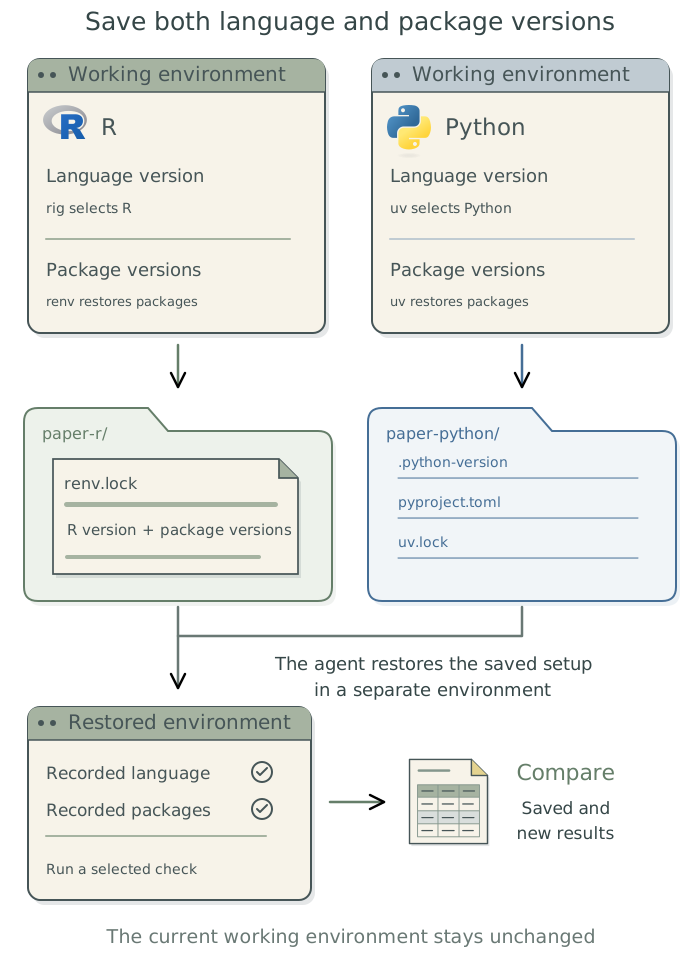
Suppose a collaborator reruns an analysis and obtains different intervals. The agent can recreate the original software setup to investigate whether a change in software explains the discrepancy. It can use rig to select the R version and renv to restore its packages, or uv to manage both language and package versions for Python.
Record the language and package versions
A software environment includes the language, packages, and other programs used by the analysis. The language interpreter, also called its runtime, executes the code. A package adds functions and may require other packages or programs; those requirements are its dependencies. A lockfile records the particular package versions selected to work together, so the agent can restore that set rather than install whatever is newest.
| Responsibility | R |
Python |
|---|---|---|
| Install and select the language | rig manages R installations. |
uv manages Python installations; .python-version records a selection. |
| Record and restore packages | renv maintains renv.lock. |
uv maintains pyproject.toml and uv.lock. |
The R package renv records the R version and package versions in renv.lock, but does not install or switch R itself. The standalone tool rig supplies that capability. For Python, the standalone tool uv handles both language and package management. The agent can install rig and uv through Homebrew; it installs renv from within R. Stata projects also need their Stata release and community-command versions recorded.
When other environment tools are useful
An environment manager creates and maintains a separate software setup for a project. renv manages R packages this way; uv manages Python and its packages.
Conda, Micromamba, and pixi can also manage other languages and supporting programs. They can be useful when an analysis combines several kinds of software, such as Python packages and separate programs for processing genetic data. They may also be the practical choice when collaborators already provide a working setup. Otherwise, rig with renv for R, or uv for Python, remain the recommended starting points.
These tools can coexist on the same computer, with different projects using different setups. If the agent combines tools within one project, it should explain what each manages and record how to restore the complete setup. It should avoid having two tools independently update the same packages, which can leave their records inconsistent.
Capture the working environment
Have the agent use the appropriate tools to record the project’s language and package versions. For an existing project, it should capture the versions already in use without upgrading them. To check that the setup can be recreated, the agent should save the output from a small part of the analysis, restore the recorded software versions, and rerun that part to compare the results.
Inspect this project’s software and record the language version and all required package versions without upgrading them. Choose a small, representative part of the analysis, run it with the current setup, and save the output. Recreate the recorded software setup in a separate environment, leaving the current one unchanged. Rerun the same part of the analysis and compare the outputs. Report anything that could not be restored and any differences in the results. Keep the setup files with the project and update the project context files with any additional software requirements, restoration instructions, and the outcome of the check.
When adding or updating a package later, have the agent update the lockfile and rerun the affected part of the analysis.
Check the restored environment
The agent should confirm that the analysis runs with the recorded language and package versions.1 This matters when the computer has several versions installed: installing the intended version does not ensure that the analysis uses it.
It should then rerun the small part of the analysis chosen before restoration, using the same code, data, and analysis settings. The agent should report whether the software versions match, whether the analysis completed, and whether its output differs from the saved result.
The agent should diagnose and fix installation problems, and investigate any differences in results. It should explain any need to change the recorded software versions before making that change.
Save the setup files and instructions
Some packages depend on system libraries, compilers, or external programs.2 For example, a Bayesian analysis may require a working C++ compiler and supporting build tools. Have the agent identify the required software and record its versions and installation instructions. Where compilation is required, it should check that it can compile and run a small representative model.
Ask the agent to keep the setup files with the project, in the locations expected by the tools. These include renv.lock and its supporting files for R, or pyproject.toml, uv.lock, and .python-version for Python.3 The agent should maintain these through the relevant tools.
Have it save software setup instructions in the project context files. These should explain any additional software requirements, including the versions used and how to install them. They should also identify the operating system and processor type used for the restoration check, give the commands for restoring the environment and rerunning the check, and summarize the outcome. Where requirements are already recorded in a setup file, the instructions should point to that file.
If supporting software remains difficult to reproduce, ask the agent whether a container would help; see Chapter 10: Run work in a separate environment: containers.
Footnotes
For
R, the agent can compare installed package versions withrenv.lock. Withuv, locked synchronization stops if the lockfile needs updating, rather than changing it during restoration. A list of package names alone cannot restore the earlier setup; the agent also needs exact versions available for the intended operating system and hardware.↩︎A system library provides functions used by other software, such as reading map files. A compiler translates source code into a form the computer can run.↩︎
The lockfiles belong in the project’s top-level folder. For
R, also retain.Rprofile,renv/activate.R, andrenv/settings.json; see therenvcollaboration guidance. ForPython, keeppyproject.tomland.python-versionalongsideuv.lock; see theuvproject files.↩︎