8. Apply your conventions across projects
8. Apply your conventions across projects
You should not have to explain the same coding, modeling, or writing preferences whenever you begin a project. Global user instructions let the agent reuse those conventions while keeping each study’s question, data, and decisions in its own records. Corrections made during one project can then improve work on the next.
For example, you might ask the agent to save results at full precision and report uncertainty alongside estimates. Those conventions can apply to many papers. A decision to restrict one survey analysis to respondents aged 18 and over belongs in that paper’s SPECIFICATION.md, with the reason recorded in METHODOLOGY.md.
Decide which conventions apply across projects
Global user instructions establish default behaviors across your projects. When a project needs an exception, record it in that project’s CLAUDE.md1 and tell the agent to follow it for that project. For example, your usual writing conventions might specify American spelling, while a particular journal requires British spelling.
Save instructions that describe a recurring way of working. “Preserve the existing software environment and explain any required package change” is more useful than “be reproducible.” A good shared instruction tells the agent what to do in a recognizable situation. It should leave study-specific choices to the project.
Global user instructions can also point to reference information, such as the software already installed or the locations of related projects. Keeping an inventory is different from prescribing a rule, but both can prevent the agent from making unnecessary guesses.
Organize detailed guidance by subject
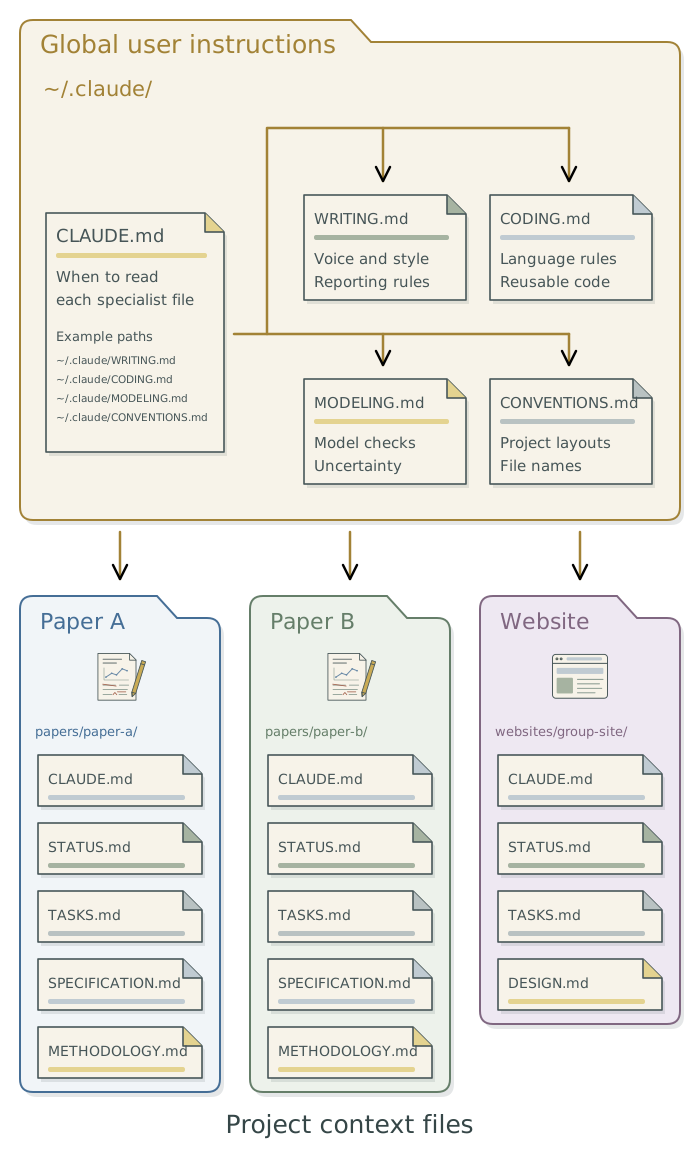
The global CLAUDE.md acts as a hub: it holds shared defaults and gives the agent paths to specialist files, with instructions on when to read them. Give each specialist file a clear purpose. The following examples cover common research needs; add the files that are useful to your work.
| File | When to consult it | Example content |
|---|---|---|
CONVENTIONS.md |
Creating or organizing a project. | Folder layouts for papers, datasets, and websites; names for inputs and outputs. |
CODING.md |
Writing or changing code. | Use project-relative paths, reusable functions, and the existing package environment. |
MODELING.md |
Planning, fitting, or checking statistical models. | Specify the estimand; use the required simulation checks and uncertainty summaries. |
WRITING.md |
Drafting or editing prose. | State the point directly, define unfamiliar terms, and remove repeated explanations. |
TOOLCHAIN.md |
Adding or troubleshooting software. | Available tools, their configurations, and how they are maintained. |
WORKSPACE.md |
Finding a project or shared input. | Project purposes, folder locations, and dependencies between projects. |
Start with the conventions you repeatedly explain. Separate a topic when its detail makes the global instruction file hard to read. For instance, a manuscript edit needs the writing guidance but may not need several pages of statistical conventions. These filenames do not cause the agent to load their contents automatically; the main instructions (see below) must point to them.
Footnotes
If you use an agent from another provider, record the exception in
AGENTS.mdif that is the project instructions file the agent reads.↩︎Anthropic calls these user instructions. Other agent tools may use
AGENTS.mdin a different location:Codex, for example, uses~/.codex/AGENTS.mdby default. Ask the agent to confirm the location for the tool you use.↩︎