10. Run work in a separate environment: containers
An analysis may depend on software beyond its language and packages, making it difficult to recreate the setup on another computer. A container provides a separate environment containing the programs and supporting software needed for a task. The agent can also configure which folders and network connections are available inside it.
Suppose a collaborator needs to rerun your Bayesian analysis. They have the required R packages, but the analysis also needs a compiler1 and supporting software that are missing from their computer. The agent can use Docker, software for building and running containers,2 to package these requirements into a prepared environment, check it with a small model fit, and provide instructions for running the analysis on the collaborator’s computer.3
When a container is useful
A container is useful when collaborators need a prepared software setup that would otherwise be difficult to recreate on each computer. The agent can package the required language, packages, and supporting programs using the project’s recorded versions. It can also configure which files and network connections the analysis can access.
| Research need | What the agent configures |
|---|---|
| Run the analysis on another computer | The required language, packages, and supporting programs, prepared for the intended computer. |
| Run a task with selected files and network access | Read-only input folders, a writable results folder, and the connections the task needs. |
Prepare the software and file access
Have the agent check what container software is already available on the computer that will run the analysis. On a Mac, Colima provides the Linux environment needed to run the containers, while Docker’s command-line tools let the agent build and operate them. The agent can install missing components through Homebrew, or retain an existing suitable Docker Desktop setup. On institutional infrastructure, it should use the supported container software, which may be Apptainer, and check that software’s file and network access settings.
For Docker, the agent writes a Dockerfile: instructions for assembling the required software. Building those instructions produces an image, a saved package from which containers can be created. The agent then starts a container and makes selected project folders available inside it. These folder connections are called mounts.4 Keeping the study data outside the image lets a collaborator receive the prepared software without receiving those data.
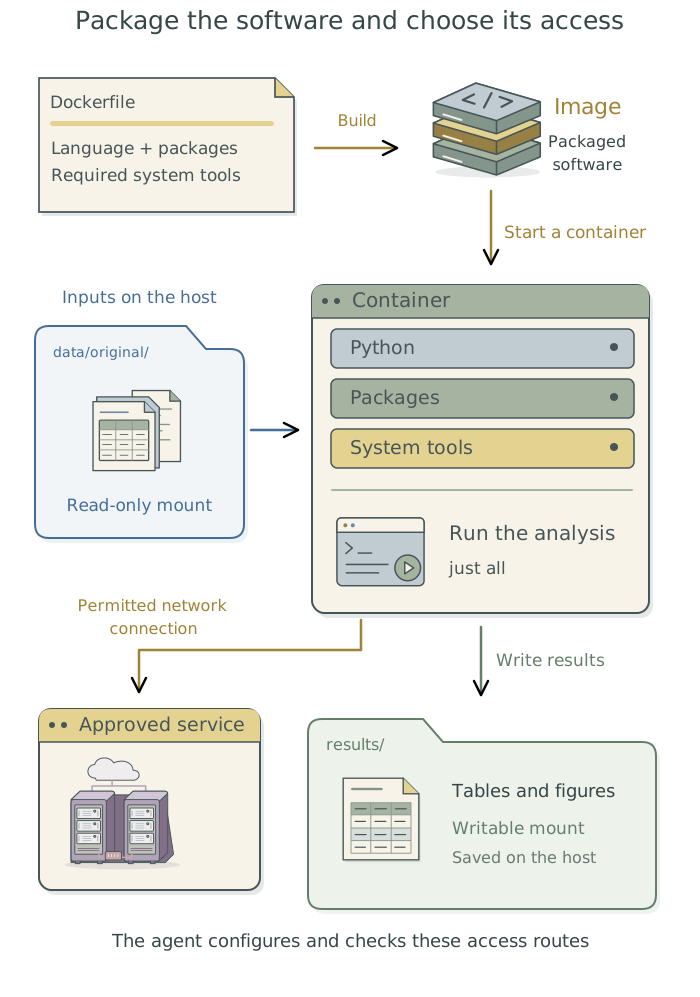
For the Bayesian analysis example, have the agent make the required input files available without permission to change them, and save the fitted results to a designated project folder outside the container. Those results remain available when the container is removed. If the fit needs no external service, have the agent disable network access during the analysis. It should share only the folders and connections needed for the task.5
These restrictions apply to programs running inside the container. The agent’s other tools still need their own access controls; see Chapter 2: Control what added tools can access. For protected data, establish where processing is permitted before configuring the container. Chapter 3: Know where your data goes in the companion guide Doing Research with AI Agents explains that decision.
The agent can operate the analysis inside the container while its large language model (LLM) runs elsewhere. Even an agent running inside a container can use a hosted LLM, which runs on the service provider’s computers; information sent to that service leaves the computer. Running the LLM locally requires additional software, described in Chapter 17: Run and adapt an LLM on your own hardware.
Build and check the environment
Ask the agent to save results from a small representative fit using the working setup, then run the same fit inside the container with the same data, code, and analysis settings. This is a smoke test: a small run through the actual workflow before the full analysis. It should check that the model compiles and runs, compare the saved estimates, and investigate unexpected differences.6
Have the agent confirm that results are saved in the intended project folder and remain available after the test container is removed. It should separately test any required file and network restrictions with harmless substitute inputs. A successful fit does not establish that those restrictions work.
Prepare a container so a collaborator can rerun this Bayesian analysis. Preserve the recorded
Rand package versions, and include the compiler and other supporting software the analysis needs. Check the intended computer and any existing container setup, then install or configure what is missing through the appropriate route. Make the required inputs read-only and save fitted results to a designated project folder outside the container. Run a small representative fit in the working setup and in the container with the same data, code, and settings. Compare the estimates and investigate unexpected differences. Check that results remain available after the test container is removed, and test required access restrictions with harmless substitute inputs. Save the configuration with the project and document how to build, run, and check it inREADME.mdfor collaborators. Link to these instructions from the project context files and use this setup for future analysis runs.
After the test, have the agent report which software versions were used, which outputs it compared, any differences it found, and where the results are saved. It should identify the access restrictions actually tested and diagnose and fix setup problems before the full run. Changes to the statistical model or research inputs remain your decision.
Save the setup for future runs
Have the agent keep the Dockerfile and existing records of language and package versions with the project. It should also save the command or configuration that starts the container with the intended folders and network access. When tasks need different access, have it maintain separately named commands or configurations so the differences remain explicit.
Ask it to add a “Container setup” section to README.md for collaborators, linked from the project context files. This should identify the tested operating system and processor type, the exact image used,7 and the input and output locations. It should give the commands for building the image, running the analysis, and repeating the check, with a short record of the outcome. The collaborator can give these instructions to their agent to check compatibility and run the analysis.
A Dockerfile that downloads software from changing repositories is not a permanent copy of that software. When long-term recovery matters, have the agent save the built image in an agreed storage location and record how to retrieve it. The image identifier establishes which version was used; retaining the image makes that version available later.
The agent can keep the project’s saved commands while arranging for them to run the analysis inside the container. If the project uses a job queue, it can submit those commands as before. Chapter 7: Give research tasks reliable commands: just and Chapter 9: Keep unattended jobs moving: pueue explain how the agent sets up those parts of the workflow.
Footnotes
A compiler translates source code into a form the computer can run. Some Bayesian fitting software compiles code for a statistical model before fitting; the example assumes such a setup.↩︎
The command-line tool is called
docker; it sends instructions to the background service that builds images and runs containers.Docker Desktopis an application that bundles those components with a graphical interface. See Docker’s explanation of its components.↩︎Containers still have operating-system and processor requirements. Have the agent check the intended computer and prepare a compatible image; Docker’s platform documentation explains the available approaches.↩︎
The computer running the container is called the host. A bind mount makes one of its files or folders available inside the container.
Dockerbind mounts allow writing by default, so the agent must explicitly configure read-only inputs. See Docker’s mount documentation.↩︎Have the agent avoid sharing the entire home folder or granting powers the analysis does not need.
Docker’s control socket is a connection through which software can controlDockerand its containers; making it available inside a container requires a separate access decision.↩︎Bayesian estimates can vary between runs because fitting involves random sampling. The agent should account for expected sampling variation when comparing results, rather than require identical posterior draws.↩︎
A digest identifies particular image content. A tag is a convenient name that can later refer to a different image. The agent should record enough information to recover the version actually used.↩︎