11. Generate documents from research outputs: Quarto and Pandoc
A manuscript often reports the same result in a table, a figure, and a sentence. Linking those locations to saved analysis outputs makes updates easier to carry through consistently. The agent can maintain the text and its supporting inputs as the document’s source, then build or render a readable document from them.
Suppose a revised sample definition changes the number of participants and the estimated difference between two groups. The agent can use Quarto, a tool for producing documents from text and code, to read the updated values from saved analysis results and insert them into the results table and accompanying text. It can then produce a Word draft for coauthors and a PDF for review.
Connect the document to saved results
Markdown is a plain-text format that uses simple symbols to indicate headings, lists, and links. A Quarto source file, usually ending in .qmd, can contain this text, document settings, and code. The agent writes and maintains that source.
Have the agent configure the .qmd file to read numerical results from saved analysis files. Code within the document can format those values for tables and insert them into the relevant sentences.1 The document can also include figures that the analysis has saved as image files.
Have the agent keep the code for fitting statistical models in separate analysis scripts and save their results before building the document. It can then rebuild a draft after a wording or layout change without fitting the statistical models again.
Quarto runs the document’s code and uses Pandoc, a tool for converting documents between formats, to produce the requested output. Both are standalone programs.2 Quarto is the recommended starting point for a new manuscript that reads saved research results. For a document whose text, tables, and figures are already prepared, the agent can use Pandoc directly.
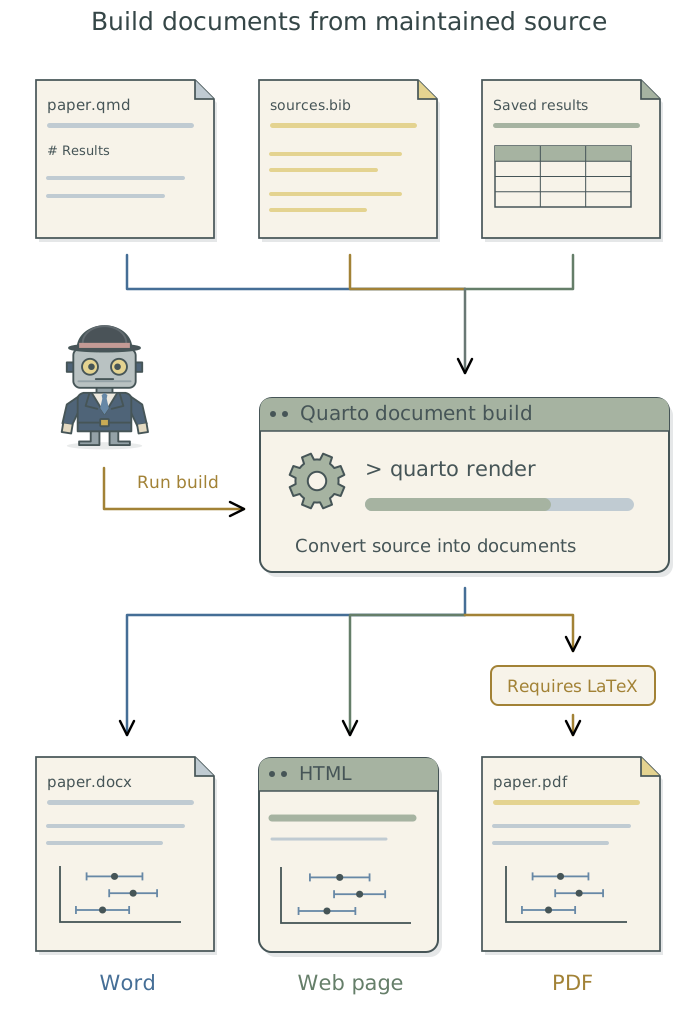
Choose the output formats and prepare the tools
Tell the agent which formats you need and supply any journal or collaborator formatting requirements.
| Output | Typical purpose | What the agent checks |
|---|---|---|
Word (.docx) |
Editable drafts for coauthors. | Required styles, equations, and editable tables. |
| Reading, printing, or submission. | Fonts, page layout, equations, and figure placement. | |
| Web document (HTML) | Reports read in a browser. | Links, images, interactive elements, and supporting files. |
Have the agent inspect the project’s existing document setup and confirm that it can use the required tools from its session. It should install missing components through Homebrew or the established installation route, preserving a working setup where one exists. Chapter 3: Install and manage tools with Homebrew explains this process.
For the PDF route described here, , a document typesetting system, arranges the text, equations, and figures on the page. The agent should check that the required typesetting software and fonts are available, then produce and inspect a PDF.3
Word formatting can come from a reference document: a .docx file that supplies styles for headings, text, and tables. If a journal or collaborator provides a template, have the agent use its styles and check the resulting draft.
Build and check the document
The agent can use just, a command runner, to save the build instructions as a command such as just paper. It creates that command for the project, specifying the manuscript source, output formats, and destination folder. If an equivalent command already exists, have the agent retain it. Chapter 7: Give research tasks reliable commands: just explains how it creates and maintains these commands.
When analysis results change, have the agent confirm that rebuilding reads the updated files. If the document reuses earlier computed output, the agent should configure and document how that output is refreshed.4 In the sample-definition example, it should compare the new sample size and group difference in both the table and the text with the saved analysis results.
If the project already uses a dependency runner, such as targets or Snakemake, to decide which steps need rerunning, have the agent include the document build and its saved inputs in that workflow. This lets the runner identify when changed results require a new draft; see Chapter 8: Rerun only affected steps: targets and Snakemake.
Configure this manuscript in
Quartoto produce aWorddraft for coauthors and a PDF for review. Check the existing document tools and install any missing components through the appropriate route. Generate the results table and insert numerical values in the text from saved analysis outputs, keeping model fitting separate from document production. Save the build asjust paper, or use the project’s existing equivalent. Build both formats and confirm that the revised sample size and group difference appear correctly in the table and accompanying text. Inspect both documents for citation, equation, figure, and layout problems, and fix any build problems. Record the setup, input files, output locations, and build instructions in the project context files. Use the saved command for subsequent drafts.
Have the agent inspect each requested format for missing citations, misplaced tables, clipped figures, and broken equations. After the build, it should report where it saved the documents, which results files it used, any analysis steps it repeated, and what it checked. It should diagnose and fix build problems and identify anything still unresolved. Appendix D: Troubleshooting explains known R and build problems.
You review interpretation and prose. Chapter 18: Write and revise the manuscript in the companion guide Doing Research with AI Agents explains how the agent checks reported results throughout the manuscript against their saved sources.
Save the setup for future drafts
Have the agent keep the manuscript source, bibliography, formatting files, and build configuration with the project. For example, paper.qmd can hold the manuscript and sources.bib5 the bibliographic details used to generate its citations and reference list. Retain the saved results and figures that the build reads too.
Ask the agent to record the installed versions of Quarto, Pandoc, and any PDF software, along with the required fonts, in the global user instructions file TOOLCHAIN.md.6 If the document runs R or Python code, its packages belong in the project’s software-version records; Chapter 6: Preserve a software environment: rig, renv, and uv explains how the agent maintains those records.
Have the agent save document build instructions in the project context files. These should identify the maintained manuscript, required software and versions, input files, and output locations. They should give the build command, explain how to refresh reused output, and record the checks completed. Ask the agent to use these instructions for subsequent drafts and keep them current as the setup changes.
Footnotes
Inline code inserts a computed value into a sentence. The agent can configure it to use a value read from a saved results file and apply the appropriate rounding; see Quarto’s inline-code documentation.↩︎
These programs are installed separately from the analysis language and its packages. The standard
Quartoinstallation includesPandoc, so this route does not ordinarily require a separatePandocinstallation; see Quarto’s FAQ.↩︎A distribution supplies the programs and packages used by . If none is suitable, the agent can follow Quarto’s PDF setup and install
TinyTeXwithquarto install tinytex. It should retain a workingMacTeXorTeX Liveinstallation.Wordand HTML output do not require this PDF software.↩︎Quartocan save and reuse the output of code run within a document. This is called caching or freezing, depending on the mechanism. A change to an external results file may not trigger fresh execution under those settings. The agent should check the actual build route and configure the required refresh; see Quarto’s execution settings.↩︎A
.bibfile stores references in BibTeX format: plain-text entries containing details such as authors, titles, and publication dates. The agent connects citations in the manuscript to these records and applies the required citation style; see Quarto’s citation documentation.↩︎See Chapter 8: Apply your conventions across projects in Doing Research with AI Agents for guidance on organizing these files and telling the agent when to read them.↩︎
When reading a
.docxfile,Pandocaccepts tracked insertions and deletions and omits comments by default. Its--track-changes=alloption retains them for inspection in the converted content; it does not guarantee that a later conversion back toWordpreserves the original review features. See Pandoc’s tracked-change options.↩︎These are project context files: saved instructions and records that the agent can consult in later sessions. See Chapter 7: Give the agent context for your project in Doing Research with AI Agents.↩︎