3. Know where your data goes
3. Know where your data goes
An agent can send research material to the company running its LLM (the provider), even while working with files on your computer. For Claude, that company is Anthropic. Before giving an agent access, you need to understand what information may be sent, what the provider keeps, and whether your project permits that use.
Suppose you ask an agent to diagnose an error in a script that analyzes confidential birth records. It prints several records to understand the problem. Those records can be sent to the LLM as part of its context, even though you never uploaded the dataset yourself.
What reaches the LLM
With a hosted LLM, the LLM runs on the provider’s computers. The agent’s tools can run on your computer and return whole files, selected records, figures, or messages printed by a program. When the agent supplies those results to the LLM, it sends that information to the provider, even with This computer selected in Claude Code.
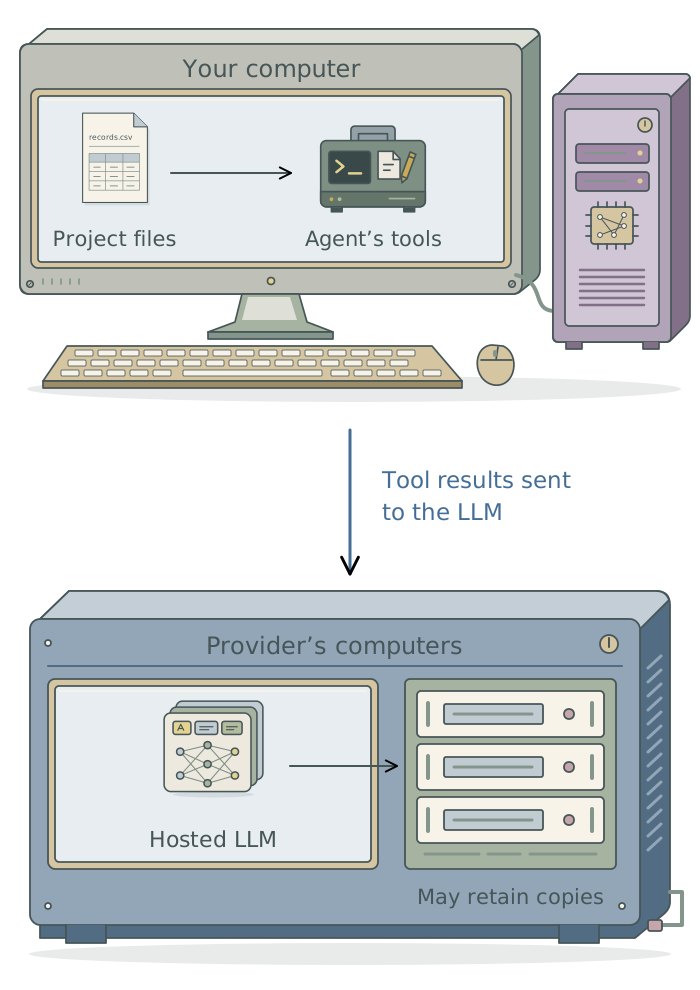
A script reading a dataset does not, by itself, send every record to the LLM. What matters is what the agent sends to the LLM. An error message might contain a participant’s identifier, for example. Consider code, filenames, data dictionaries, and derived outputs as well as data files. Summaries can also contain protected information.
What the provider keeps
The LLM uses the information sent to it to generate a response. The provider may retain conversations and tool results after the task ends. Using that material to train an LLM is a separate use: a promise not to train on your data does not mean that no copy is kept.
Anthropic documents a standard 30-day retention period for commercial Claude Code use, with other arrangements available to qualifying organizations. Enterprise chat and project retention controls have different coverage.1 Even a few weeks may exceed what your project permits. Confirm the terms for your product and account; personal-account privacy settings do not provide an institutional agreement’s contractual coverage.
Check what your project permits
Check both institutional approval for the service and your project’s terms. An institution may approve a tool while a data-use agreement prohibits sending your records to it. Consent, an IRB protocol, confidentiality agreements, and federal grant or other funder requirements may also limit the use. If the terms are unclear, ask the responsible institutional office before supplying the material.
Harvard, checked November 6, 2026. HUIT’s Claude guidance approves Harvard Claude Chat and Code for data up to Level 3; inputs are not used for training. Connected services require separate security and privacy approval. Check the guidance for the feature you intend to use and confirm retention with the service team. Your project’s terms may be more restrictive.
If you connect the agent to another service, check your institution’s guidance to confirm that the connection is approved for the data you intend to use.
Work with restricted data
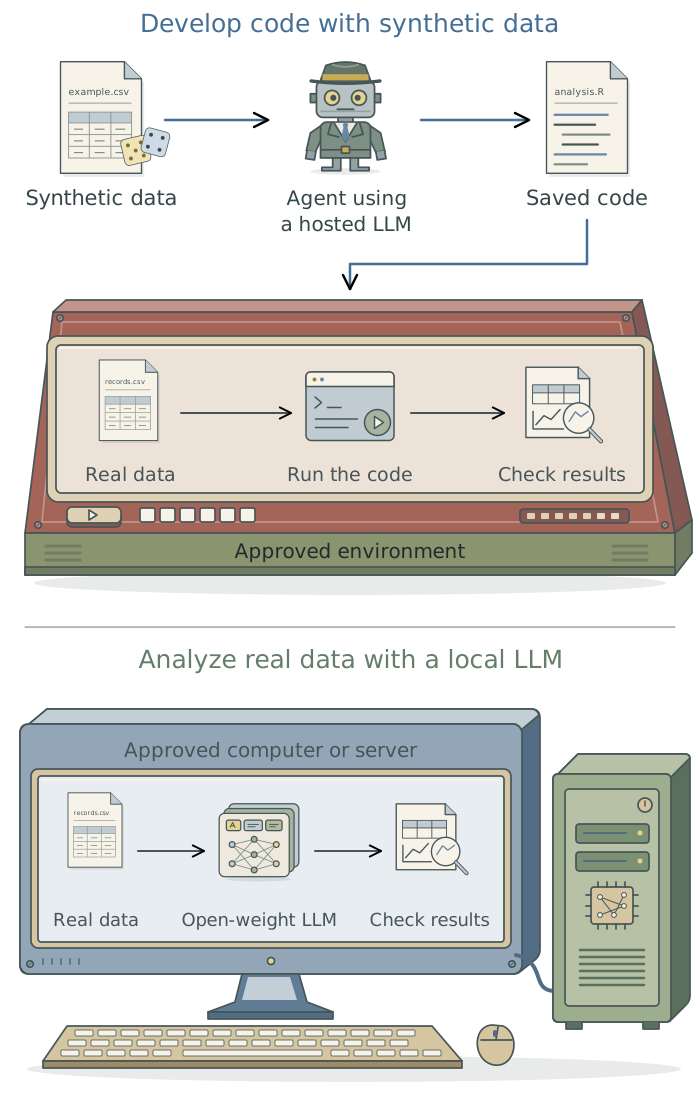
An agent writing analysis code can work with synthetic records that have the required columns and types. Give it a shareable data description and have it develop and test the code with those records. Run the saved code on real data in an approved environment, without giving the agent access unless separately authorized. Check the real-data analysis there; return only information that is permitted to leave.
If the LLM must analyze the material, such as coding confidential interviews, it needs the real text. You could use an approved hosted service or an open-weight LLM, whose trained parameters are available to download and run on your computer or an institutional server. Running the LLM within approved infrastructure gives you control over where it processes data; the agent’s tools and connections still need restrictions. Chapter 17: Run and adapt LLMs for your research explains these choices, and Chapter 16: Use LLM outputs as research data covers evaluating the LLM’s work.
Keep a chain of custody
For protected data, keep a chain of custody: a record of where the material goes, who or what can access it, and where copies remain. Include sensitive content in conversations, tool results, outputs, logs, and backups. Before sharing protected data with a service, establish where it will store the data, how long it will keep them, and how deletion can be arranged if your project requires it. Consult your institution’s guidance or ask the service administrator for these details.
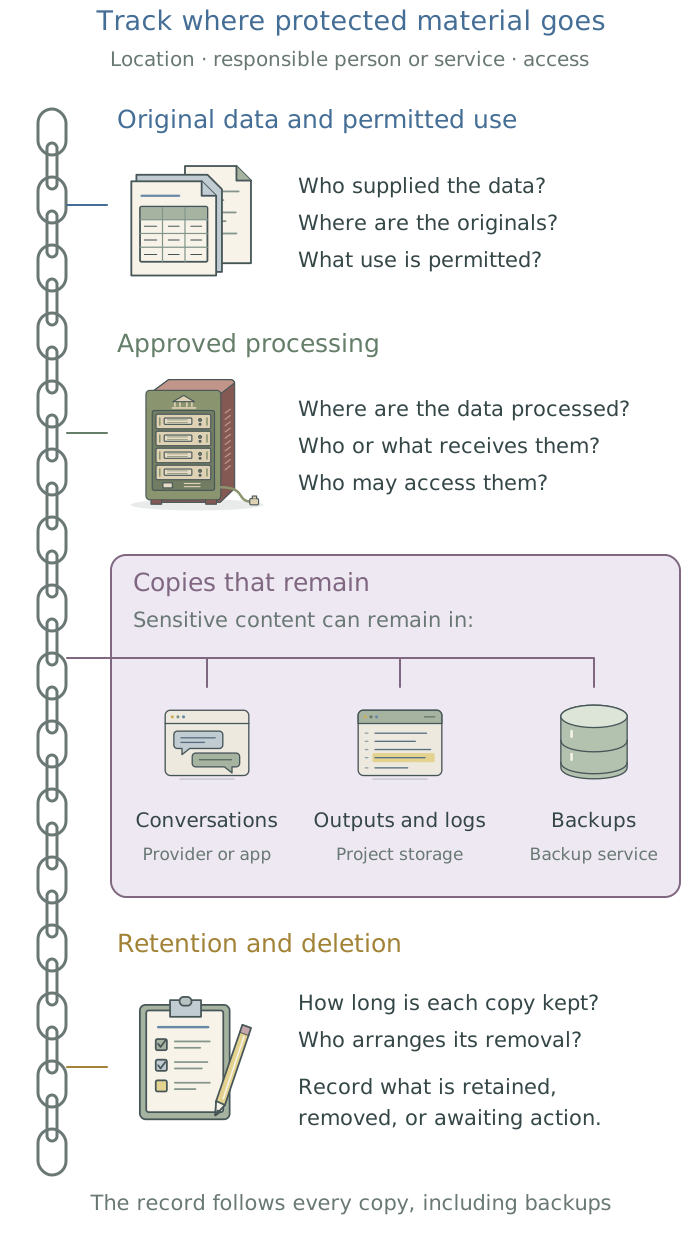
The example below keeps confidential birth records on an institutional server while the agent develops code with synthetic records. Replace these entries with your project’s actual locations, responsible people, and agreed retention dates.
| What to record | Example entry |
|---|---|
| Data and authority | Birth-record extract v2; the data-use agreement permits analysis on the institutional server. |
| Who receives what | The agent uses synthetic records and a shareable dictionary, which may be sent to the LLM provider. Authorized researchers access real records on the server. |
| Copies and storage | Real records, logs, and uncleared outputs stay in restricted project storage and managed backups. Synthetic inputs remain in the hosted conversation. |
| Retention and deletion | The service administrator confirms conversation retention. The server administrator records when and how project files and backup copies will be removed. |
| Project closure | Retain permitted code and cleared results. The data custodian confirms removal of restricted copies as the agreement requires. |
Confirm what deletion covers, including backups and service records. Keep the custody record in approved storage and update it when the work changes. Give the agent only the instructions and details it is permitted to see.
If material is exposed accidentally. Stop further access and transfer. Record what was sent, to which service and account, and when. Report the incident promptly through your institution’s designated route and follow its instructions. Do not assume deleting the conversation resolves the exposure or erase records needed to assess it.
Once you know which information the agent may use, configure its access to files and tools. Chapter 4: Control what the agent can do explains how.
Footnotes
See Anthropic’s
Claude Codedata-usage documentation and Enterprise retention guidance, checked November 6, 2026. The products have different controls and exclusions. These public documents do not establish Harvard’s retention duration.↩︎