15. Divide work between agents: shared projects and git worktrees
Several agents can develop different parts of a research project at the same time. This helps when each task can make progress without waiting for the others. For a small change involving the same few files, one agent may finish sooner because there is less work to coordinate.
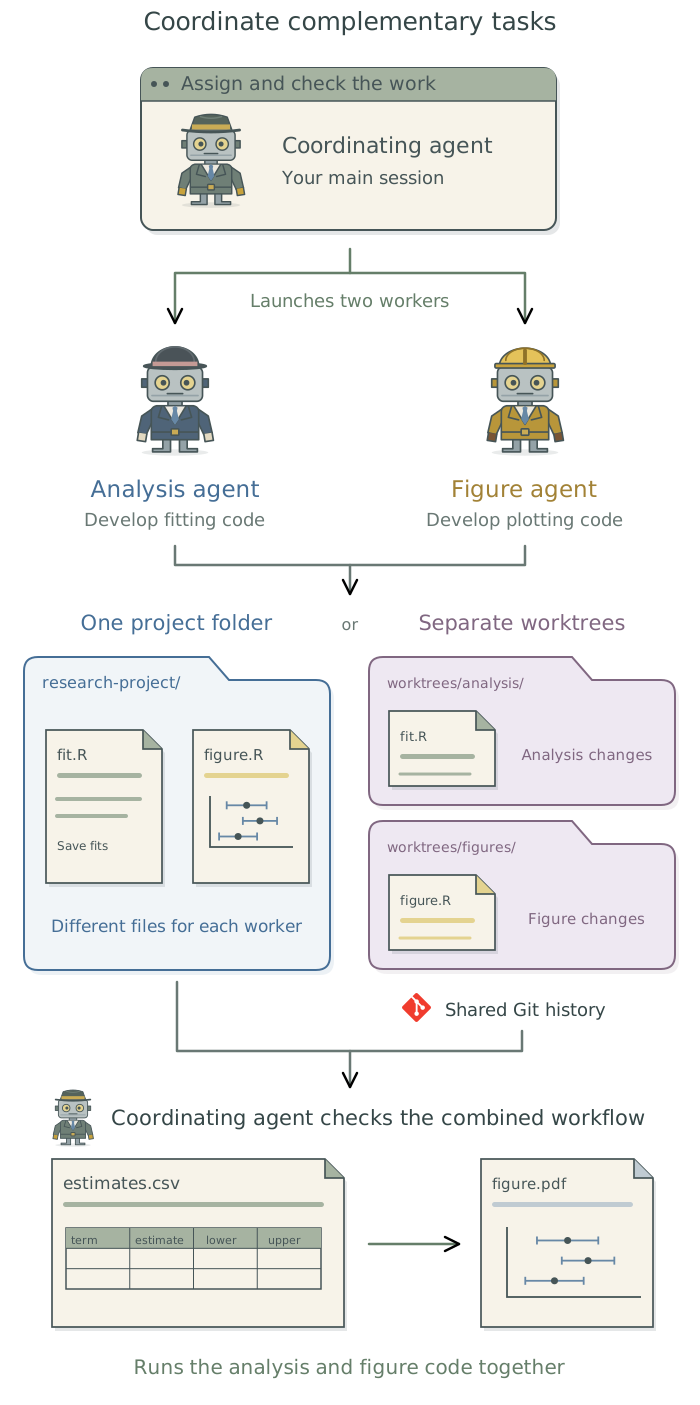
Suppose an analysis needs new modeling code and figures. The agent in your current conversation can coordinate two others: an analysis agent to write the modeling code and a figure agent to develop the plots. It establishes the format of the results they will exchange, assigns their files, and later combines and checks their work. You continue to direct the work through that coordinating agent.
Assign tasks and agree on exchanged results
A subagent is another agent given a separate assignment by a coordinating agent. Claude Code supports subagents; other applications may offer different ways to delegate work.
The following terms describe different aspects of how agents work:
| Term | What it describes |
|---|---|
| Subagent | Delegation within the coordinating agent’s session. The worker has its own context (the information supplied for its work) and returns results to the coordinator. |
| Headless session | How a run receives instructions: a program supplies its prompt and inputs, without an interactive conversation. |
| Background execution | Work continues while the main conversation remains available. This can involve a subagent or a separate agent session. |
These terms can overlap: a subagent can run in the background, and a headless session can itself delegate to subagents.1
Ask the coordinating agent to delegate the tasks to subagents where supported. If separate runs are needed, have it prepare and launch headless sessions and collect their results. Chapter 16: Run agents from saved prompts explains how to configure those runs and control what each receives. Each assignment should identify the task, inputs, expected outputs, and files that agent may change.
In the analysis-and-figure example, both agents need to know what the saved estimates will contain. The coordinator might specify an estimates.csv file with a row for each quantity to plot and columns for its name, estimate, and lower and upper uncertainty limits. It should also specify the units and meaning of those limits. The figure agent can develop its plotting code using a clearly labeled synthetic example of this file while the analysis agent builds the code that produces the actual estimates.
Shared files need an assigned maintainer. Have the coordinator handle changes to functions used by both tasks, software requirements, and commands that connect the analysis to the figures. It also coordinates changes to version history so one agent does not remove work another is using.
Coordinate an analysis agent and a figure agent for this project. The figure agent will write plotting code that reads results saved by the analysis agent. Before they start, specify the contents and layout of that results file, including the estimates, their units, and the lower and upper uncertainty limits. Give each agent its inputs, expected outputs, and files to edit. Let the figure agent develop against a labeled synthetic example while the analysis code is being built. Coordinate shared files and preserve existing edits. When both agents finish, combine their work and run the analysis followed by the figures using the newly produced estimates. Report any research decisions that need my input.
Choose shared or separate working copies
Agents editing different files can often share one project directory. Git worktrees provide separate working copies attached to the same repository, the project’s stored version history. Each worktree usually uses a different branch, allowing changes to be developed separately and combined later.2 Worktrees help when agents need to edit overlapping files or test different versions of the code.
| Arrangement | Useful when | What the coordinating agent manages |
|---|---|---|
| One project directory | The tasks edit different files and can share current results | Shared files, output names, and changes to version history |
| Separate worktrees | The tasks need overlapping edits or different versions | Inputs and software in each copy, separate outputs, and combining the changes |
Have the coordinating agent choose and prepare the arrangement. A new worktree may lack data excluded from version control, installed packages, or saved model fits. The agent should supply the permitted inputs and restore the recorded software environment before work begins. Separate output locations prevent one run from replacing another’s results. Worktrees share repository history and do not restrict access to other files or services.
Combine and check the work
Once both tasks are complete, the coordinating agent combines their changes and runs the analysis followed by the plotting code. In this example, it should confirm that the figure reads the newly produced estimates.csv, includes the intended quantities and uncertainty limits, and no longer uses the synthetic example. This can expose mismatches that neither worker would find alone, such as a renamed column or an estimate reported in different units.
Have the coordinator fix implementation problems and report scientific choices that require your decision. It should document the results format, relevant files, and commands in the project context files3 so a later session can repeat the combined workflow. After an approved scientific change, it updates the current requirements in SPECIFICATION.md and adds the dated decision and reason to METHODOLOGY.md. Before removing a worktree, it should confirm that the needed code and outputs have been retained.
These agents collaborate on one implementation. An independent-implementation check instead asks separate agents to build from the same fixed specification and inputs without seeing one another’s code or results. Chapter 15: Check the agent with independent implementations in the companion guide Doing Research with AI Agents explains that different purpose. A worktree alone does not provide the required separation; Chapter 16: Run agents from saved prompts explains how to configure and check what a separate session receives.
Footnotes
The
Claude Codedocumentation describes foreground and background subagents, separate background sessions, and headless runs.↩︎A branch names a line of work within a repository’s version history. The agent can develop changes on separate branches and combine them when ready; see the
Gitbranching introduction.↩︎See Chapter 7: Give the agent context for your project in Doing Research with AI Agents.↩︎