1. Choose tools for a research need
Research involves tasks worth setting up once and repeating reliably: running a batch of analyses, rebuilding a manuscript, or restoring the software used in an analysis. This guide shows how to get an AI agent to set up and use tools for that work.1 A tool is software the agent can use to perform an action, such as searching files, running an analysis, or retrieving records from a database. Examples in this guide use Claude Code in the Claude desktop app. You direct the research through conversation; the agent sets up and operates the tools and checks their output, so you do not need to learn their commands.
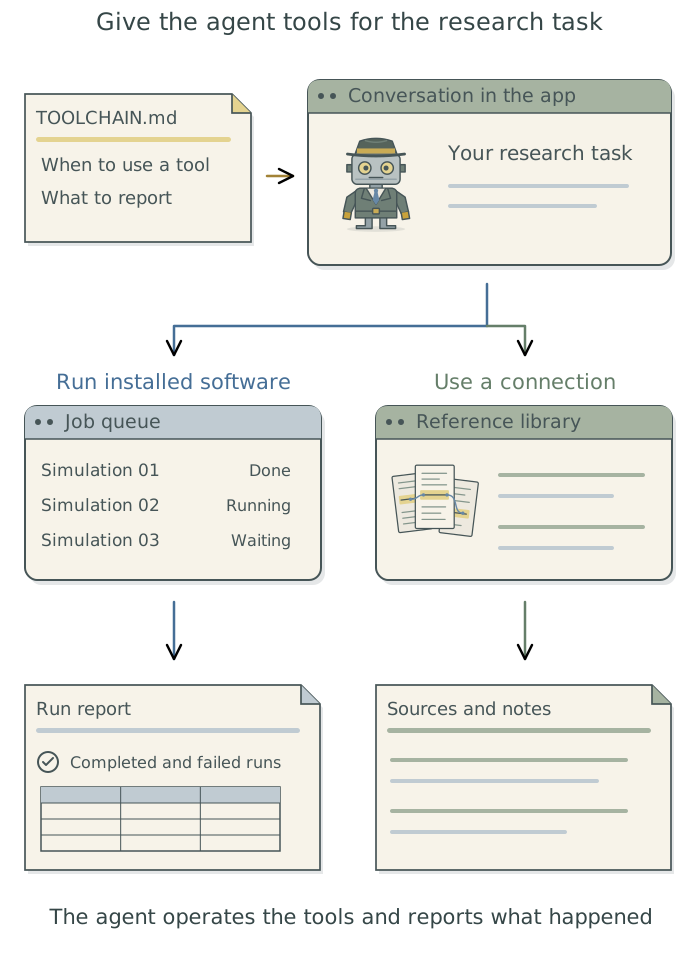
Suppose a study needs 100 simulation runs, but your computer can handle four at once. A job queue can keep four running and automatically start another whenever one finishes. Ask the agent to prepare the batch, choose a suitable limit, and report completed and failed jobs when you return.
Use this guide as a reference. Read the next chapter on access, then turn to the tool your work needs. Each chapter explains its purpose and what to ask the agent to do. The companion Doing Research with AI Agents covers research workflows and judgment; if you are new to the app, start with its Chapter 2: Get started with the app.
Find the tool for your task
The table below is a menu of capabilities, not a list to install in order. Keep tools that already serve the project, and add others when they supply a useful capability.
| Research need | Start here |
|---|---|
| Foundations | |
| Control what a new tool can read, change, or send | Chapter 2: Control what added tools can access |
| Install tools and manage project files | |
| Install and maintain research tools | Chapter 3: Install and manage tools with Homebrew |
| Record changes and recover earlier work | Chapter 4: Recover earlier work: git and gh |
| Find files and inspect their contents | Chapter 5: Find and inspect project files |
| Run and reproduce research | |
| Restore the language and package versions used for an analysis | Chapter 6: Preserve a software environment: rig, renv, and uv |
| Rerun analyses or rebuild figures with saved commands | Chapter 7: Give research tasks reliable commands: just |
| Rerun only steps affected by a change | Chapter 8: Rerun only affected steps: targets and Snakemake |
| Keep a batch of analyses running unattended | Chapter 9: Keep unattended jobs moving: pueue |
| Package software and configure a separate place to run it | Chapter 10: Run work in a separate environment: containers |
| Build a document from saved research outputs | Chapter 11: Generate documents from research outputs: Quarto and Pandoc |
| Connect to data and services | |
| Supply account credentials without putting them in research code | Chapter 12: Keep credentials out of research files: 1Password and direnv |
| Give the agent access to an application or service | Chapter 13: Connect to research data and services: MCP |
| Build, inspect, or collect data from a website | Chapter 14: Inspect and interact with a browser |
| Run and coordinate agents | |
| Divide a project between several agents | Chapter 15: Divide work between agents: shared projects and git worktrees |
| Automate repeated agent tasks, such as checking whether an analysis can be reproduced | Chapter 16: Run agents from saved prompts |
| Run or adapt a large language model (LLM) on your own hardware | Chapter 17: Run and adapt an LLM on your own hardware |
| Work from the terminal | |
| Use a terminal interface to the agent | Chapter 18: Use an agent from the terminal: Claude Code |
| Reference | |
| Customize the terminal, shell, prompts and panes | Appendix A: Tools for customizing your terminal |
| Restore personal settings across computers | Appendix B: Maintain personal settings: chezmoi |
| Find and adapt prompts from the guide | Appendix C: Prompt bank |
| Diagnose execution and document-build problems | Appendix D: Troubleshooting |
| Understand terminal terminology | Appendix E: Terminal vocabulary |
Tell the agent when to use each tool
Tell the agent when you want it to use each tool and what it should report, or ask it for suggestions if you are unsure. Ask it to save guidance that applies across projects in your global user instructions, such as TOOLCHAIN.md.2 Keep requirements specific to one study in its project context files. A longer recurring procedure can become a skill: saved instructions that guide the agent through a task and its checks. The DSS agent skills catalogue provides reusable procedures for research tasks.
Use tools from the app
You can ask the agent to install and operate these tools from the app. You supply the research decisions and complete personal steps such as signing in or entering an administrator password.
The setup examples cover macOS and Linux. On Windows, the examples assume the tools run in Windows Subsystem for Linux (WSL2), which provides a Linux environment on a Windows computer. Ask the agent to check the environment where the work will run before installing software there. You can keep using R, Python, Stata, or other analysis software; adopting new tools does not require changing research language.
Footnotes
An agent combines a large language model (LLM), which processes supplied information and generates responses or tool requests, with tools and software that runs them and returns their results.↩︎
See Chapter 8: Apply your conventions across projects in Doing Research with AI Agents for guidance on organizing these files and telling the agent when to read them.↩︎