9. Keep unattended jobs moving: pueue
Some analyses involve more tasks than a computer can run at once. A job queue holds tasks until they can run, then starts waiting tasks as others finish. Each submitted task is a job; a set of jobs is a batch. This lets prepared work continue while you are away.
Suppose a sensitivity analysis requires 100 independent model fits, but the computer can comfortably run four at once. The agent can use the tool pueue to run four fits at a time and start another whenever one finishes. pueue’s background service1 runs separately from the conversation with the agent and retains each job’s status and logs, the messages recorded while it runs. You can return later and ask the agent which results are ready and which jobs need attention.
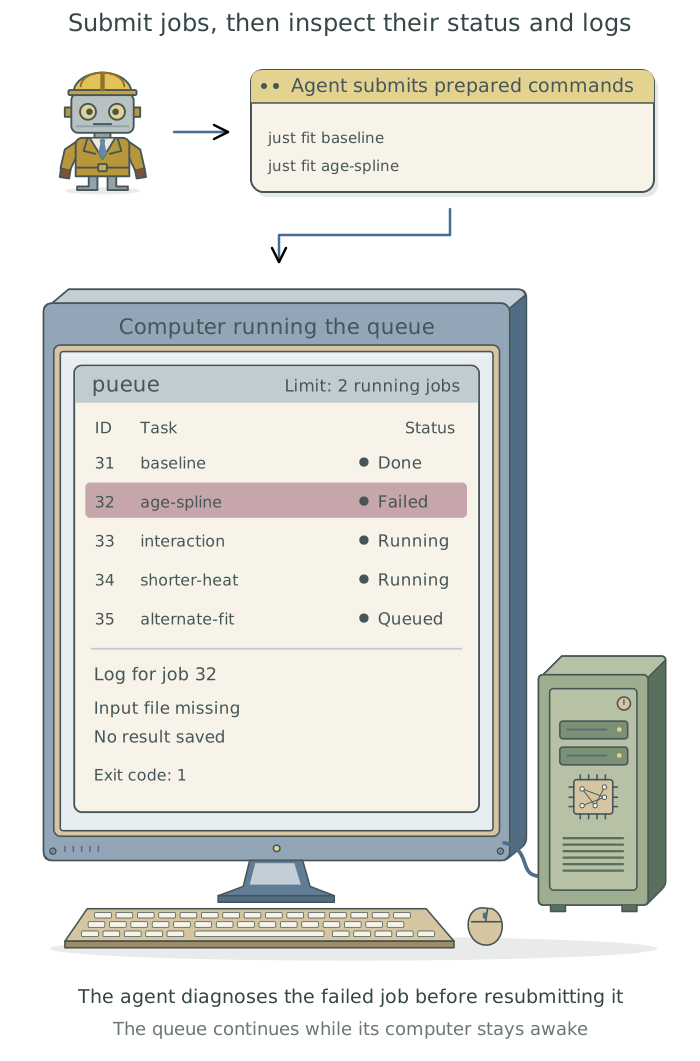
Prepare the job batch
Have the agent check for pueue on the computer that will run the work, install it if needed through Homebrew or your preferred package manager, and configure and check its background service.2 Chapter 3: Install and manage tools with Homebrew explains installation. For short tasks, the agent can run the work directly. On a computing cluster, it should use the institution’s scheduler, the service that assigns jobs to available computing resources.
Each fit needs specified inputs and settings, the intended software versions, and its own output files. Have the agent check that it can run independently, without relying on objects left in an earlier analysis session. Chapter 7: Give research tasks reliable commands: just explains how to prepare tasks this way.
For the 100-fit example, ask the agent to submit one representative fit through the queue as a smoke test: a small run through the actual workflow before the full batch. It should inspect the saved result and measure memory and processor use, then set the concurrency limit, the maximum number of jobs running at once. The limit should leave the computer usable for other work.3
Before starting the job batch, the agent should also confirm that queued jobs use the recorded software versions, can read the approved inputs, and can write to the intended output folders. These checks must use the queue service’s actual access.4
Set up
pueuefor these 100 sensitivity fits, installing it if needed and checking its background service. Make each fit run independently with the intended inputs, settings, and software versions, saving its results and log separately. Submit one representative fit through the queue, inspect its saved result, and use its memory and processor use to choose how many fits can run at once. Then submit the batch and confirm that jobs start and produce logs or outputs. Save a job list alongside the outputs with each fit’s settings, queue identifier, status, result file, and log. Record how to submit and check future batches in the project context files, and use the queue for future unattended runs.
Run the job batch unattended
After submission, have the agent confirm early progress in the actual batch: a job should be running and its expected log or output should have appeared. A successful small test does not establish that the later batch was launched correctly.
The background service runs submitted jobs independently of the conversation with the agent. The statistical model fits can compute without repeated LLM calls; ask the agent to summarize their saved logs and results when you return. The computer must remain awake and available; a reboot or shutdown can interrupt unfinished fits.5 An interrupted fit may need to start again from the beginning.6
Review results and recover failures
Ask the agent to inspect the saved results as well as each job’s reported status. A job that reports success may still have saved incomplete results or written them to an unexpected location. Have the agent retain failed attempts and their logs so it can investigate what happened.
An illustrative report might say:
Of 100 jobs, 98 completed with the expected results files. Two failed before saving estimates; their logs report insufficient memory. Their settings and logs are retained, and the 98 completed fits do not need rerunning.
Ask the agent to diagnose the two failures, adjust operational settings where needed, and rerun only those fits. For example, running fewer fits at once may resolve memory pressure. Changes to the statistical model or research inputs require your decision. Have the agent update the job list, link each retry to its original fit, and preserve the earlier logs and completed results.
Example commands the agent can use to submit a fit and inspect its outcome
For a project using just, the agent can submit an existing fit recipe: saved instructions for fitting a named statistical model. Here, age-spline is an example name for a model allowing a curved relationship between age and the outcome.
pueue add --print-task-id -- just fit age-spline
pueue status
The agent uses the returned job identifier. If it were 42, the following commands inspect its log, wait for it to finish, and use jq to check the recorded success/failure result:
pueue log 42
pueue wait 42
pueue status --json | jq -e '.tasks["42"].status.Done.result == "Success"'
pueue wait reports that waiting has ended; its own exit status does not establish whether the fit succeeded. The agent must inspect the recorded result and the saved analysis output. This structure of the status report was checked with pueue 4.0.4; the agent should check it against the installed version.7
Queue a complete workflow
The agent can also queue a complete analysis workflow as one job. Three tools can work together:
| Tool | What the agent uses it for |
|---|---|
just |
Give a task or complete workflow a consistent command. |
targets or Snakemake |
Determine which analysis steps need running and reuse current results. |
pueue |
Start submitted jobs when their turn comes and retain their status and logs. |
Suppose a workflow prepares data, fits two Bayesian models, then produces a comparison figure and manuscript. The agent can define just all as the command that runs this workflow through targets, and submit just all to pueue as one job. When the queue starts that job, targets checks the dependencies and runs the steps that need updating, reusing current results.
The queue counts the whole workflow as one job even if targets fits both models at once. Have the agent account for this when setting limits on simultaneous jobs and on calculations within each workflow. Chapter 8: Rerun only affected steps: targets and Snakemake explains how the agent connects the analysis steps and checks selective reruns.
Footnotes
A background service is a separate program that runs without ongoing interaction from you or the agent.
pueue’s service maintains the queue, starts waiting jobs, and records their progress.↩︎The DSS Pueue skill covers job submission, progress checks, and verification of saved outputs.↩︎
A core is a part of the computer’s processor that can carry out calculations independently. Many computers have several cores. One model fit may use several cores through threads, parts of a program that can run at the same time. Limiting the queue to four jobs therefore does not limit the computer to four active threads. Available memory may also limit how many fits can run together.↩︎
Chapter 6: Preserve a software environment: rig, renv, and uv explains software-version records. Chapter 2: Control what added tools can access explains why a separate queue service needs its own access checks.↩︎
On Windows through
WSL2, the Linux environment used by this guide, have the agent check that both the environment and the queue service remain available. Starting a service does not itself keep WSL running.↩︎A checkpoint saves the state of an unfinished fit so the fitting software can continue from it.
pueuecan rerun the command that starts a fit, but it does not create checkpoints. Pausing a job also does not save a checkpoint that survives a reboot. Recover work after an interruption in Chapter 8 explains how to ask the agent to save progress and check that interrupted work can resume.↩︎On macOS,
Rprograms launched by an agent can sometimes stall without producing output. Have the agent follow the R execution instructions in Appendix D: Troubleshooting, including for queued jobs.↩︎