5. Find and inspect project files
Agents often need to locate a small piece of information in a large project: where an exposure is defined, which script writes a table, or what information a downloaded data file contains. Computers already provide search and file-reading tools. The programs here give the agent faster searches, useful filters, and ways to query structured data without reading everything into the conversation.
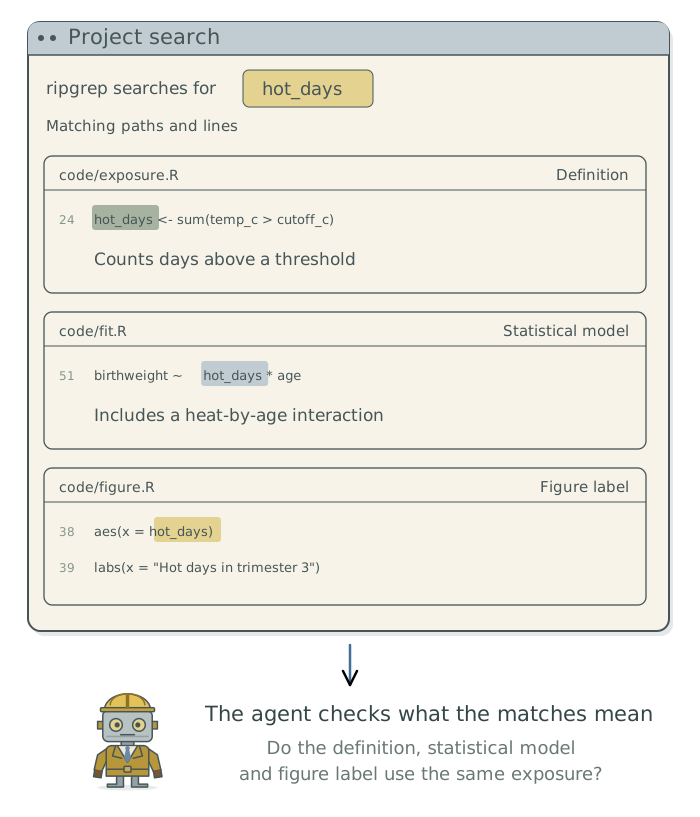
Suppose a journal reviewer asks how hot_days, a variable counting days of heat exposure, enters an analysis like the synthetic heat-and-birthweight study in Doing Research with AI Agents. To answer that question, the agent needs to find the code that calculates hot_days, see how the statistical model uses it, and check how it is labeled in figures. The tool ripgrep (rg) searches text across files and reports matching paths and lines. ripgrep is the program’s name; rg is its command.
The agent must report the file paths and line numbers of matching text, then explain any inconsistencies in how hot_days is calculated, used in the statistical model, and labeled in figures.
Choose the right type of search
Some files arrange information under named fields, such as a record identifier or an output folder. JSON and YAML1 are text formats for storing information this way, including fields grouped inside other fields. The agent can select the value it needs instead of printing the whole file or guessing which nearby words belong together.
The agent can install any missing programs through Homebrew or your preferred package manager.
| Task | Tool2 | Useful result |
|---|---|---|
| Search text within project files | ripgrep (rg) |
Matching passages with file paths and line numbers. |
| Locate files by name or type | fd |
A focused list of candidate files. |
| Find values in a JSON response | jq |
Selected fields from the response. |
| Read or update YAML settings | yq |
Relevant configuration values, preserving their structure. |
| Inspect source text | bat |
Readable excerpts with line numbers. |
Ask for findings tied to files
Find where
hot_daysis constructed, used in statistical models, and labeled in figures. Report the relevant file paths and line numbers. Use focused searches and excerpts. If a saved JSON or YAML response is involved, select the relevant fields rather than printing the entire response. Explain whether the construction, statistical-model use, and figure label describe the same exposure and units.
Investigate a missing match
ripgrep ordinarily skips hidden files, whose names begin with a dot, and files covered by ignore rules. If no match appears, have the agent check which files were searched and whether any relevant files were excluded.
A text search can miss information even when it includes the right files. The agent may need a suitable tool to read a PDF, image, or saved dataset. If code builds a variable name or filename from several pieces of text, the agent should follow the code to identify it.
When inspecting a JSON or YAML file, the agent should distinguish between an absent field, empty text, and null, a marker for no value. These can mean different things. The agent should check their meaning in the source data before treating a value as missing data or replacing it.
Footnotes
JSON stands for JavaScript Object Notation; YAML stands for YAML Ain’t Markup Language. See these examples of JSON and YAML to see how information is arranged in each format.↩︎
The linked
yqis Mike Farah’s implementation; other programs use that name. Some Linux distributions namefdandbatdifferently. Ask the agent to identify the installed program and record any naming convention needed for later sessions.↩︎