19. Reproduce and hand off the research
19. Reproduce and hand off the research
Another researcher should be able to reproduce the reported results using the supplied files and instructions. An agent can prepare and test those materials, finding dependencies that are easy to miss in a familiar working project. The same preparation helps when you return to the study months later.
Suppose a figure from the heat-and-birthweight study (Chapter 10: The example research project) builds because a fitted statistical model was saved elsewhere on your computer. A collaborator receives the project folder, but neither that saved fit nor instructions for recreating it. Testing the files intended for handoff exposes the omission before the collaborator has to investigate it.
Decide what should be reproducible
State what the recipient should be able to produce and where the calculation should begin. Rebuilding a figure from saved estimates and rerunning the analysis from study data require different inputs. A project can support both.
| Starting inputs | What to reproduce |
|---|---|
| Saved estimates or fitted statistical models | The reported tables, figures, or numerical values in the manuscript. |
| Study data, including saved LLM responses when used | The analysis and its reported results, using the supplied code. |
Saved LLM responses are research inputs. Generating new responses is a new collection run and can change the measurements, even when the analysis code is unchanged. Chapter 16: Use LLM outputs as research data explains reproduction from saved responses. If future work also needs an adapted LLM, Chapter 17: Run and adapt LLMs for your research explains what to retain.
Prepare the files and instructions
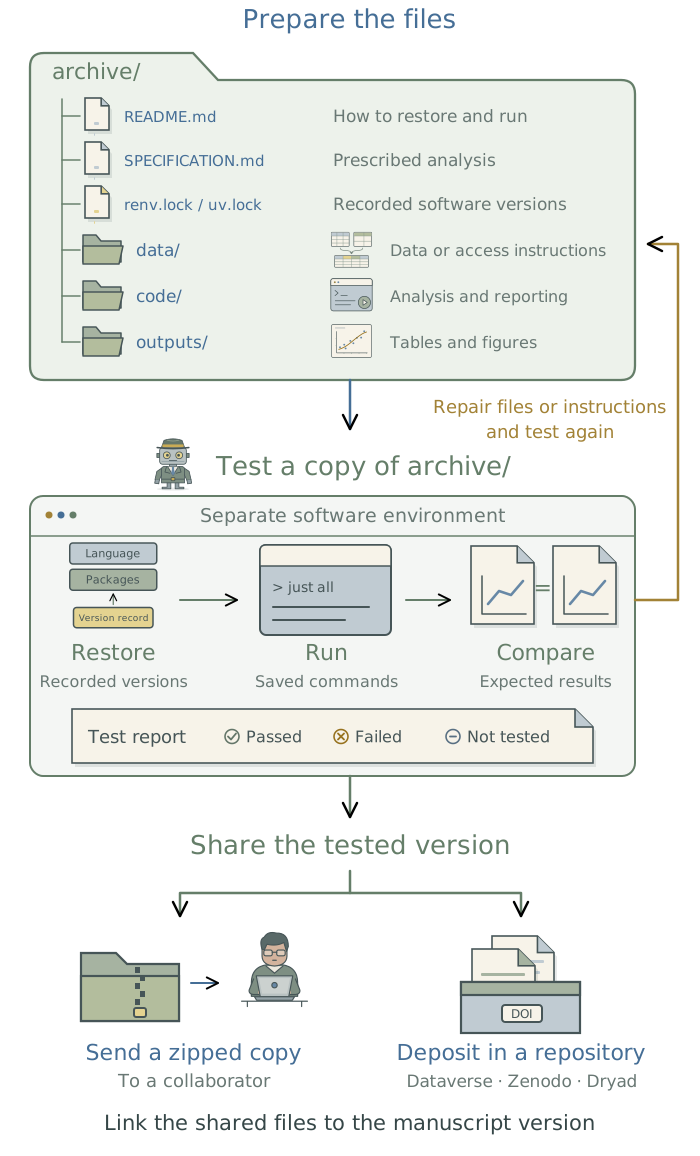
Ask the agent to prepare an archive/ folder containing the files another researcher will need to reproduce the reported results. The name is your choice; this chapter uses archive/. To rebuild tables and figures, include the saved estimates and reporting code. To rerun the analysis, include the permitted study data and analysis code as well. Keep the saved results against which the rerun will be compared.
Have the agent place a copy of the SPECIFICATION.md used for the reported analysis in archive/, together with the relevant decision history from METHODOLOGY.md. If the working project has newer requirements, the copy in archive/ should retain the earlier specification that matches the supplied code and results. The working project’s current SPECIFICATION.md stays in place.
Have the agent write a README.md for archive/ that explains what the folder contains, where any additional inputs must come from, and which commands produce each output. Keep the existing commands from Chapter 13: Build a modular analysis workflow. The recipient should not need an agent to invent an execution order. Any manual steps must also be documented.
The software environment includes the language, packages, and system tools needed to run the code. Have the agent preserve their versions and the instructions for restoring them before changing the working setup. Chapter 6: Preserve a software environment: rig, renv, and uv in the companion guide Extending Your Agent’s Toolkit explains the supporting tools.
For restricted data, the instructions in archive/ should explain how an authorized researcher can obtain the required files and where to place them. A synthetic example can let others run the code without access to those records. State clearly when only synthetic inputs have been tested: that run does not reproduce findings from the protected data.
Test the project outside the working folder
Ask the agent to copy archive/ into a temporary directory outside the working project. If you will share a zipped copy, have it extract and test that exact file there. It should start a fresh headless agent session1 with access to the test directory but no access to the working project or earlier conversation. Have that agent restore the recorded software versions in a separate environment and follow the supplied README.md. Missing files, dependencies, or instructions should be reported rather than recovered from the working project.
A headless session alone does not isolate files or software: the agent must configure the access restrictions and separate environment. A container can help; Chapter 10: Run work in a separate environment: containers in the companion toolkit explains how. Once omissions are corrected in archive/, have the agent repeat the affected steps with a new copy of those corrected files.
Copy
archive/into a temporary test directory outside the working project, or extract the exact zip file proposed for sharing there. Set up a separate software environment and a fresh headless agent session whose file access excludes the working project. Have that agent follow the suppliedREADMEusing only the supplied files, listed inputs, and documented commands. Restore the recorded software versions without upgrading them. Compare rebuilt outputs with the supplied results using the agreed tolerances. Report missing files or instructions rather than filling gaps from the working project. Record failures and untested steps; do not alter the analysis or comparison criteria to force agreement.
Ask the agent to compare both the reported results and the data selections that produced them. Identifiers and deterministic counts should match exactly. Numerical estimates should meet the tolerances specified for the analysis; procedures involving randomness need the agreed settings and comparison criteria. A rebuilt PDF can have different file metadata while displaying identical results, so document checks should compare the content rather than require identical file fingerprints.
The agent should save a short report stating what it ran, the inputs and software used, which comparisons passed, and anything that failed or remains untested. In the heat-and-birthweight example, the agent copied the project to a different directory and rebuilt the main analysis and figures there, using the existing software installation. Recreating the software environment on a new computer has not yet been tested.
Reproduction checks whether the supplied files and instructions allow someone to repeat the analysis. Chapter 15: Check the agent with independent implementations asks whether the agent implemented the analysis the researcher requested. Different agents independently build analysis pipelines from the same specification and inputs; agreement between their results provides evidence that the requested calculation was implemented correctly. Neither check establishes whether the specified analysis is appropriate for the research question.
Share the tested version
The tested archive/ folder can be shared as a zipped copy or deposited in a research repository such as Dataverse, Zenodo, or Dryad. Agree with coauthors who should be credited, which licenses apply, and which manuscript version the files support. Have the agent include the relevant AI-use disclosure and, for LLM-derived measurements, the prompts and evaluation records needed to understand them.
Before sharing, have the agent review the proposed files for confidential material, credentials, and paths that work only on your computer. If version history is included, it needs the same review. The agent should identify proposed exclusions and check whether they would prevent reproduction; you decide what may be shared. Retest affected steps after any corrections.
Review the exact contents of
archive/proposed for sharing against the manuscript, reproduction report, and sharing requirements. Identify confidential material, credentials, personal paths, missing files, and incomplete access instructions, including in any supplied version history. Check contributors, licenses, AI disclosure, and the manuscript version. Explain how proposed exclusions affect reproduction. Propose corrections without uploading, deleting files, or rewriting history.
After approval, share the tested version and link its version identifier to the corresponding manuscript. Preserve those files and the reproduction report so a later revision can be compared with what readers received.
Footnotes
For setup of headless sessions and guidance on controlling each run’s inputs and tool access, see Chapter 16: Run agents from saved prompts in the companion guide Extending Your Agent’s Toolkit.↩︎