18. Write and revise the manuscript
18. Write and revise the manuscript
A manuscript can retain an outdated estimate after the analysis has changed. An agent can help keep the text, tables, and figures consistent with the saved results, and identify interpretations that need reconsidering.
Suppose a revised sample definition changes the estimated birthweight difference in the heat-and-birthweight study (Chapter 10: The example research project). The agent should locate every use of the earlier result, including the abstract and captions, and propose the necessary updates. The researcher decides whether the revised finding changes the argument.
Build a chain of evidence
Ask the agent to create a chain of evidence linking each reported result to the saved output that produced it. The links should identify the results file, the analysis run, the exact entry, and every place that result appears in the manuscript. The agent can use these links to find affected passages when an analysis changes.
For the synthetic heat-and-birthweight study, the sample row in outputs/results/analysis/contrasts.csv supplies this sentence:
In the synthetic sample, the estimated mean birthweight difference between ten and five hot days of maternal exposure during the third trimester was -31.6 g (95% confidence interval -74.3 to 11.0 g), standardized over the sample’s maternal age and smoking distribution.
The saved results retain full precision; the manuscript rounds them for presentation. The agent should check that the sentence describes the comparison and sample represented by the selected row.
The agent can record a checksum, a digital fingerprint of a file’s contents, and compare it with a newly calculated fingerprint to detect whether the results file has changed. Chapter 12: Bring data into the project explains these fingerprints. It should also check that the manuscript uses the correct entry and reports its values accurately, including the exposure contrast, sample, units, sign, interval, and rounding.
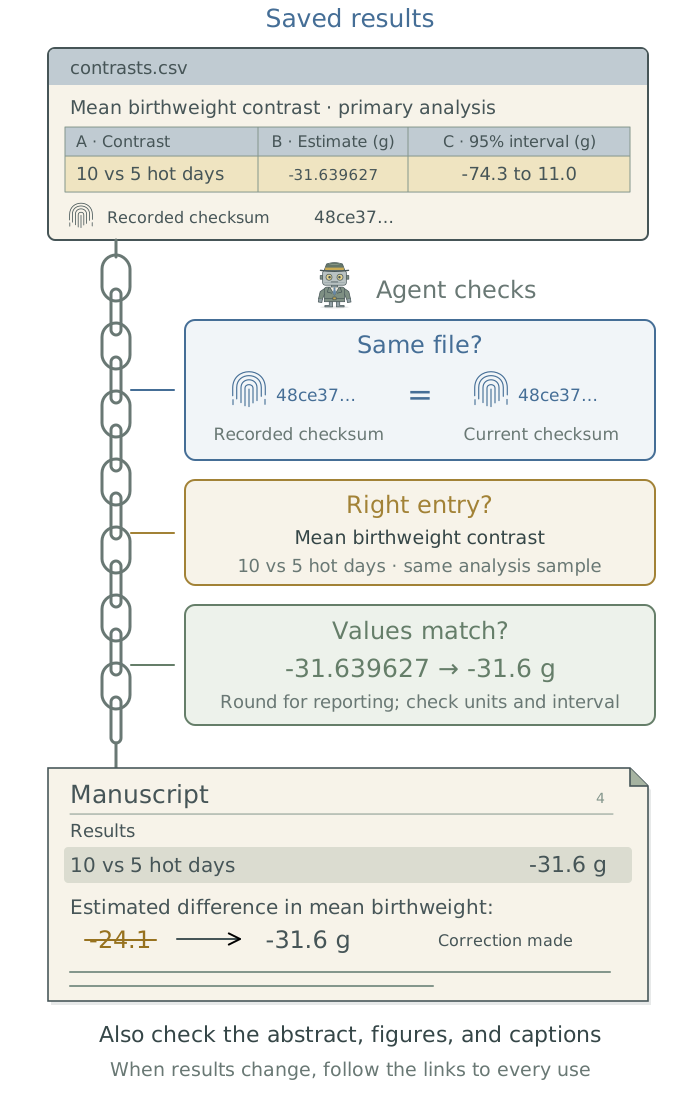
Where the document software supports it, have the agent insert numbers directly from saved results. For example, Quarto can calculate values within the text when it builds a document.1 For a manuscript, the agent can extract values from saved results into a file that the document reads when it is compiled. This keeps reported numbers connected to their sources without copying them by hand. If the team writes directly in Word, the agent can instead compare manuscript values with the saved results after each revision. All three approaches need a check of the final document, including figure scales, labels, and captions.
Create a chain of evidence linking each main manuscript result to its saved source file, exact entry, and analysis run. Record where it appears, including the abstract, tables, and captions, and save source checksums to detect changes. Compare the final document with those results, checking contrasts, samples, values, units, signs, intervals, and rounding. Propose updates to affected passages and identify unsupported claims for my decision.
Draft and revise from the evidence
Give the agent the argument you want to develop, the supporting files, and your writing conventions. Different sections need different evidence. Work section by section so you can assess the reasoning as well as the prose.
| Section | What to supply | What the agent should check |
|---|---|---|
| Methods | The specification used for the reported analysis, executed scripts, and relevant decisions in METHODOLOGY.md. |
The text describes what actually ran, including any departures from the specification. |
| Results | Saved estimates, checked tables and figures, and their source links. | Numbers and descriptions match the relevant comparison, sample, and uncertainty. |
| Discussion | The findings, relevant literature, and your interpretation and limitations. | Claims have support; conflicting evidence and alternative explanations are considered. |
The current SPECIFICATION.md may include approved changes that have not yet been implemented. Ask the agent to flag these differences rather than describe planned work as completed. It can also identify a missing step in the argument, explain where a conclusion exceeds the evidence, or propose another interpretation for you to consider. You decide which scientific claims the paper should make.
Draft this section from the supplied research decisions, verified sources, and saved results. Follow my writing conventions. Mark unsupported claims, numbers, and references as gaps. Identify weaknesses in the argument and propose alternatives separately for my consideration. Describe the analysis that actually ran; do not present planned work as completed or change the scientific interpretation without agreement.
Read the draft for clear connections between ideas, sufficient context, and repetition.2 Have the agent save recurring style corrections in the global user instructions for writing, as explained in Chapter 8: Apply your conventions across projects. Manuscript-specific terminology belongs in the project context files. Use the literature checks in Chapter 11: Find and assess research literature when assessing whether cited papers support a claim.
Respond to reviewers
Give the agent the reviewer comments and your proposed responses. It can identify which requests require clarification, a wording change, or further analysis, and help you assess the options. Once you decide, it should connect each response to the actual manuscript change or explain why no change was made.
For an approved analysis change, have the agent preserve the original results, update SPECIFICATION.md, and add the decision and reason to METHODOLOGY.md. It should then rerun the affected analysis and checks before revising the manuscript, following Chapter 13: Build a modular analysis workflow.
Draft the reviewer response from the supplied comments, my decisions, the revised manuscript, and completed analysis outputs. Quote each comment, lead with the substantive answer, and cite the actual locations of changes. Distinguish analyses from wording edits. Do not add concessions I did not make or claim unfinished work is complete. Flag unresolved comments and decisions.
Use the same results for a talk
Ask for an outline with one main claim per slide and the supporting saved figure or result. Review the argument and audience fit before generating a deck. Use the same result-to-source links as the manuscript, and check the final slides after revisions. The companion toolkit’s Chapter 11: Generate documents from research outputs: Quarto and Pandoc covers output formats.
Report how AI was used
Ask the agent to check the target journal’s current AI-use instructions when preparing the submission. For example, ICMJE guidance calls for disclosure of AI assistance and holds human authors responsible for the submitted work; AI tools cannot be listed as authors. Individual journals determine the applicable details and placement.4
Have the agent maintain a brief account of the tools used, dates, tasks, affected work, and checks completed. Include the LLM name and version when available, without inferring an exact version from an app label. From those records, it can draft a disclosure explaining the assistance and how the authors checked the work. Review the statement against what was actually done before submitting it.
LLM-derived measurements need more than an assistance disclosure: the methods must explain their generation and evaluation, as described in Chapter 16: Use LLM outputs as research data. Have the agent preserve that documentation and the disclosure with the files prepared for handoff in the next chapter.
Footnotes
Quarto’s inline-code documentation explains how computed values appear in prose. The agent can configure this to read the project’s saved estimates. For document setup, see Chapter 11: Generate documents from research outputs: Quarto and Pandoc in the companion guide Extending Your Agent’s Toolkit.↩︎The DSS prose-review skill identifies unclear passages and proposes revisions in context.↩︎
Use
File → Download → Markdown (.md); see Google’s export instructions. Anthropic also documents direct Google Docs editing through connectors. Direct editing from aClaude Codesession depends on its connected tools and permissions. For connection setup, see Chapter 13: Connect to research data and services: MCP in the companion guide Extending Your Agent’s Toolkit.↩︎ICMJE, “AI Use by Authors”, checked November 12, 2026. Acting as a reviewer raises a separate confidentiality question: using AI on your own paper does not authorize sending someone else’s manuscript or grant application to a provider. Follow the journal’s or funder’s policy; see ICMJE’s reviewer guidance.↩︎