15. Check the agent with independent implementations
15. Check the agent with independent implementations
The code an agent builds can run without error yet use the wrong sample, report a coefficient instead of the requested contrast, or calculate uncertainty incorrectly. An independent implementation is a separately written set of code for the same prescribed analysis. Comparing its outputs with those of the first implementation can reveal mistakes that rerunning the original code would repeat.
For the heat-and-birthweight study (Chapter 10: The example research project), one fresh agent implemented the analysis in R and another in Python. Neither saw the other’s code or results while building. Whereas the simulations in Chapter 14: Test the analysis against known truth assessed the estimator’s performance under specified scenarios, this comparison checked whether separately written code produced the same data processing and calculations.
Define the analysis to be checked
Both implementations need to follow the same scientific requirements. Ask the agent to prepare a fixed copy of SPECIFICATION.md with the quantities to estimate, input files, sample rules, estimator, and uncertainty calculation. For the heat-and-birthweight example, “estimate the heat effect” is too vague: the specification identifies the birthweight contrast between 10 and 5 hot days, the sample over which to average it, and the age-specific comparisons.
Also have the agent propose comparison tolerances: how close numerical results must be to count as agreement. Tiny differences can arise from numerical calculations, while estimates based on simulation draws require allowance for Monte Carlo variation. Agree on these tolerances before comparing outputs. Record identifiers and categorical values should match exactly.
Keep the specification version used for the check even if the project later changes. If either agent finds an ambiguity, resolve it and give both the same clarification. Have the agent record your decision and its reason in METHODOLOGY.md, without passing the other implementation’s code or results to either builder.
Have the agents build separately
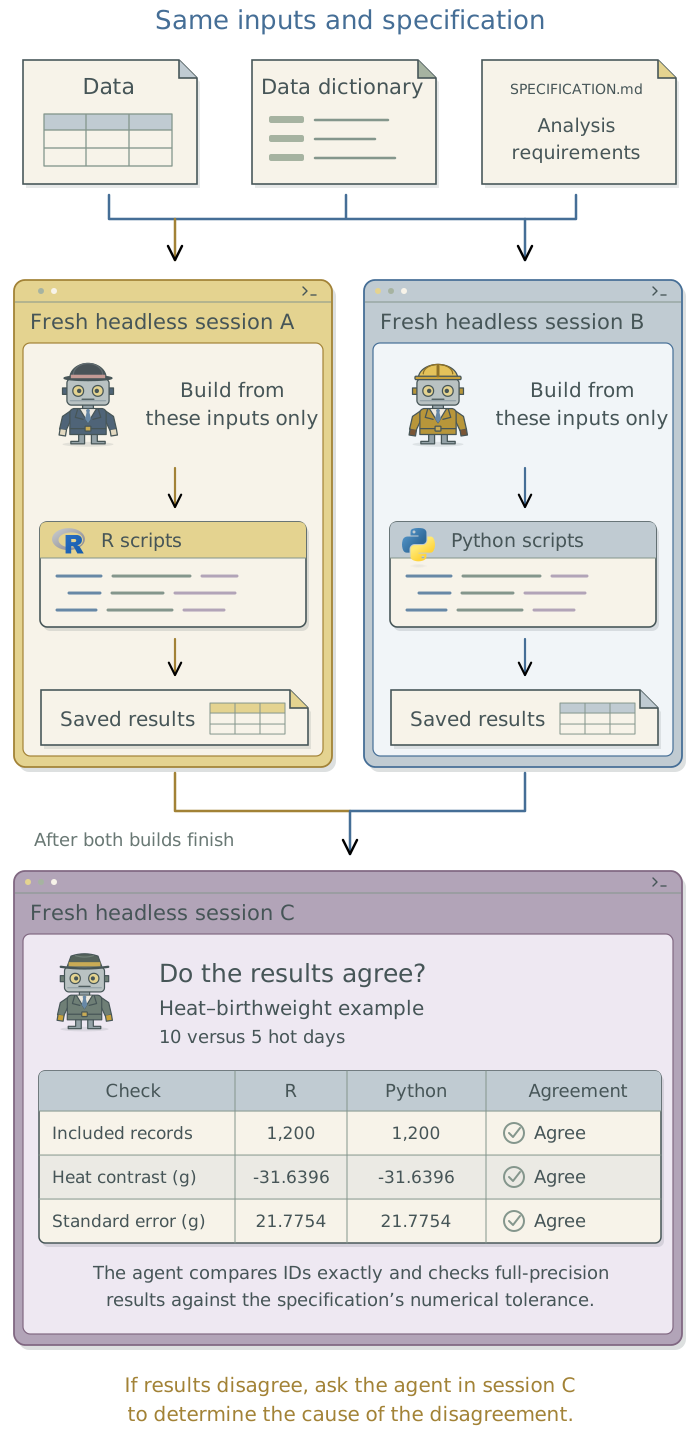
Ask the agent in your current session to prepare separate folders and launch two separate headless1 Claude Code sessions: agent runs that follow supplied instructions without an interactive conversation. Each receives the same specification, data dictionary, and approved inputs and builds its implementation without inheriting the current conversation or seeing the other’s code or results. The coordinating agent can arrange these runs sequentially or simultaneously.
You can also open fresh interactive sessions yourself. Chapter 16: Use LLM outputs as research data explains headless runs and how to control their inputs. Separate sessions and folders alone do not prevent access to shared files; configure any required access restrictions as described in Chapter 4: Control what the agent can do.
If the project already has the analysis code developed in Chapter 13: Build a modular analysis workflow, keep it and have the coordinating agent launch just the independent second build. It should work from the specification and inputs only. Translating or revising the first implementation can carry its mistakes into the second.
The inputs depend on what you want to check. To check data processing as well as analysis, have both implementations start from the original data. Sharing one agent’s processed dataset would leave that processing unchecked. To check only the analysis of an already verified dataset, use that dataset as the common starting point.
Working only from the supplied
SPECIFICATION.md, data dictionary, and approved input files, independently implement the prescribed analysis in the assigned language. Do not consult another implementation’s code or results, or use intermediate files it produced beyond the shared inputs explicitly approved for this check. Stop and ask about missing inputs or ambiguous requirements. Save the code, input-file checksums, included record identifiers, derived variables, model terms, and labeled full-precision estimates and uncertainty calculations.
The agents do not need to use different agent providers or programming languages. Where practical, use different analysis software, such as R, Python, or Stata. This can reveal differences in defaults and data handling, while checking calculations performed by different statistical libraries. The essential requirement is to construct the implementations independently from the same specification.
For restricted inputs, develop code with permitted synthetic data and run each implementation on the real records in the approved environment. Keep the comparison there unless its contents may be shared. Chapter 3: Know where your data goes explains that separation.
Have an agent compare and investigate the outputs
Once both implementations are complete, have the coordinating agent launch another separate headless session to compare them. This session can read both sets of code and results. It should work from the input files through to the reported estimates, because a difference early in the analysis can explain several later ones. If the samples differ, for example, resolve that before investigating why the estimates differ.
| What to compare, in order | What a disagreement may reveal |
|---|---|
| Input files and their checksums | A different data release, the wrong file, or a variable taken from the wrong source. |
| Included records and exclusions | Different exclusion rules, duplicate records, or rules applied in a different order. Equal sample sizes can conceal different people. |
| Derived variables and model terms | Different units, transformations, or joins; different variables supplied to the statistical model. |
| Fitted results | Differences in estimation settings, convergence, or software defaults. Compare coefficients and fitted values before the summaries calculated from them. |
| Reported quantities and uncertainty | A different exposure contrast, averaging sample, prediction scale, or uncertainty calculation. |
Compare the completed implementations against the shared
SPECIFICATION.mdand agreed tolerances. Work from input-file checksums and included records through exclusions, derived variables, model terms, fitted results, and reported quantities and uncertainty. Use full-precision values. Save an agreement-and-discrepancy table and identify the earliest stage at which each difference appears. Investigate its cause against the specification and source data; do not treat either implementation as the answer key or change outputs merely to make them agree. Report unresolved issues and proposed corrections, distinguishing code errors from scientific decisions that need my approval.
Compare full-precision values before rounding, using the agreed tolerances. Have the agent trace each discrepancy back to the specification and source data, explain the cause, and correct the implementation that departs from the requirements. Neither implementation is the answer key, and agreement by majority vote would not resolve the issue. If the investigation leads you to change the scientific specification, have the agent update SPECIFICATION.md, record the reason in METHODOLOGY.md, and bring both implementations into line before rerunning the comparison.
What the heat-and-birthweight comparison found
The completed R and Python implementations included the same 1,200 birth records. Every value supplied to the statistical model matched exactly, including the transformed variables and interaction terms. The reported birthweight contrasts, standard errors, and confidence intervals agreed within the specified tolerances.
Compare the saved estimates
Estimates and intervals are in grams. The intervals below are rounded to one decimal place.
| Quantity | R estimate |
Python estimate |
95% interval |
|---|---|---|---|
| Sample average | -31.639627 | -31.639627 | -74.3 to 11.0 |
| Age 22 | -34.325612 | -34.325612 | -93.8 to 25.1 |
| Age 28 | -31.978065 | -31.978065 | -74.9 to 10.9 |
| Age 36 | -28.848003 | -28.848003 | -90.7 to 33.0 |
Across the contrasts, standard errors, and interval endpoints, the largest absolute difference was 3e-12, below the prespecified tolerance of 0.000001. The comparison also checks coefficients, their covariance matrix, and fitted values at full precision. The project download preserves the original specification in docs/notes/independent-implementation-specification.md; the current root specification links to it.
Other checks revealed problems that the final numerical agreement does not show. During implementation checking, the Python package used to calculate contrasts returned t-based confidence intervals by default. Because the specification required intervals based on the normal distribution, the agent calculated those intervals separately from the estimates and standard errors. A separate audit of the R input checks found that they accepted ages outside the specified range and unnecessarily required whole numbers of hot days. Correcting those rules left the numerical results unchanged because none of the supplied records triggered the mistakes. Comparing this dataset’s results alone would not have exposed them.
Keep the comparison with the project
Ask the agent to save both implementations, the comparison code, and a report identifying the exact input files and specification version. Keep unresolved differences in that report, and have the agent rerun the affected comparisons when the data, code, or specification changes. Both implementations can share a mistaken interpretation or faulty software routine, so retain the simulations in Chapter 14: Test the analysis against known truth and the targeted checks in Chapter 13: Build a modular analysis workflow, including cases such as duplicates or boundary values.
Even error-free code and excellent agreement provide no evidence that the specification is methodologically appropriate for the research question. Both agents could faithfully implement an analysis that estimates the wrong quantity or relies on implausible assumptions. The researcher remains responsible for justifying the approach; agreement between implementations cannot supply that justification.
For analysis built from saved code, continue to Chapter 18: Write and revise the manuscript. The next two chapters address studies that use LLM-generated measurements and decisions about running or adapting LLMs.
Footnotes
Chapter 15: Divide work between agents: shared projects and git worktrees in the companion guide Extending Your Agent’s Toolkit compares subagents, headless sessions, and background execution. Chapter 16: Run agents from saved prompts explains setup and control over each run’s inputs and tool access.↩︎