12. Bring data into the project
12. Bring data into the project
An agent needs access to your research data and enough documentation to use them correctly. Whether the files come from a collaborator, are already on your computer, or need to be collected, ask the agent to check what they contain and record where they came from.
For the heat-and-birthweight study introduced in Chapter 10: The example research project, ask the agent to compare the birth records with their data dictionary. It should report discrepancies, such as duplicate birth identifiers or birthweight recorded in kilograms when the documentation specifies grams, before using the data in an analysis.
Identify and check the inputs
Ask the agent to compare the data with the requirements in SPECIFICATION.md and the available documentation. It should check what each row represents, the dates covered, and whether the required variables, units, and identifiers are present.1
In the heat-and-birthweight example, the agent should check for 1,200 unique birth identifiers, maternal ages from 18 to 40, hot-day counts from 0 to 20, smoking status coded as 0 or 1, and positive birthweight values. If any check fails, the analysis should stop and report which values or records caused the problem.
If the data cannot support the specified sample or research question, ask the agent to explain the limitation and propose options. Once you approve a change, have it update SPECIFICATION.md and record the decision and its reason in METHODOLOGY.md.
Acquire web data through a repeatable route
Ask the agent to work down the ladder below and use the first suitable, permitted route. It should look for an API or structured download before extracting data from web pages. Because this approach applies across projects, the ladder is a useful addition to CODING.md as part of your global user instructions.
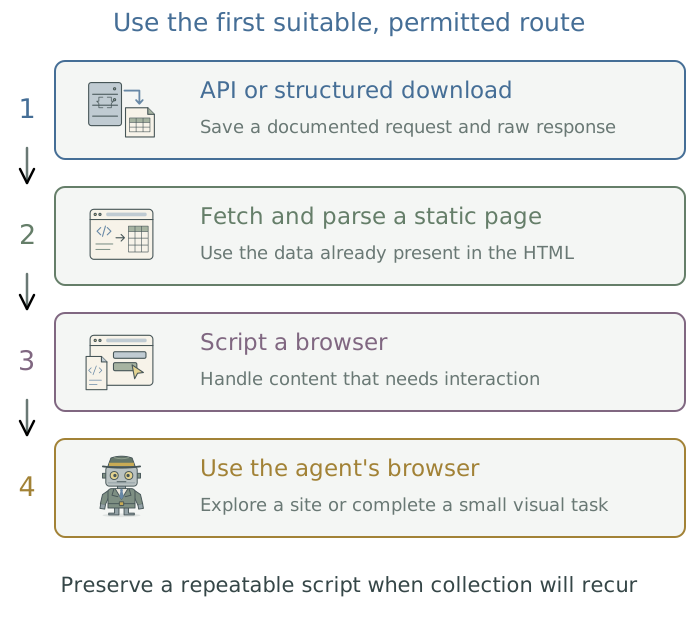
A documented API, bulk download, or CSV export usually leaves a clearer collection record than interpreting a displayed page. If the data are in the page’s HTML, the agent can write a script to save the page and extract them. When collection requires interaction, such as logging in or clicking through results, ask it to automate those steps with a scripted browser. Where permitted, the script can save the data sent to the browser to populate the page.
An interactive agent browser helps explore an unfamiliar site or complete a small task requiring visual judgment. Once the agent has worked out how to collect the data, ask it to write a script for any collection that needs to be repeated. Chapter 14: Inspect and interact with a browser in the companion guide Extending Your Agent’s Toolkit covers the tools.
Ask the agent to check whether a website or service permits automated data collection before using it, including its access requirements and request limits. If access requires an API key (a credential that lets software access the service through your account), have the agent store it separately from collection scripts and keep it out of saved request records. The toolkit’s Chapter 12: Keep credentials out of research files: 1Password and direnv explains how. Apply the data-use decisions in Chapter 3: Know where your data goes to collection as well as analysis.
Preserve originals and their provenance
Have the agent save downloaded and supplied files unchanged, with cleaned and derived data in separate files. This lets it correct an error in processing without collecting the data again. If a new release becomes available, keep the earlier release too when it supports reported results.
Ask the agent to maintain a source log as it saves each file. For supplied or downloaded data, the log should identify the supplier or source address, the version or release, and the acquisition date. Have it also save any collection request and restrictions on use or redistribution. If information about a file’s origins is unavailable, the agent should identify what is unknown.
Have the agent also record a checksum for each original data file. This digital fingerprint lets it check whether a file has changed before rerunning the analysis. The heat-and-birthweight example keeps the following information with its data:
| Record | Heat-and-birthweight example |
|---|---|
| Origin | Synthetic records; no observed pregnancies. |
| Original | data/raw/births.csv, unchanged after generation. |
| Reconstruction | Generator, seed, and R version. |
| Identity | Checksum recorded when the file is created. |
| Documentation | Data dictionary and SPECIFICATION.md. |
| Derived data | Scripted transformations saved separately from the original. |
Inspect the research data and documentation. Record each source, version or acquisition date, permitted use, and checksum. Preserve the originals. Write checks for the variables, identifiers, units, ranges, and missingness rules in
SPECIFICATION.md. Report discrepancies before using the data in an analysis. Do not substitute synthetic observations for missing research inputs.
Repeat collection without repeating unnecessary work
Before collecting a large dataset, ask the agent to run a few representative requests through the collection code. This smoke test checks that it can retrieve the data, interpret the response, and save the expected files. The agent should investigate any problems before starting the full batch.
During the full collection, the code should respect the service’s request limits and save its progress. If collection is interrupted, it should resume from where it stopped, reusing completed downloads. Have the agent keep a log of failed requests and retry attempts so gaps remain visible.
After collection, ask the agent to compare what was received with what was requested and report anything missing or incomplete. A failed download should be recorded as missing data to investigate, never filled with guessed values or silently omitted.
Footnotes
The DSS data-exploration skill creates an initial report on distributions and missingness using R and Quarto.↩︎