6. Organize your research projects
6. Organize your research projects
An agent needs to find the right files before it can do useful work. A consistent project structure helps it locate the current analysis, preserve original inputs, and save results where you and your collaborators expect them. The same organization makes it easier to explain how a result was produced or return to an earlier version.
Suppose a paper has folders called analysis-final/ and analysis-new/, plus three sets of figures. You may remember which files belong together; an agent needs that relationship made explicit. Establishing a clear structure helps whether you are starting a paper or introducing an agent to work already underway.
Give projects a place in a workspace
A workspace is a parent folder containing your projects. You might group papers together, keep shared datasets in a separate area, and give a research group’s website its own project folder. The arrangement should make sense for your work; the example below is one possible layout.
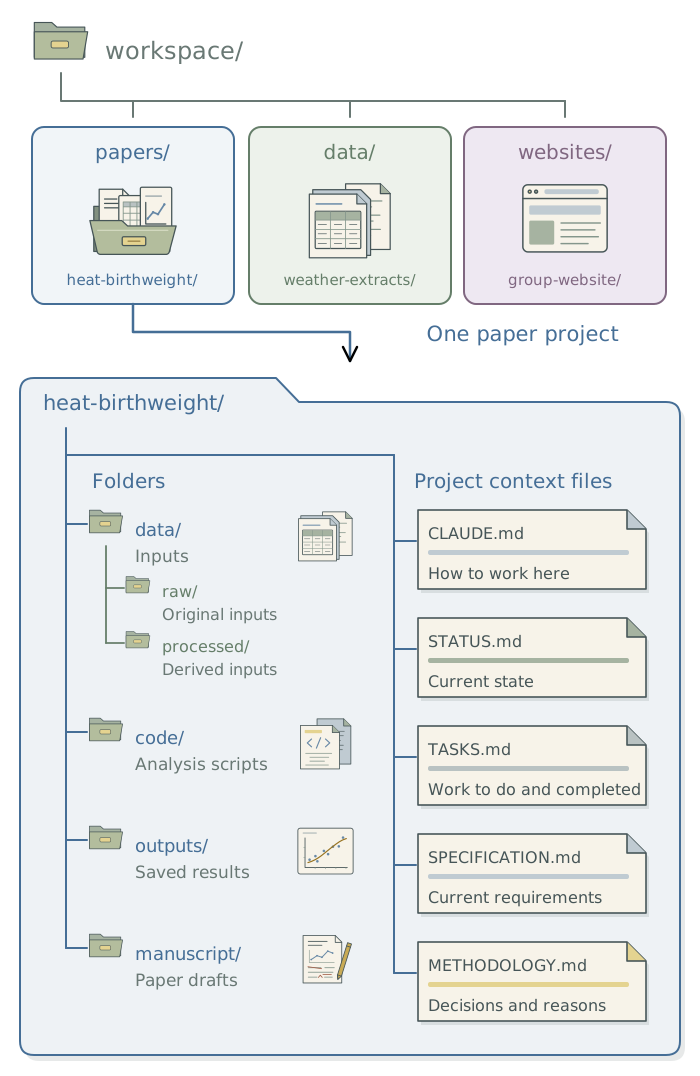
Keep independently maintained projects in separate folders and open the relevant one in the app. A short workspace index can record each project’s purpose and location. If two papers use the same curated dataset, the index can show that relationship, while each paper records the data version it used. Chapter 8: Apply your conventions across projects explains how to make this index available across projects.
Choose a structure suited to the project
Different outputs need different folders. A paper needs analysis results and manuscript source; a website needs editable pages and somewhere to build the site. Use consistent names for common purposes without forcing every project into the same layout.
| Project | What its structure needs to distinguish |
|---|---|
| Paper | Original inputs, analysis code, saved results, manuscript source, and research decisions. |
| Dataset | Acquisition code, source records, processing steps, and documented releases. |
| Website | Editable content, images and styles, and the generated site. |
Consistent file and folder names help you and the agent recognize what belongs where. Lowercase words joined by hyphens (kebab-case) are one option: heat-birthweight/ and analysis-results.csv.1 Consistency across the workspace matters more than the particular convention. Ask the agent to apply the chosen scheme while respecting programming-language conventions and keeping established project context filenames such as CLAUDE.md and SPECIFICATION.md.
Preserve original inputs and create derived files through saved code. Keep current figures and tables separate from exploratory outputs, with enough information to identify the analysis that produced them. Appendix A: Project scaffolds and starter files provides example folder structures and project context files to adapt. Chapter 7: Give the agent context for your project explains what to put in the project context files shown in the diagram and how the agent keeps them current.
Paths in scripts should be relative to the project root, the folder containing the project. A script that reads data/raw/births.csv can work on a collaborator’s computer even when their home folder has a different name. Ask the agent to use the project’s existing method for locating its root, if one is already established. For R projects without one, the here package is a good choice: it builds file paths from the project root. Chapter 13: Build a modular analysis workflow explains how to organize the analysis code itself.
Keep a recoverable version
Use Git to retain versions of code, documentation, and suitable configuration files as the project develops. The agent can create these checkpoints and recover earlier work; you do not need to learn Git commands or inspect every line of code. Give a specific recovery prompt, such as restoring yesterday’s sample-selection code while keeping today’s manuscript edits. Chapter 4: Recover earlier work: git and gh in the companion guide Extending Your Agent’s Toolkit explains how to have the agent save versions of your work and restore earlier ones.
Before a substantial reorganization, also keep a recoverable copy outside the folder being changed. A dated copy is a workable starting point if you are not yet using version control. Git only preserves files and versions it records, and neither Git nor a synchronized folder replaces a backup. Keep restricted inputs and credentials out of Git history and use the project’s approved storage for them.
If the project uses a synchronization service (e.g., Dropbox, Google Drive, or OneDrive), retain that arrangement while asking the agent to check how it handles software libraries, caches, and Git’s internal files. The toolkit’s synchronized-folder guidance explains what to check and how to handle exclusions.
Start a new project
A project scaffold is a starting set of folders and files suited to the intended output. Give the agent the project’s purpose, deliverable, and any research group conventions, then ask it to create that structure. A scaffold can include project context files with instructions and space for decisions without pretending that the scientific choices have already been made.
Set up a project for the research described below. Use the existing workspace and research group conventions where available. Propose a structure suited to the deliverable, then create the agreed folders and project context files. Preserve existing files and list research decisions still needed from me.
Review the proposed organization and the facts entered in the project context files. Unknown methods, collaborators, or input permissions should remain questions for you. Once a layout works well, the DSS scaffold skill can reuse it for subsequent projects; Chapter 9: Use skills for recurring tasks develops that example.
Organize an existing project
Keep the project’s existing folder structure if it already makes the files easy to find. For a confusing project, identify the manuscript and outputs you consider current, then ask the agent to inspect the files and propose a reorganization. Filenames and modification dates can help, but script references and your knowledge may be needed to distinguish competing versions.
Inspect this project and propose a clearer structure. Identify current and uncertain files before moving anything. After I approve the plan, make a recovery copy, reorganize the files, update affected paths, and save an old-to-new file map. Preserve original inputs and check that the affected outputs still reproduce.
Have the agent retain original inputs and uncertain duplicates, record old and new paths, and update references in scripts and documents. It should rerun the affected work and compare the results with the saved baseline. Keep the recovery copy until those checks succeed and unresolved files have been explained.
Coauthors can continue sending files in their preferred format. An incoming folder can preserve what arrived while the agent records how each contribution fits into the organized project. The next step is to give it the knowledge needed to work within that structure.
Footnotes
Compare
analysis-results(kebab case),analysis_results(snake case), andanalysisResults(camel case). MDN explains kebab case, snake case, and camel case.↩︎