1. How agents can help your research
1. How agents can help your research
An artificial intelligence (AI) agent can work directly with your research files and software, carrying out tasks you describe in ordinary language. You can ask it to find relevant papers, write and run an analysis, or revise a manuscript. These capabilities also make it useful for checking that the agent did what you asked and documenting how the results were produced. This guide explains how to use agents to make research more efficient, strengthen checks on the work, and preserve the information needed to understand and reproduce the findings.
Suppose you and a collaborator decide to change an inclusion criterion. An agent can update the analysis code, rerun the affected steps, and regenerate the tables and figures. It can then check that the sample sizes and estimates reported in the manuscript match the revised results. By saving the updated code and recording what changed, it leaves you and your collaborators with an analysis you can inspect and run again. Much of this guide concerns organizing the whole research workflow so agents can help carry it out, check it, and document it.
Three uses for AI in research

Develop ideas. A conversation with AI can help you explore a research question and consider explanations you might otherwise overlook. For example, you could describe an observed association and ask for competing explanations, then discuss what evidence would distinguish them. You can develop the promising suggestions further, drawing on the literature and your own expertise to judge which are worth pursuing.
Build and run research workflows. An agent can turn a research plan into working code and carry out the steps needed to produce results. For example, it could prepare a dataset, fit the statistical models you specify, and generate figures for a manuscript. Saving those steps as reusable scripts makes it easier to revise the analysis or run it on new data. The agent can also help check its implementation and document the work for collaborators.
Use AI within the research method. A large language model (LLM) can classify interview passages, extract information from documents, or evaluate written responses. Here, the LLM’s outputs become part of the research data. If you use it to identify themes in interviews, for example, the study depends on how well its classifications reflect the concepts you are investigating. You therefore need to evaluate its performance and record how it was instructed and used.
From LLMs to agents
How does an LLM generate a response?
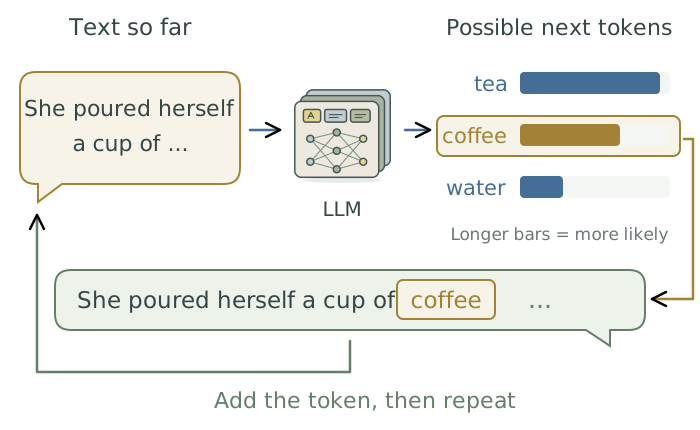
A large language model (LLM) is a neural network1 trained on large amounts of text to learn patterns in language. LLMs used in AI assistants generate text by predicting what could come next, using the conversation so far. They work in tokens: pieces of text that may be a word, part of a word, or punctuation.2
For each new token, the LLM assigns probabilities to possible continuations. One is selected and added to the text, then the process repeats. Selection can involve randomness, so the most likely continuation is not always the one chosen.3
How can an LLM act on a research project?
An agent combines an LLM with tools and the software needed to use them. A tool is a program that performs an action, such as reading a file or running an analysis script. The LLM can request a tool call: an instruction to run one of those programs.
The surrounding software is called the harness. It supplies instructions and information to the LLM, handles permission checks, executes permitted tool calls, and returns their results. This lets the agent carry out work directly in your project.4
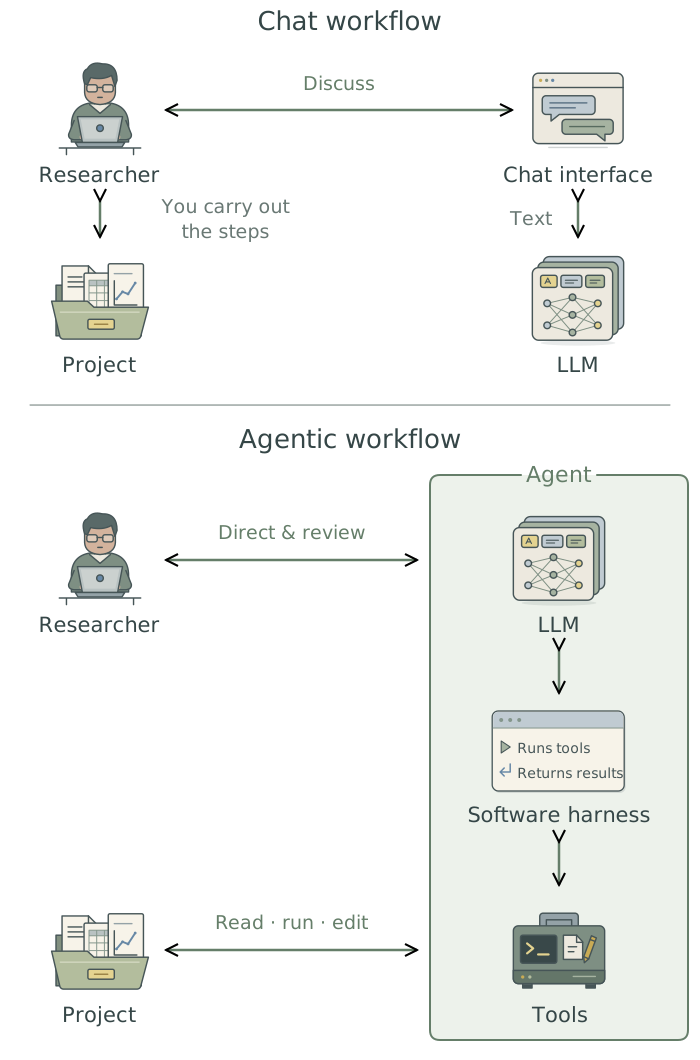
The same AI app may support both ways of working. You can keep your existing R, Stata, or Python software; adopting an agent does not require changing statistical languages.
How does an agent work through a task?
The result of a tool call gives the LLM new information to use in choosing its next action. The harness passes that result back, and the LLM may request another tool call or respond to you. Repeating this cycle lets an agent work through a task and adjust when it encounters an error or an unexpected result.5
The instructions, conversation, and tool results supplied to the LLM form its context. The context window limits how much information it can work with at once.
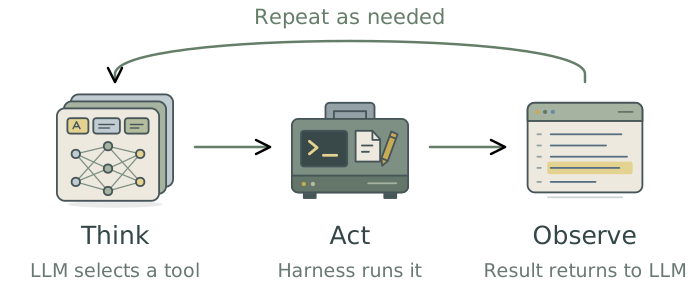
For example, an analysis fails because the script expects a column called birth_weight, while the dataset uses birthweight_g. The agent reads the error and consults the data dictionary to confirm which variable the script needs. It can then correct the code and run it again, using the new output to decide whether further work is needed.
Your role as a supervisor
Think of an agent as a capable research assistant joining your project. It needs context that an established collaborator might already have: what you are trying to establish, which files to use, and which decisions have already been made. Explaining these things helps it carry out work that fits your intentions.
Your role is to give the work direction and assess what the agent produces. You can let it handle implementation details, while remaining involved in decisions that require your research judgment. A script can run without errors while using the wrong variable or excluding observations you intended to keep. Later chapters explain how to detect these mistakes.
Ask the agent to provide the outputs and the results of its checks, then use those to identify anything that needs explaining or revising. The guide develops ways to supervise this work without having to perform every step yourself or read every line of generated code.
How to use this guide
If you are new to agents, begin with Orientation. If you already use one, you can turn to the chapters relevant to your current work. The guide has three parts:
- Orientation introduces the app, explains where your data goes, and shows how to control the agent’s access and choose its settings.
- Direct the work covers organizing your projects, giving the agent useful context, and saving instructions and procedures you want it to reuse.
- Do the research follows a worked research project through literature searches, analysis, checking, writing, and sharing the results. It also covers using LLMs within the research method and running or adapting open-weight LLMs.
The examples use Claude Code in the Mac desktop app. You do not need terminal or Git experience to begin, and the research practices apply to other agents. Harvard-specific guidance appears in clearly marked passages.
The appendices provide downloadable project scaffolds and starter files, example prompts, troubleshooting advice, and a glossary. The companion, Extending Your Agent’s Toolkit, explains how to ask an agent to install, configure, and use additional tools when your research needs them. You can adopt those tools as they become useful.
Footnotes
A neural network is a mathematical model that learns patterns from examples. It passes information through layers of connected units and adjusts the strength of their connections during training to improve its predictions. See IBM’s “What is a neural network?” for an illustrated introduction.↩︎
Hugging Face, “Tokenizers”, explains how text is divided into tokens.↩︎
Hugging Face, “Text generation”, describes generating successive tokens and the choices involved in selecting them.↩︎
Anthropic, “How Claude Code works”, explains the LLM, tools, and surrounding harness.↩︎
Yao et al. (2023), “ReAct: Synergizing Reasoning and Acting in Language Models”, demonstrates how language models can alternate reasoning with actions and use observations to guide subsequent steps.↩︎